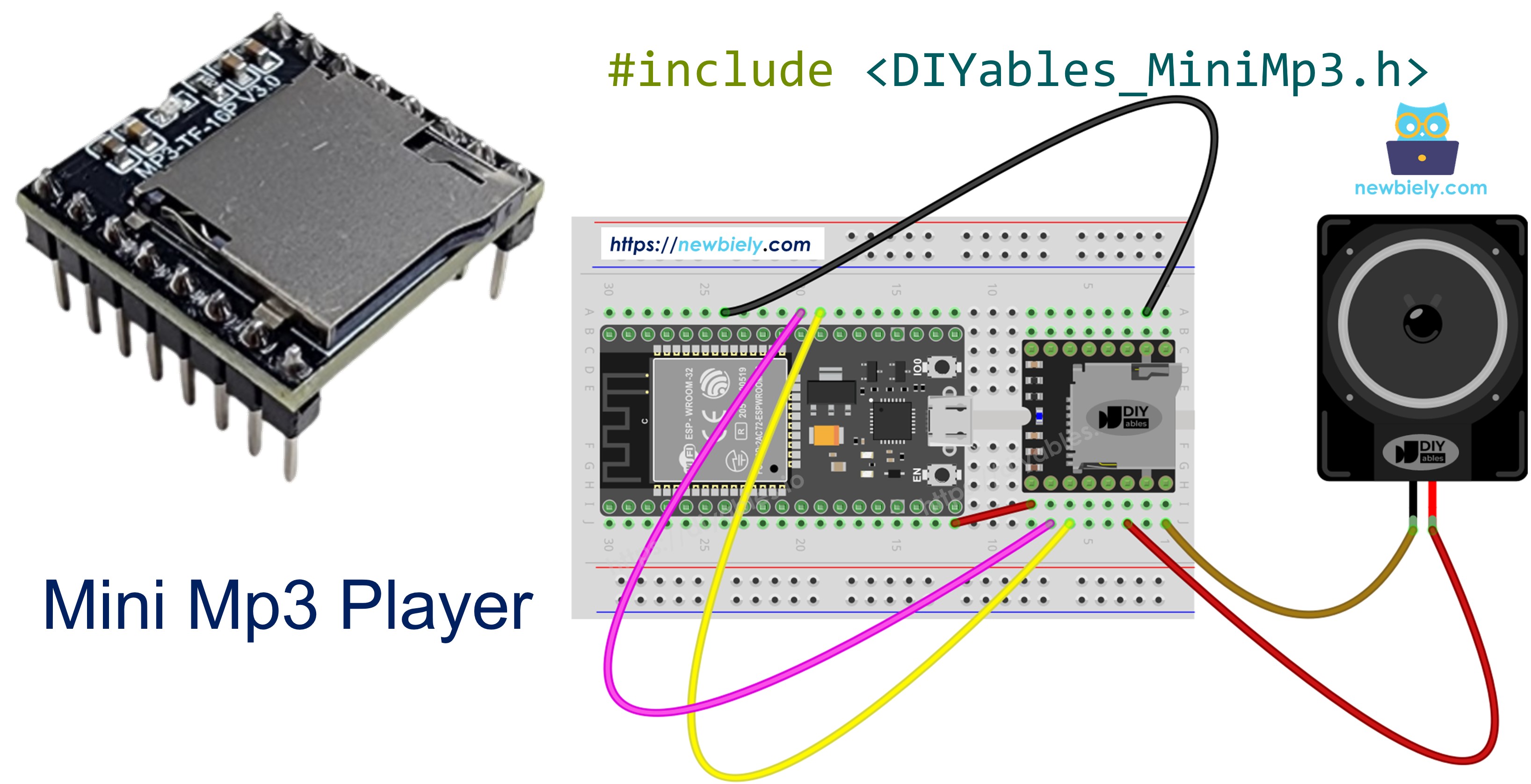
ESP32 - Mini Mp3 Player

O ESP32 é um microcontrolador versátil de 3.3V com WiFi, Bluetooth e várias portas seriais de hardware. Combinado com o módulo DIYables Mini Mp3 Player, você pode criar de tudo, desde uma simples placa de efeitos sonoros até um jukebox controlado por WiFi.

Este tutorial mostra como:

ESP32 Mini Mp3 Player

O Módulo Mini Mp3 Player

O DIYables Mini Mp3 Player é uma placa minúscula construída com o chip YX5200-24SS. Ele decodifica arquivos mp3 de um cartão micro SD e pode acionar um alto-falante diretamente, por meio do seu amplificador embutido de 3W. Como alternativa, use os pinos DAC para alimentar um amplificador externo e obter uma saída mais alta.

Tudo é controlado por comandos seriais a 9600 baud:

  • Transporte: tocar, pausar, retomar, parar, próxima, anterior
  • Volume: 31 níveis (0–30)
  • Equalizador: Normal, Pop, Rock, Jazz, Classic, Bass
  • Repetição: repetir uma faixa, repetir a pasta, repetir todas as faixas, modo aleatório
  • Pastas: tocar a partir de diretórios numerados no cartão
  • Anúncios: interromper a reprodução por um momento e depois continuar
  • Consultas: ler o número da faixa, o volume, o estado de reprodução e a quantidade de faixas

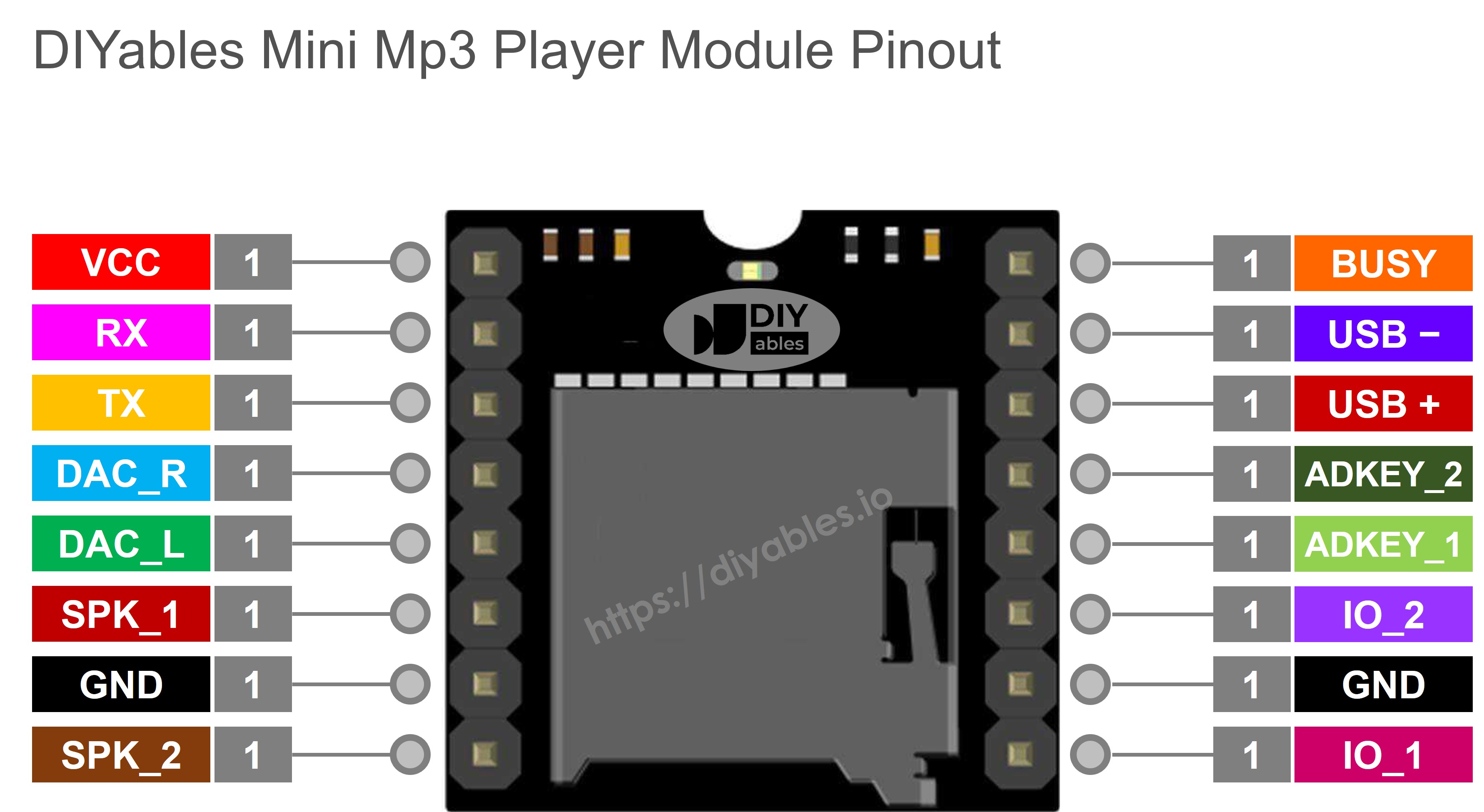
Descrição dos Pinos

Pino Finalidade
VCC Entrada de alimentação de 3.2V a 5.0V
GND Terra
RX Entrada de dados seriais (conecte ao pino TX do ESP32)
TX Saída de dados seriais (conecte ao pino RX do ESP32)
SPK_1 Alto-falante + (amplificador embutido, máx. 3W)
SPK_2 Alto-falante −
DAC_R Saída de linha do canal direito
DAC_L Saída de linha do canal esquerdo
BUSY LOW = tocando, HIGH = parado
IO_1 Toque curto → faixa anterior; toque longo → diminuir volume
IO_2 Toque curto → próxima faixa; toque longo → aumentar volume
Pinagem do Mini Mp3 Player

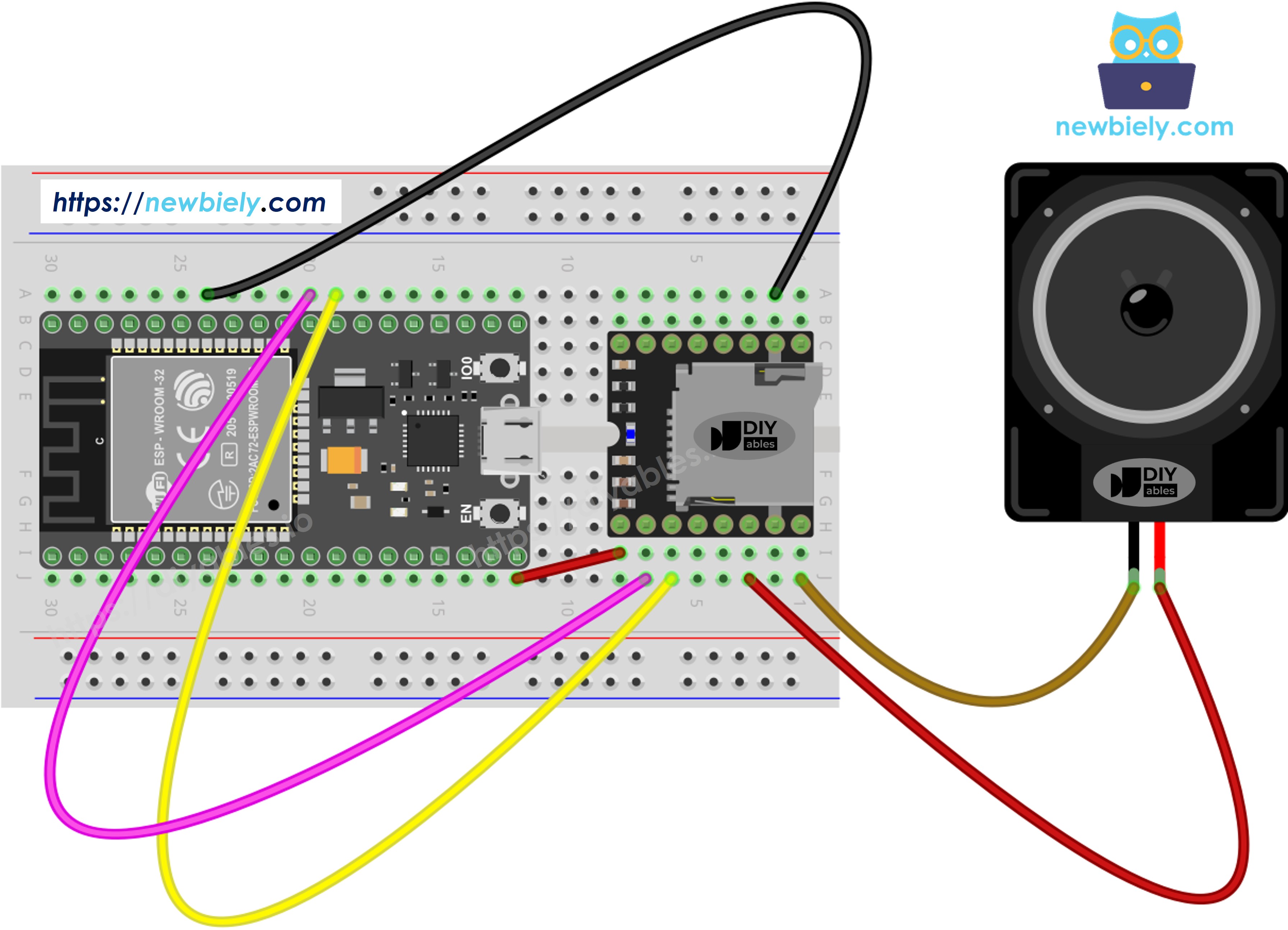
Ligação

O ESP32 usa nativamente lógica de 3.3V, então você liga as linhas seriais diretamente — sem conversão de nível e sem resistores.

Recomendamos usar a Serial2 (disponível por padrão na maioria das placas ESP32 DevKit):

Mini Mp3 Player ESP32 Observações
VCC 3.3V Ou 5V do VIN, se disponível
GND GND
RX GPIO 17 (TX2) Conexão direta
TX GPIO 16 (RX2) Conexão direta
SPK_1 Alto-falante +
SPK_2 Alto-falante −
Diagrama de ligação do ESP32 com Mini Mp3 Player

This image is created using Fritzing. Click to enlarge image

Se você não sabe como alimentar o ESP32 e outros componentes, veja as instruções no tutorial a seguir: Como alimentar o ESP32.

Dica: Se a sua variante de ESP32 não expõe os GPIO 16/17 (algumas placas DevKit-C V4 os usam para a PSRAM), você pode reatribuir os pinos da Serial2 no código:

Serial2.begin(9600, SERIAL_8N1, 4, 5); // RX=GPIO4, TX=GPIO5

Preparando o Cartão SD

  1. Formate como FAT16 ou FAT32.
  2. Coloque os arquivos mp3 na raiz:
/001.mp3 /002.mp3 /003.mp3
  1. Para uma reprodução organizada, use pastas numeradas:
/01/001.mp3 /01/002.mp3 /02/001.mp3

Observações críticas:

  • Os números das faixas começam em 1.
  • O módulo indexa as faixas pela ordem em que foram copiadas para o cartão, não pelo nome do arquivo. Sempre formate primeiro e depois copie em sequência.
  • Nomes de pastas: 01–99 (2 dígitos), nomes de arquivos: 001–255 (3 dígitos).

Instalando a Biblioteca

  • Conecte o ESP32 ao seu computador.
  • No Arduino IDE, selecione a variante da sua placa ESP32 e a porta correta.
  • Abra o gerenciador de Libraries.
  • Pesquise "DIYables_MiniMp3" e instale a biblioteca da DIYables.
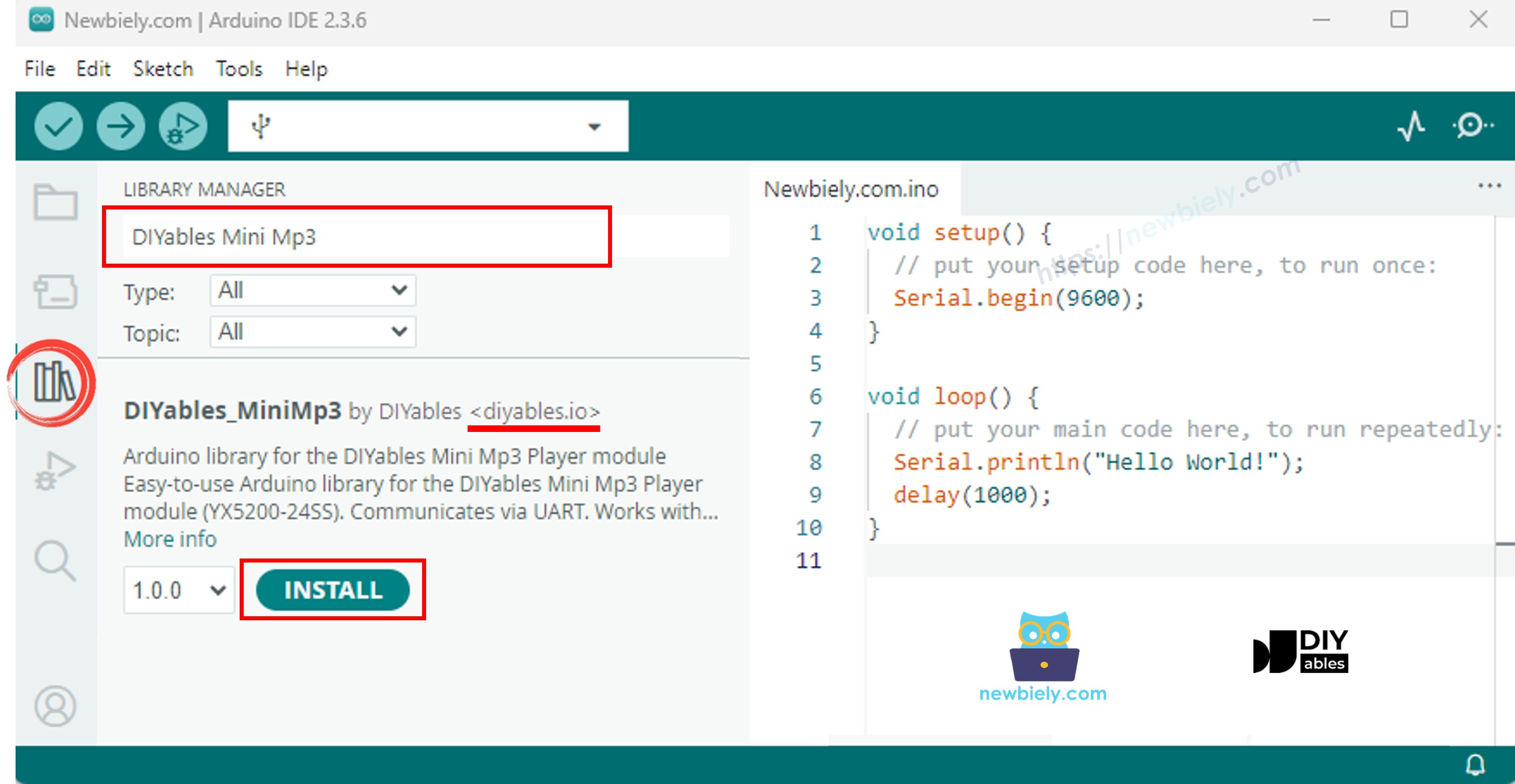
Biblioteca do ESP32 Mini Mp3 Player

Zero dependências — funciona logo de cara.

Modelo de Código Inicial

#include <DIYables_MiniMp3.h> DIYables_MiniMp3 mp3; void setup() { Serial.begin(115200); // Debug output Serial2.begin(9600); // Mp3 module communication mp3.begin(Serial2); delay(1000); mp3.setVolume(25); // 0 = silence, 30 = maximum } void loop() { // Add your logic }

Código ESP32 — Tocar uma Faixa

/* * DIYables Mini Mp3 Player - Play One Track * * Product: DIYables Mini Mp3 Player Module * https://diyables.io/products/mini-mp3-player-module * * Plays track 001 once, then stops. * * Wiring (Arduino Uno): * Mini Mp3 RX -> ESP32 pin GPIO 17 (TX2) * Mini Mp3 TX -> ESP32 pin GPIO 16 (RX2) * Mini Mp3 VCC -> 5V * Mini Mp3 GND -> GND * Speaker connected to SPK_1 and SPK_2 pins * * SD Card: Put mp3 files in root, named 001.mp3, 002.mp3, etc. */ #include <DIYables_MiniMp3.h> DIYables_MiniMp3 mp3; void setup() { Serial.begin(9600); Serial2.begin(9600); mp3.begin(Serial2); delay(1000); // Wait for the module to initialize mp3.setVolume(25); // Set volume (0 to 30) Serial.println("Playing track 1..."); mp3.play(1); // Play track 001.mp3 } void loop() { // Nothing to do here }

Experimente

  • Coloque o cartão SD, ligue o módulo e conecte o ESP32 pelo USB.
  • Selecione a sua placa ESP32 no IDE e faça o upload.

Controle de Reprodução

Método O Que Acontece Exemplo de Código
play(n) Toca a faixa de número n mp3.play(1)
playNext() Vai para a próxima faixa mp3.playNext()
playPrevious() Volta uma faixa mp3.playPrevious()
pause() Congela a reprodução mp3.pause()
resume() Continua de onde você parou mp3.resume()
stop() Encerra a reprodução por completo mp3.stop()

Código ESP32 — Várias Faixas

/* * DIYables Mini Mp3 Player - Play Multiple Tracks * * Product: DIYables Mini Mp3 Player Module * https://diyables.io/products/mini-mp3-player-module * * Plays tracks one after another with a delay between them. * * Wiring (Arduino Uno): * Mini Mp3 RX -> ESP32 pin GPIO 17 (TX2) * Mini Mp3 TX -> ESP32 pin GPIO 16 (RX2) * Mini Mp3 VCC -> 5V * Mini Mp3 GND -> GND * Speaker connected to SPK_1 and SPK_2 pins * * SD Card: Put mp3 files in root, named 001.mp3, 002.mp3, 003.mp3 */ #include <DIYables_MiniMp3.h> DIYables_MiniMp3 mp3; int currentTrack = 1; int totalTracks = 3; // Change this to match your SD card unsigned long lastTrackTime = 0; unsigned long trackDuration = 5000; // Wait 5 seconds between tracks (adjust as needed) void setup() { Serial.begin(9600); Serial2.begin(9600); mp3.begin(Serial2); delay(1000); mp3.setVolume(20); Serial.println("Playing track 1..."); mp3.play(currentTrack); lastTrackTime = millis(); } void loop() { // After trackDuration, play the next track if (millis() - lastTrackTime >= trackDuration) { currentTrack++; if (currentTrack > totalTracks) currentTrack = 1; // Loop back to first track Serial.print("Playing track "); Serial.println(currentTrack); mp3.play(currentTrack); lastTrackTime = millis(); } }

Código ESP32 — Botões de Volume

/* * DIYables Mini Mp3 Player - Volume Control * * Product: DIYables Mini Mp3 Player Module * https://diyables.io/products/mini-mp3-player-module * * Use two buttons to increase/decrease the volume. * Press button on pin GPIO1 to volume up, pin GPIO3 to volume down. * * Wiring (Arduino Uno): * Mini Mp3 RX -> ESP32 pin GPIO 17 (TX2) * Mini Mp3 TX -> ESP32 pin GPIO 16 (RX2) * Mini Mp3 VCC -> 5V * Mini Mp3 GND -> GND * Speaker connected to SPK_1 and SPK_2 pins * Button UP -> Pin GPIO1 (other leg to GND) * Button DOWN -> Pin GPIO3 (other leg to GND) * * SD Card: Put mp3 files in root, named 001.mp3, 002.mp3, etc. */ #include <DIYables_MiniMp3.h> DIYables_MiniMp3 mp3; const int BUTTON_VOL_UP = 1; const int BUTTON_VOL_DOWN = 3; int volume = 15; // Start at half volume void setup() { Serial.begin(9600); Serial2.begin(9600); pinMode(BUTTON_VOL_UP, INPUT_PULLUP); pinMode(BUTTON_VOL_DOWN, INPUT_PULLUP); mp3.begin(Serial2); delay(1000); mp3.setVolume(volume); mp3.loopTrack(1); // Play track 1 on repeat Serial.print("Volume: "); Serial.println(volume); } void loop() { // Volume Up button (pressed = LOW because of INPUT_PULLUP) if (digitalRead(BUTTON_VOL_UP) == LOW) { if (volume < 30) { volume++; mp3.setVolume(volume); Serial.print("Volume: "); Serial.println(volume); } delay(200); // Simple debounce } // Volume Down button if (digitalRead(BUTTON_VOL_DOWN) == LOW) { if (volume > 0) { volume--; mp3.setVolume(volume); Serial.print("Volume: "); Serial.println(volume); } delay(200); // Simple debounce } }

API de Volume

Método Ação Exemplo
setVolume(v) Vai direto para o nível v mp3.setVolume(20)
volumeUp() Aumenta de 1 em 1 mp3.volumeUp()
volumeDown() Diminui de 1 em 1 mp3.volumeDown()
getVolume() Lê o nível atual mp3.getVolume()

Código ESP32 — Próxima/Anterior

/* * DIYables Mini Mp3 Player - Next/Previous with Buttons * * Product: DIYables Mini Mp3 Player Module * https://diyables.io/products/mini-mp3-player-module * * Use two buttons to play next/previous tracks. * Displays the current track number on the Serial Monitor. * * Wiring (Arduino Uno): * Mini Mp3 RX -> ESP32 pin GPIO 17 (TX2) * Mini Mp3 TX -> ESP32 pin GPIO 16 (RX2) * Mini Mp3 VCC -> 5V * Mini Mp3 GND -> GND * Speaker connected to SPK_1 and SPK_2 pins * Button NEXT -> Pin GPIO1 (other leg to GND) * Button PREV -> Pin GPIO3 (other leg to GND) * * SD Card: Put mp3 files in root, named 001.mp3, 002.mp3, etc. */ #include <DIYables_MiniMp3.h> DIYables_MiniMp3 mp3; const int BUTTON_NEXT = 1; const int BUTTON_PREV = 3; void setup() { Serial.begin(9600); Serial2.begin(9600); pinMode(BUTTON_NEXT, INPUT_PULLUP); pinMode(BUTTON_PREV, INPUT_PULLUP); mp3.begin(Serial2); delay(1000); mp3.setVolume(20); mp3.play(1); // Start with track 1 Serial.println("Press NEXT or PREV button to change track"); } void loop() { if (digitalRead(BUTTON_NEXT) == LOW) { Serial.println("Next track"); mp3.playNext(); delay(300); // Simple debounce } if (digitalRead(BUTTON_PREV) == LOW) { Serial.println("Previous track"); mp3.playPrevious(); delay(300); // Simple debounce } }

Código ESP32 — Pausar/Retomar

/* * DIYables Mini Mp3 Player - Pause and Resume * * Product: DIYables Mini Mp3 Player Module * https://diyables.io/products/mini-mp3-player-module * * Demonstrates pausing and resuming playback using a single button. * Press the button to toggle between pause and resume. * * Wiring (Arduino Uno): * Mini Mp3 RX -> ESP32 pin GPIO 17 (TX2) * Mini Mp3 TX -> ESP32 pin GPIO 16 (RX2) * Mini Mp3 VCC -> 5V * Mini Mp3 GND -> GND * Speaker connected to SPK_1 and SPK_2 pins * Button -> Pin GPIO1 (other leg to GND) * * SD Card: Put mp3 files in root, named 001.mp3, 002.mp3, etc. */ #include <DIYables_MiniMp3.h> DIYables_MiniMp3 mp3; const int BUTTON_PIN = 1; bool paused = false; void setup() { Serial.begin(9600); Serial2.begin(9600); pinMode(BUTTON_PIN, INPUT_PULLUP); mp3.begin(Serial2); delay(1000); mp3.setVolume(20); mp3.play(1); Serial.println("Playing. Press button to pause/resume."); } void loop() { if (digitalRead(BUTTON_PIN) == LOW) { if (paused) { mp3.resume(); Serial.println("Resumed"); } else { mp3.pause(); Serial.println("Paused"); } paused = !paused; delay(300); // Simple debounce } }

Código ESP32 — Repetir uma Faixa

/* * DIYables Mini Mp3 Player - Loop Track * * Product: DIYables Mini Mp3 Player Module * https://diyables.io/products/mini-mp3-player-module * * Loops (repeats) a track continuously with EQ setting. * * Wiring (Arduino Uno): * Mini Mp3 RX -> ESP32 pin GPIO 17 (TX2) * Mini Mp3 TX -> ESP32 pin GPIO 16 (RX2) * Mini Mp3 VCC -> 5V * Mini Mp3 GND -> GND * Speaker connected to SPK_1 and SPK_2 pins * * SD Card file structure: * /001.mp3 * /002.mp3 * ... */ #include <DIYables_MiniMp3.h> DIYables_MiniMp3 mp3; void setup() { Serial.begin(9600); Serial2.begin(9600); mp3.begin(Serial2); delay(1000); // Wait for the module to initialize mp3.setVolume(25); // Volume: 0 to 30 mp3.setEQ(DIYables_MiniMp3::EQ_NORMAL); Serial.println("Playing track 1 on loop..."); mp3.loopTrack(1); } void loop() { // Your code here }

Repetir e Aleatório

Método Comportamento Exemplo
loopTrack(n) Repete a faixa n sem parar mp3.loopTrack(1)
loopFolder(f) Repete todas as faixas da pasta f mp3.loopFolder(1)
loopAll() Repete todas as faixas mp3.loopAll()
stopLoop() Cancela a repetição ativa mp3.stopLoop()
shuffle() Reprodução aleatória mp3.shuffle()

Código ESP32 — Reprodução por Pasta

/* * DIYables Mini Mp3 Player - Play from Folder * * Product: DIYables Mini Mp3 Player Module * https://diyables.io/products/mini-mp3-player-module * * Plays tracks from specific folders on the SD card. * * Wiring (Arduino Uno): * Mini Mp3 RX -> ESP32 pin GPIO 17 (TX2) * Mini Mp3 TX -> ESP32 pin GPIO 16 (RX2) * Mini Mp3 VCC -> 5V * Mini Mp3 GND -> GND * Speaker connected to SPK_1 and SPK_2 pins * * SD Card file structure: * /01/001.mp3 <- playFolder(1, 1) * /01/002.mp3 <- playFolder(1, 2) * /02/001.mp3 <- playFolder(2, 1) * /02/002.mp3 <- playFolder(2, 2) * * IMPORTANT: * - Numbering starts from 1, NOT 0 * - Folder names must be 2-digit zero-padded (01-99) * - Track names must be 3-digit zero-padded (001-255) * - Format SD card as FAT32, then copy files one by one in order * - Track order is determined by the order files were copied, * NOT by filename. So copy them in the correct sequence. */ #include <DIYables_MiniMp3.h> DIYables_MiniMp3 mp3; void setup() { Serial.begin(9600); Serial2.begin(9600); mp3.begin(Serial2); delay(1000); mp3.setVolume(20); // Play track 1 from folder 01 Serial.println("Playing folder 01, track 001..."); mp3.playFolder(1, 1); delay(5000); // Play track 2 from folder 01 Serial.println("Playing folder 01, track 002..."); mp3.playFolder(1, 2); delay(5000); // Play track 1 from folder 02 Serial.println("Playing folder 02, track 001..."); mp3.playFolder(2, 1); } void loop() { // Nothing to do here }

API de Pastas

Método Descrição Exemplo
playFolder(f, t) Toca a faixa t da pasta f mp3.playFolder(1, 1)
playLargeFolder(f, t) Pasta grande (15 pastas, 3000 faixas) mp3.playLargeFolder(1, 2000)
playFromMP3Folder(t) Toca da pasta /mp3 mp3.playFromMP3Folder(1)

Código ESP32 — Controle pelo Serial Monitor

/* * DIYables Mini Mp3 Player - Serial Command Control * * Product: DIYables Mini Mp3 Player Module * https://diyables.io/products/mini-mp3-player-module * * Control the Mp3 player by typing commands in the Serial Monitor. * Great for testing all functions without extra hardware. * * Commands (type in Serial Monitor, then press Enter): * 1-9 Play track 1 to 9 * + Volume up * - Volume down * p Pause * r Resume * s Stop * n Next track * b Previous track (back) * ? Show current status * * Wiring (Arduino Uno): * Mini Mp3 RX -> ESP32 pin GPIO 17 (TX2) * Mini Mp3 TX -> ESP32 pin GPIO 16 (RX2) * Mini Mp3 VCC -> 5V * Mini Mp3 GND -> GND * Speaker connected to SPK_1 and SPK_2 pins * * SD Card: Put mp3 files in root, named 001.mp3, 002.mp3, etc. */ #include <DIYables_MiniMp3.h> DIYables_MiniMp3 mp3; void setup() { Serial.begin(9600); Serial2.begin(9600); mp3.begin(Serial2); delay(1000); mp3.setVolume(20); Serial.println("=== DIYables Mini Mp3 Player ==="); Serial.println("Commands:"); Serial.println(" 1-9 Play track number"); Serial.println(" + Volume up"); Serial.println(" - Volume down"); Serial.println(" p Pause"); Serial.println(" r Resume"); Serial.println(" s Stop"); Serial.println(" n Next track"); Serial.println(" b Previous track"); Serial.println(" ? Show status"); Serial.println("================================"); } void loop() { if (Serial.available()) { char cmd = Serial.read(); switch (cmd) { case '1': case '2': case '3': case '4': case '5': case '6': case '7': case '8': case '9': Serial.print("Playing track "); Serial.println(cmd - '0'); mp3.play(cmd - '0'); break; case '+': Serial.println("Volume up"); mp3.volumeUp(); break; case '-': Serial.println("Volume down"); mp3.volumeDown(); break; case 'p': Serial.println("Paused"); mp3.pause(); break; case 'r': Serial.println("Resumed"); mp3.resume(); break; case 's': Serial.println("Stopped"); mp3.stop(); break; case 'n': Serial.println("Next track"); mp3.playNext(); break; case 'b': Serial.println("Previous track"); mp3.playPrevious(); break; case '?': { Serial.println("--- Status ---"); int16_t vol = mp3.getVolume(); Serial.print("Volume: "); Serial.println(vol); int16_t track = mp3.getCurrentTrack(); Serial.print("Current track: "); Serial.println(track); bool playing = mp3.isPlaying(); Serial.print("Playing: "); Serial.println(playing ? "Yes" : "No"); int16_t total = mp3.getTrackCount(); Serial.print("Total tracks: "); Serial.println(total); Serial.println("--------------"); break; } default: break; } } }
Comando Efeito
1–9 Tocar faixa
+ / − Volume
p / r / s Pausar / Retomar / Parar
n / b Próxima / Anterior
? Estado

Opções de Equalizador

Constante ID Característica
DIYables_MiniMp3::EQ_NORMAL 0 Neutro
DIYables_MiniMp3::EQ_POP 1 Brilhante
DIYables_MiniMp3::EQ_ROCK 2 Marcante
DIYables_MiniMp3::EQ_JAZZ 3 Quente
DIYables_MiniMp3::EQ_CLASSIC 4 Equilibrado
DIYables_MiniMp3::EQ_BASS 5 Profundo
mp3.setEQ(DIYables_MiniMp3::EQ_BASS);

Verificando o Estado do Módulo

Estas funções bloqueiam por até 100 ms enquanto esperam a resposta do módulo. Elas retornam −1 se nenhuma resposta chegar.

Função Retorno Descrição
isPlaying() bool true durante a reprodução ativa
getVolume() int16_t Volume atual (0–30)
getEQ() int16_t EQ ativo (0–5)
getTrackCount() int16_t Total de faixas no SD
getCurrentTrack() int16_t Número da faixa que está tocando agora
getFolderCount() int16_t Total de pastas no SD
getTrackCountInFolder(f) int16_t Faixas na pasta f

※ NOSSAS MENSAGENS

  • Fique à vontade para compartilhar o link deste tutorial. Porém, por favor, não use nosso conteúdo em outros sites. Investimos muito esforço e tempo para criar este conteúdo, por favor respeite nosso trabalho!