
Arduino - Sensor de Som - Servo Motor

Neste tutorial, vamos explorar como utilizar o sensor de som para controlar um servo motor. Especificamente, vamos nos aprofundar em duas aplicações interessantes:

Hardware Necessário

1×Arduino Uno R3
1×Cabo USB 2.0 tipo A/B (para PC com USB-A)
1×Cabo USB 2.0 tipo C/B (para PC com USB-C)
1×Sensor de Som
1×Servo Motor
1×Fios Jumper
1×(Recomendado) Shield com Bornes de Parafuso para Arduino Uno
1×(Recomendado) Sensors/Servo Expansion Shield for Arduino Uno
1×(Recomendado) Shield de Protoboard para Arduino Uno
1×(Recomendado) Case para Arduino Uno
1×(Recomendado) Placa Base de Prototipagem e Kit de Protoboard para Arduino Uno

Or you can buy the following kits:

1×DIYables STEM V3 Starter Kit (Arduino included)
1×DIYables Sensor Kit (18 sensors/displays)
Divulgação: Alguns dos links desta seção são links de afiliado da Amazon. Podemos receber uma comissão pelas compras feitas por meio desses links, sem custo adicional para você. Agradecemos o seu apoio.

Buy Note: For controlling multiple servo motors, use the PCA9685 16 Channel PWM Servo Driver Module to save MCU pins and simplify wiring.

Sobre o Servo Motor e o Sensor de Som

Se você não conhece o servo motor e o sensor de som (pinagem, como funcionam, como programar ...), aprenda sobre eles nos seguintes tutoriais:

Diagrama de Ligação
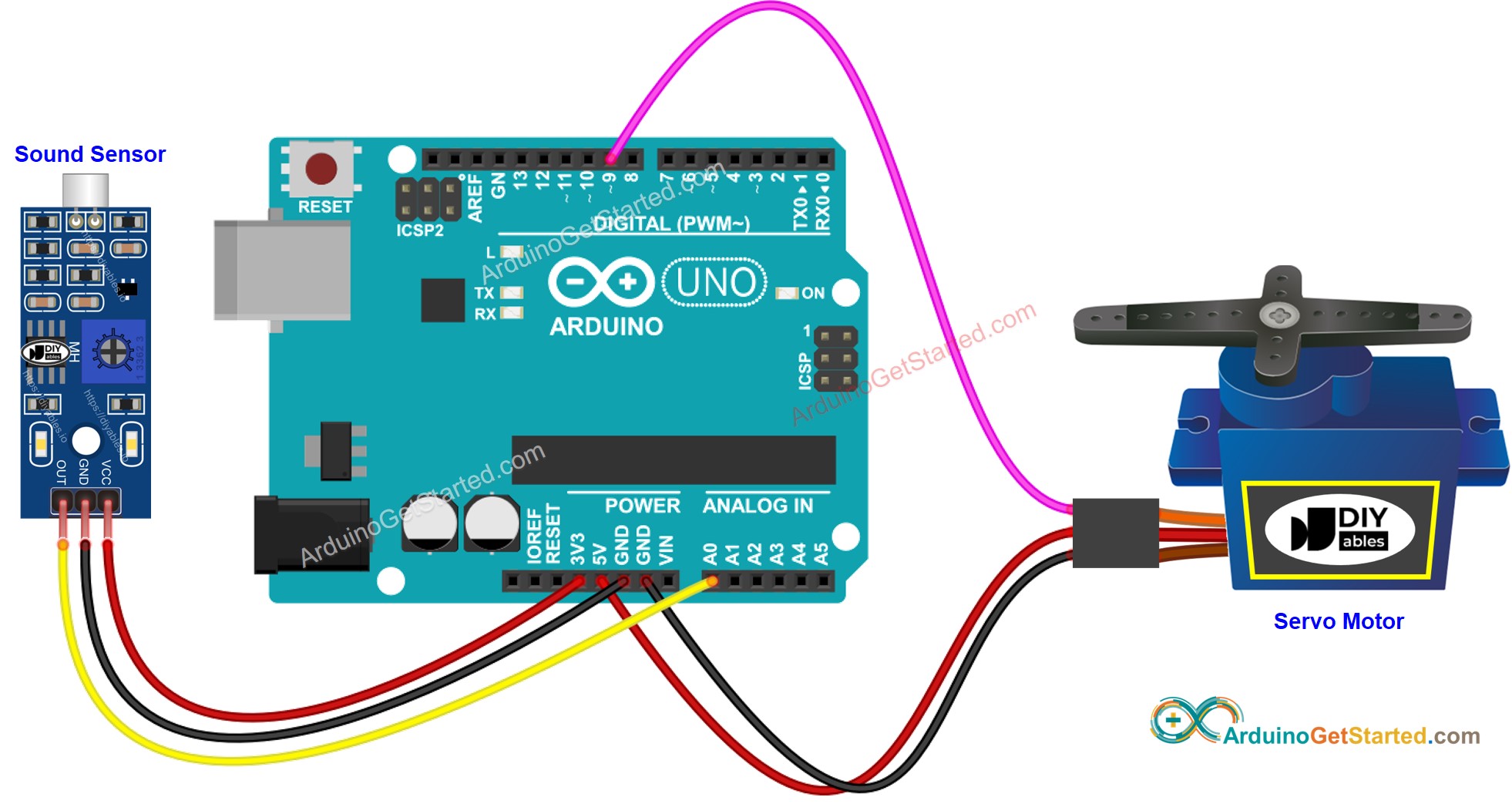
Diagrama de Ligação do Sensor de Som e Servo Motor com Arduino

This image is created using Fritzing. Click to enlarge image

Código Arduino - Interruptor por Som alterna o Ângulo do Servo Motor

O código abaixo alterna o ângulo do servo motor entre 0 e 90 graus cada vez que um som é detectado.

/* * Este código de Arduino foi desenvolvido por pt.newbiely.com * Este código de Arduino é disponibilizado ao público sem nenhuma restrição. * Para tutoriais completos e diagramas de ligação, visite: * https://pt.newbiely.com/tutorials/arduino/arduino-sound-sensor-servo-motor */ #include <Servo.h> #define SENSOR_PIN A0 // Arduino pin connected to sound sensor's pin #define SERVO_PIN 9 // Arduino pin connected to servo motor's pin Servo servo; // create servo object to control a servo // variables will change: int angle = 0; // the current angle of servo motor int lastSoundState; // the previous state of sound sensor int currentSoundState; // the current state of sound sensor void setup() { Serial.begin(9600); // initialize serial pinMode(SENSOR_PIN, INPUT); // set arduino pin to input mode servo.attach(SERVO_PIN); // attaches the servo on pin 9 to the servo object servo.write(angle); currentSoundState = digitalRead(SENSOR_PIN); } void loop() { lastSoundState = currentSoundState; // save the last state currentSoundState = digitalRead(SENSOR_PIN); // read new state if (lastSoundState == HIGH && currentSoundState == LOW) { // state change: HIGH -> LOW Serial.println("The sound has been detected"); // change angle of servo motor if (angle == 0) angle = 90; else if (angle == 90) angle = 0; // control servo motor arccoding to the angle servo.write(angle); } }

Passos Rápidos

  • Conecte o Arduino ao PC via cabo USB
  • Abra o Arduino IDE, selecione a placa e a porta corretas
  • Copie o código acima e abra-o com o Arduino IDE
  • Clique no botão Upload no Arduino IDE para carregar o código no Arduino
  • Bata palmas na frente do sensor de som
  • Veja a mudança do servo motor

Código Arduino - Servo Motor Ativado por Som por um Período de Tempo

O código abaixo gira o servo motor para 90 graus por um período de tempo quando um som é detectado. Após esse período, o servo motor é girado de volta para 0 grau.

/* * Este código de Arduino foi desenvolvido por pt.newbiely.com * Este código de Arduino é disponibilizado ao público sem nenhuma restrição. * Para tutoriais completos e diagramas de ligação, visite: * https://pt.newbiely.com/tutorials/arduino/arduino-sound-sensor-servo-motor */ #include <Servo.h> #define SENSOR_PIN A0 // Arduino pin connected to sound sensor's pin #define SERVO_PIN 9 // Arduino pin connected to servo motor's pin #define TIME_PERIOD 5000 // in milliseconds Servo servo; // create servo object to control a servo // variables will change: int lastSoundState; // the previous state of sound sensor int currentSoundState; // the current state of sound sensor void setup() { Serial.begin(9600); // initialize serial pinMode(SENSOR_PIN, INPUT); // set arduino pin to input mode servo.attach(SERVO_PIN); // attaches the servo on pin 9 to the servo object servo.write(0); currentSoundState = digitalRead(SENSOR_PIN); } void loop() { lastSoundState = currentSoundState; // save the last state currentSoundState = digitalRead(SENSOR_PIN); // read new state if (lastSoundState == HIGH && currentSoundState == LOW) { // state change: HIGH -> LOW Serial.println("The sound has been detected"); servo.write(90); // control servo motor to 90 degree delay(TIME_PERIOD); servo.write(0); // control servo motor to 0 degree } }

Observe que o código acima utiliza a função delay() para simplificar. No entanto, se você incorporar código adicional, ele pode ficar bloqueado durante o tempo de delay. Para resolver isso, o código a seguir implementa uma abordagem não bloqueante usando a função millis() em vez de delay para evitar o bloqueio.

/* * Este código de Arduino foi desenvolvido por pt.newbiely.com * Este código de Arduino é disponibilizado ao público sem nenhuma restrição. * Para tutoriais completos e diagramas de ligação, visite: * https://pt.newbiely.com/tutorials/arduino/arduino-sound-sensor-servo-motor */ #include <Servo.h> #define SENSOR_PIN A0 // Arduino pin connected to sound sensor's pin #define SERVO_PIN 9 // Arduino pin connected to servo motor's pin #define TIME_PERIOD 5000 // in milliseconds Servo servo; // create servo object to control a servo // variables will change: int lastSoundState; // the previous state of sound sensor int currentSoundState; // the current state of sound sensor unsigned long lastTime; // the current state of sound sensor int angle = 0; void setup() { Serial.begin(9600); // initialize serial pinMode(SENSOR_PIN, INPUT); // set arduino pin to input mode servo.attach(SERVO_PIN); // attaches the servo on pin 9 to the servo object servo.write(angle); currentSoundState = digitalRead(SENSOR_PIN); } void loop() { lastSoundState = currentSoundState; // save the last state currentSoundState = digitalRead(SENSOR_PIN); // read new state if (lastSoundState == HIGH && currentSoundState == LOW) { // state change: HIGH -> LOW Serial.println("The sound has been detected"); angle = 90; servo.write(angle); // control servo motor to 90 degree lastTime = millis(); } if (angle == 90 && (millis() - lastTime) > TIME_PERIOD) { angle = 0; servo.write(angle); // control servo motor to 0 degree } }

Vídeo

※ NOSSAS MENSAGENS

  • Fique à vontade para compartilhar o link deste tutorial. Porém, por favor, não use nosso conteúdo em outros sites. Investimos muito esforço e tempo para criar este conteúdo, por favor respeite nosso trabalho!