
Arduino - Sensor de Movimento - Servo Motor
Vamos aprender:
- Se um movimento for detectado, girar o servo motor para 90 graus
- Se nenhum movimento for detectado, girar o servo motor de volta para 0 grau.
Hardware Necessário
Or you can buy the following kits:
| 1 | × | DIYables STEM V3 Starter Kit (Arduino included) | |
| 1 | × | DIYables Sensor Kit (18 sensors/displays) |
Divulgação: Alguns dos links desta seção são links de afiliado da Amazon. Podemos receber uma comissão pelas compras feitas por meio desses links, sem custo adicional para você. Agradecemos o seu apoio.
Buy Note: For controlling multiple servo motors, use the PCA9685 16 Channel PWM Servo Driver Module to save MCU pins and simplify wiring.
Sobre Servo Motor e Sensor de Movimento
Se você ainda não conhece o servo motor e o sensor de movimento (pinagem, como funcionam, como programar ...), aprenda sobre eles nos seguintes tutoriais:
Diagrama de Ligação
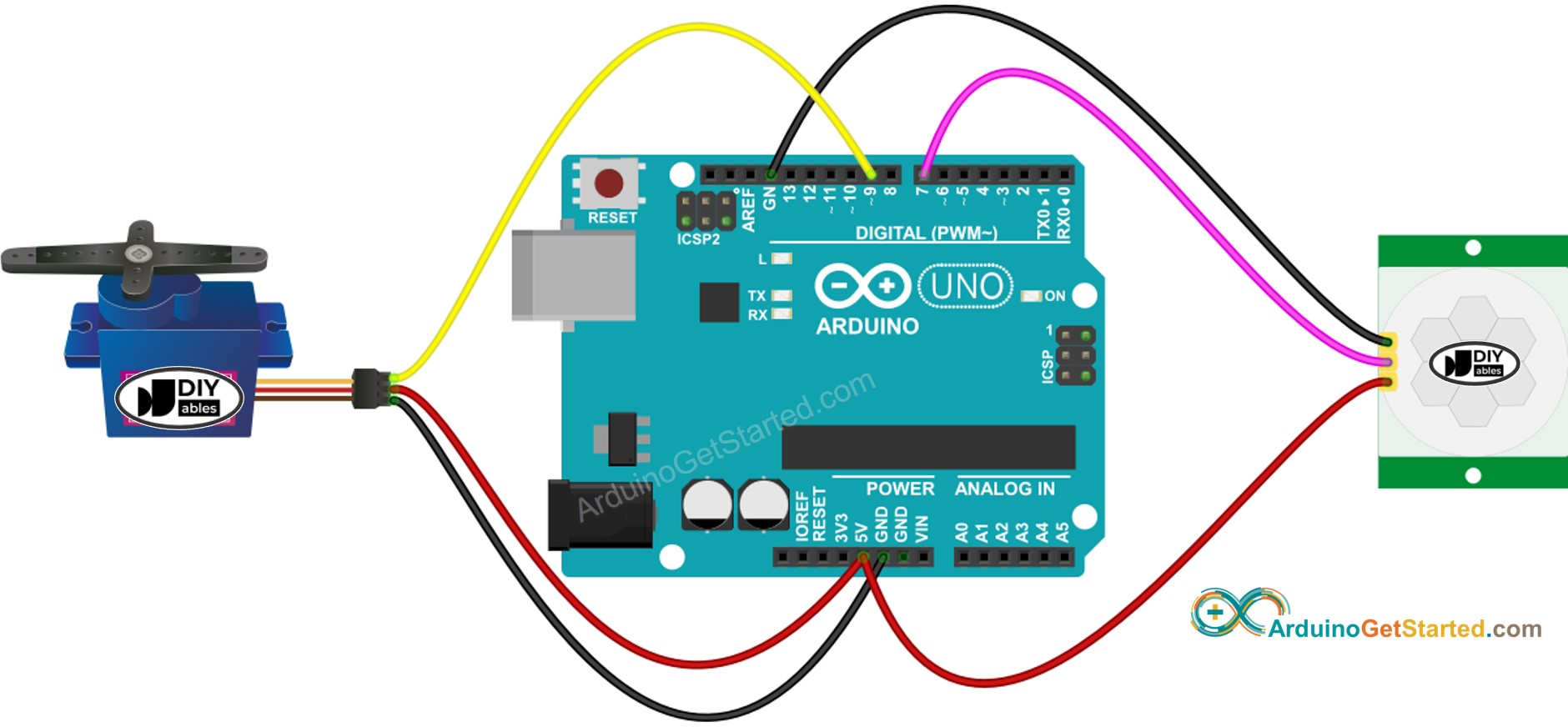
This image is created using Fritzing. Click to enlarge image
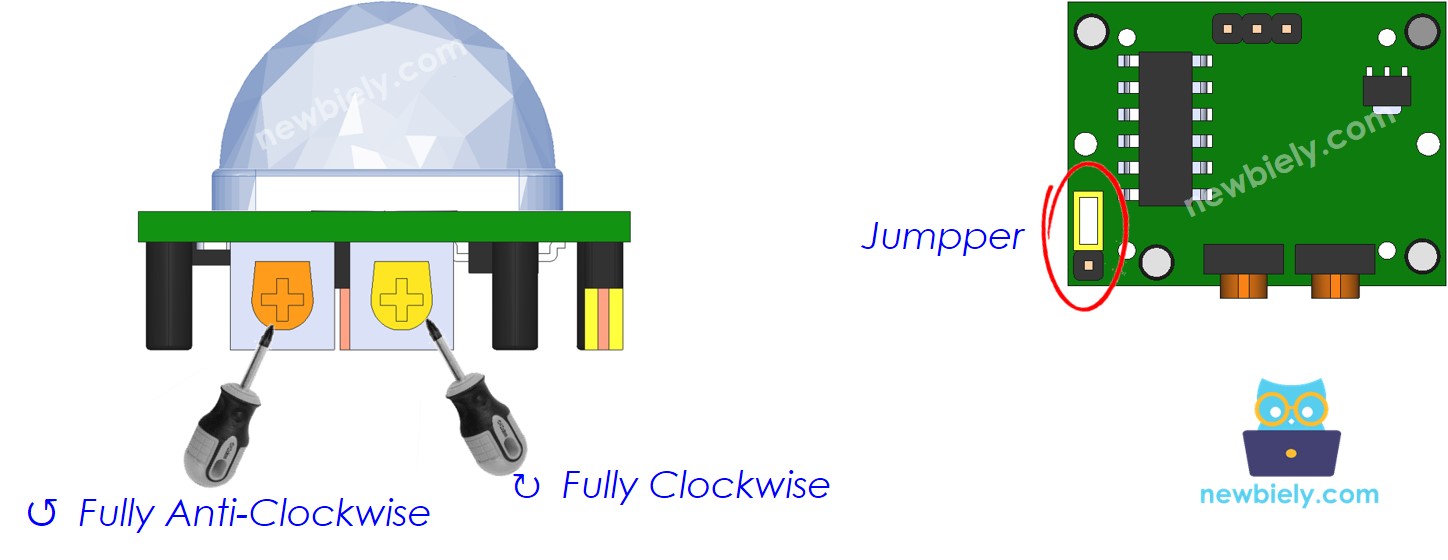
Configuração Inicial
| Ajuste de Tempo de Atraso | Gire-o totalmente no sentido anti-horário. |
| Ajuste de Alcance de Detecção | Gire-o totalmente no sentido horário. |
| Seletor de Disparo Repetido | Coloque o jumper como mostrado na imagem. |
Código Arduino - Sensor de Movimento Controla Servo Motor
/*
* Este código de Arduino foi desenvolvido por pt.newbiely.com
* Este código de Arduino é disponibilizado ao público sem nenhuma restrição.
* Para tutoriais completos e diagramas de ligação, visite:
* https://pt.newbiely.com/tutorials/arduino/arduino-motion-sensor-servo-motor
*/
#include <Servo.h>
// constants won't change
const int MOTION_SENSOR_PIN = 7; // Arduino pin connected to motion sensor's pin
const int SERVO_PIN = 9; // Arduino pin connected to servo motor's pin
Servo servo; // create servo object to control a servo
// variables will change:
int angle = 0; // the current angle of servo motor
int lastMotionState; // the previous state of motion sensor
int currentMotionState; // the current state of motion sensor
void setup() {
Serial.begin(9600); // initialize serial
pinMode(MOTION_SENSOR_PIN, INPUT); // set arduino pin to input mode
servo.attach(SERVO_PIN); // attaches the servo on pin 9 to the servo object
servo.write(angle);
currentMotionState = digitalRead(MOTION_SENSOR_PIN);
}
void loop() {
lastMotionState = currentMotionState; // save the last state
currentMotionState = digitalRead(MOTION_SENSOR_PIN); // read new state
if (currentMotionState == LOW && lastMotionState == HIGH) { // pin state change: LOW -> HIGH
Serial.println("Motion detected!");
servo.write(90);
}
else
if (currentMotionState == HIGH && lastMotionState == LOW) { // pin state change: HIGH -> LOW
Serial.println("Motion stopped!");
servo.write(0);
}
}
Passos Rápidos
- Conecte o Arduino ao PC via cabo USB
- Abra o Arduino IDE, selecione a placa e a porta corretas
- Copie o código acima e abra-o no Arduino IDE
- Clique no botão Upload no Arduino IDE para carregar o código no Arduino
- Mova sua mão na frente do sensor
- Veja a mudança no servo motor
Arduino com Sensor de Movimento HC-SR501 - Tutorial em Vídeo
Abaixo está um tutorial em vídeo passo a passo que demonstra como usar o sensor de movimento HC-SR501 com o Arduino. No final do vídeo, você verá como criar um sistema automático de abertura de porta com um servo e um buzzer usando o código abaixo:
#include <Servo.h>
#define SENSOR_PIN 2 // The Arduino UNO R4 connected to the output pin of the motion sensor
#define SERVO_PIN 5
#define BUZZER_PIN 6
Servo servo;
int motion_state = LOW; // Initialize current pin state to LOW
int prev_motion_state = LOW; // Initialize previous pin state to LOW
void setup() {
Serial.begin(9600); // Start serial communication at 9600 baud rate
pinMode(SENSOR_PIN, INPUT); // Configure pin 2 as an input for the sensor
pinMode(BUZZER_PIN, OUTPUT); // Configure the buzzer pin as output
servo.attach(SERVO_PIN);
servo.write(0);
noTone(BUZZER_PIN);
}
void beep() {
for (int i = 0; i < 2; i++) {
tone(BUZZER_PIN, 5000); delay(100);
noTone(BUZZER_PIN); delay(100);
}
}
void loop() {
prev_motion_state = motion_state; // Assign the current pin state to the previous pin state for comparison
motion_state = digitalRead(SENSOR_PIN); // Read the current state from the sensor output
// Check for transition from LOW to HIGH which indicates motion detected
if (prev_motion_state == LOW && motion_state == HIGH) {
Serial.println("Motion detected!"); // Print message when motion is detected
servo.write(180);
beep();
// Optional: Additional actions when motion is detected
}
// Check for transition from HIGH to LOW which indicates motion has stopped
else if (prev_motion_state == HIGH && motion_state == LOW) {
Serial.println("Motion stopped!"); // Print message when motion has stopped
servo.write(0);
beep();
// Optional: Additional actions when motion stops
}
}