Arduino - Matriz de LED

Displays de matriz de LED, também conhecidos como displays de LED ou displays de matriz de pontos, são muito usados. Neste tutorial, vamos aprender:

Depois disso, você pode adaptar facilmente o código para outras matrizes de LED, como matriz de LED 16x8, matriz de LED 64x8 ...

Sobre a Matriz de LED

Display de matriz de LED

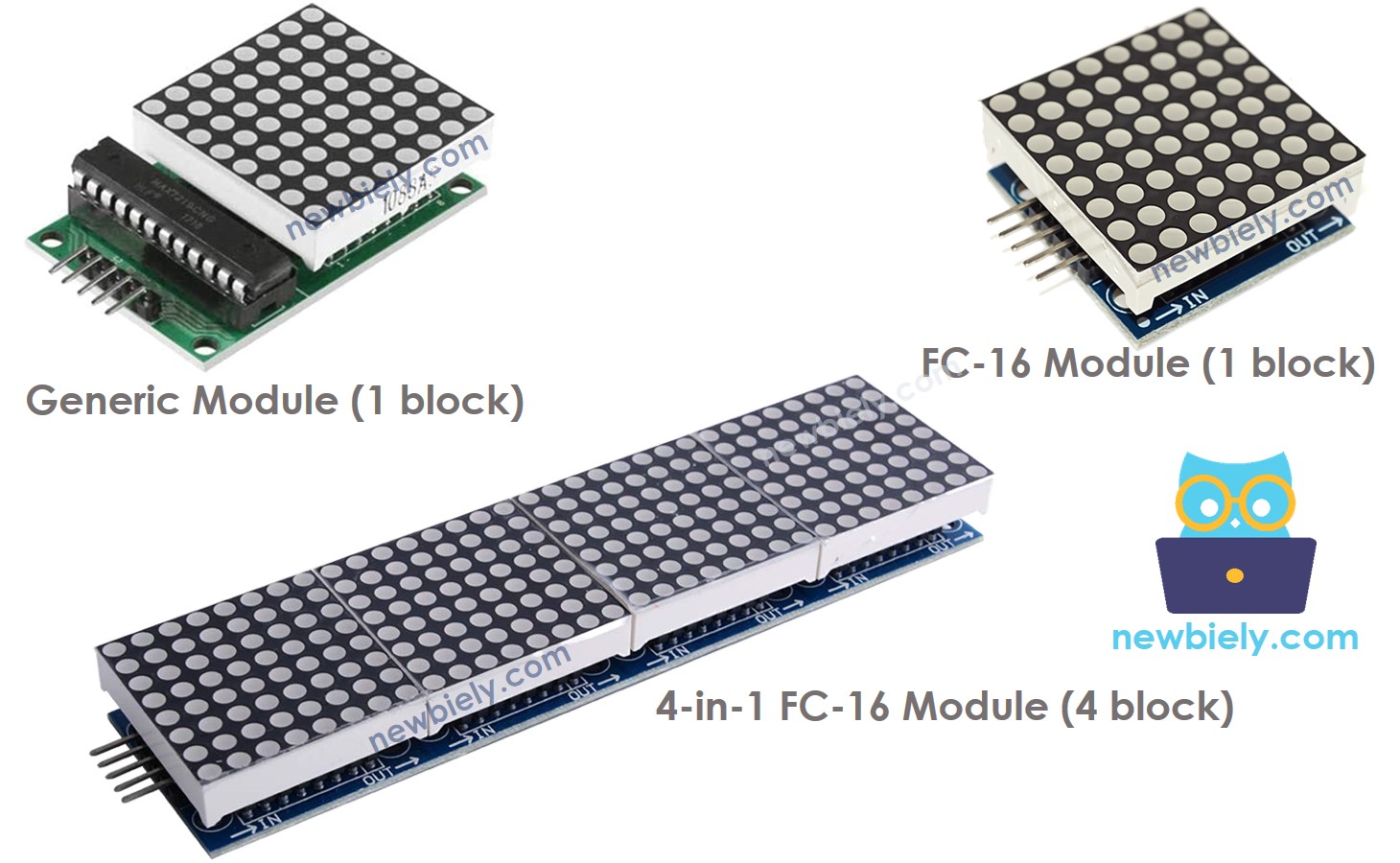
Existem muitos tipos de matriz de LED. Com o Arduino, a matriz de LED baseada no MAX7219 é muito usada. A matriz de LED baseada no MAX7219 tem as seguintes características:

  • A unidade básica de uma matriz de LED é um bloco
  • Cada bloco tem uma matriz de LED 8x8 (64 LEDs) e um driver MAX7219.
  • Existem dois formatos de bloco populares: o módulo genérico e o módulo FC-16.
  • Uma matriz de LED pode ser formada por um único bloco ou por vários blocos ligados em cascata (daisy-chain)
  • Você pode comprar uma matriz de LED pronta com vários blocos (por exemplo, 4 em 1, 8 em 1)
  • Você também pode comprar vários blocos e ligá-los para formar uma matriz de LED do tamanho desejado.
  • Você vai declarar o tamanho da matriz de LED que está usando no código do Arduino.

Pinagem
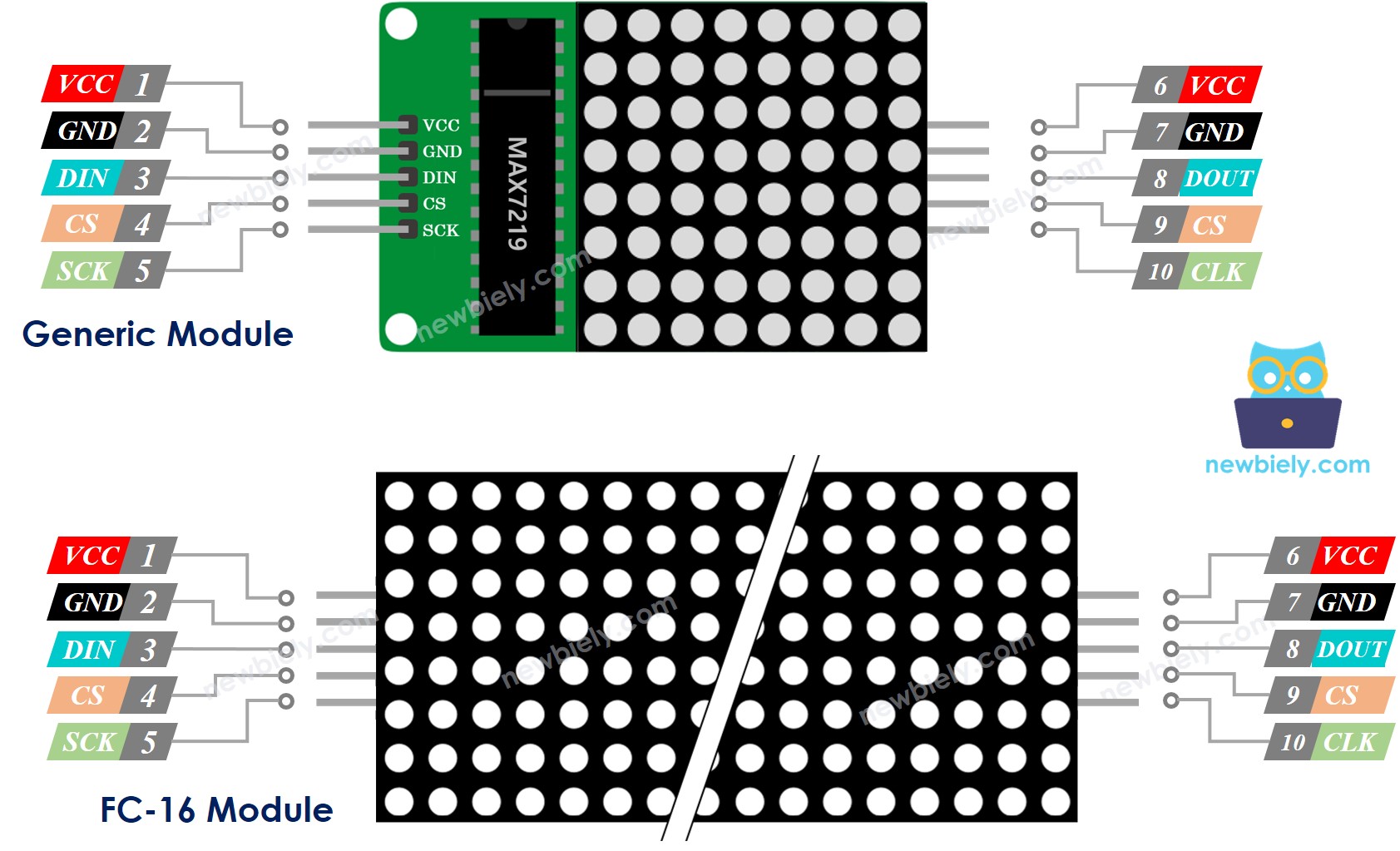
Pinagem da Matriz de LED

Uma matriz de LED é formada por um ou vários blocos. Cada bloco inclui dois grupos de pinos:

  • Grupo de pinos de entrada:
    • VCC: conectado ao 5V.
    • GND: conectado ao GND.
    • DIN é o pino de dados. Conecte-o ao pino SPI MOSI do Arduino.
    • CS: Chip Select. Conecte-o a qualquer pino digital do Arduino.
    • CLK: pino de clock. Conecte-o ao pino SPI CLK do Arduino.
  • Grupo de pinos de saída:
    • VCC: conecta ao VCC do próximo módulo.
    • GND: conecta ao GND do próximo módulo.
    • DOUT: Data Out (saída de dados), conecta ao pino DIN do próximo módulo.
    • CS: conecta ao CS do próximo módulo.
    • CLK conecta ao CLK do próximo módulo.

Diagrama de Ligação

Se a matriz de LED for formada por um único bloco:

  • Conecte o grupo de pinos de entrada ao Arduino
  • Deixe o grupo de pinos de saída desconectado
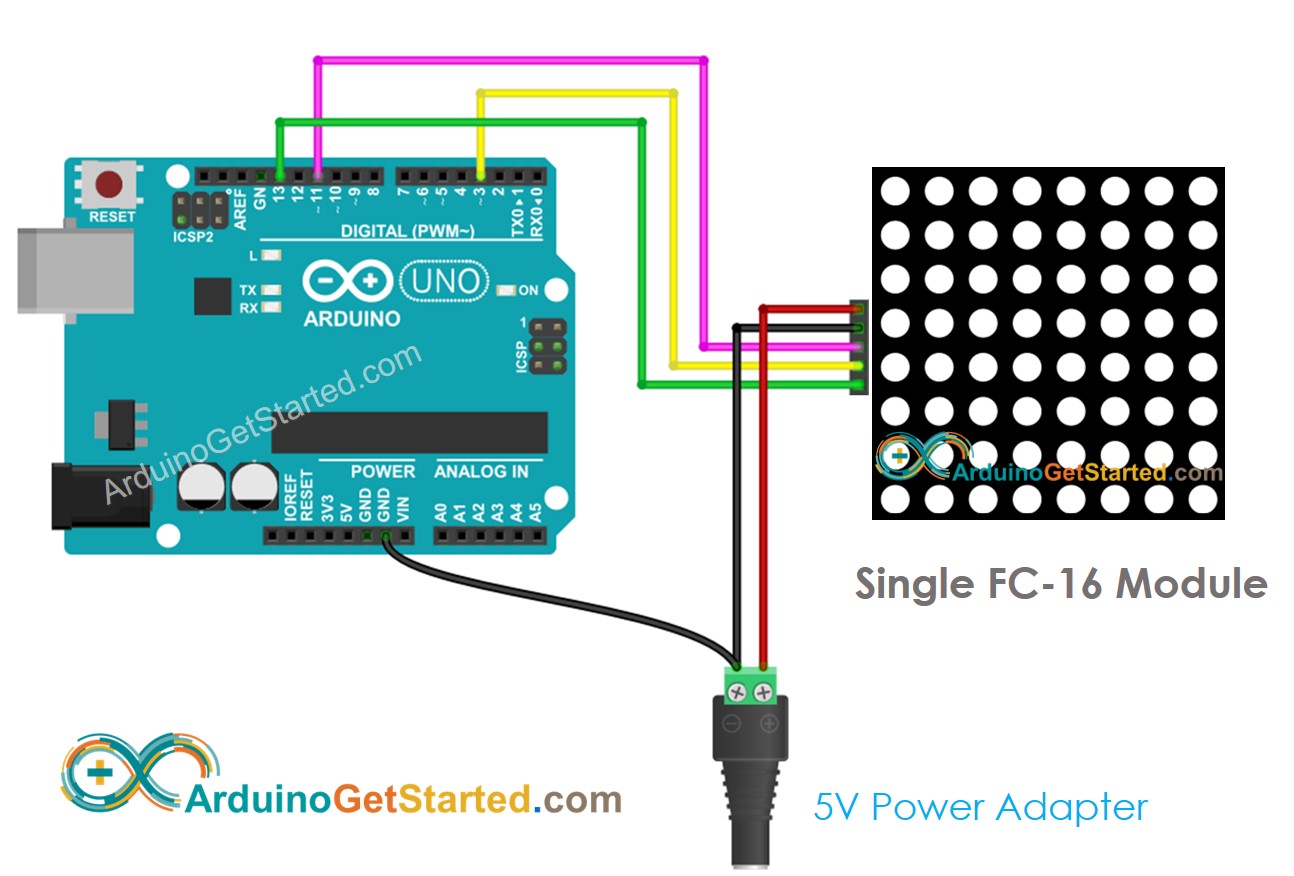
Diagrama de ligação do Arduino com matriz de LED 8x8 FC-16

This image is created using Fritzing. Click to enlarge image
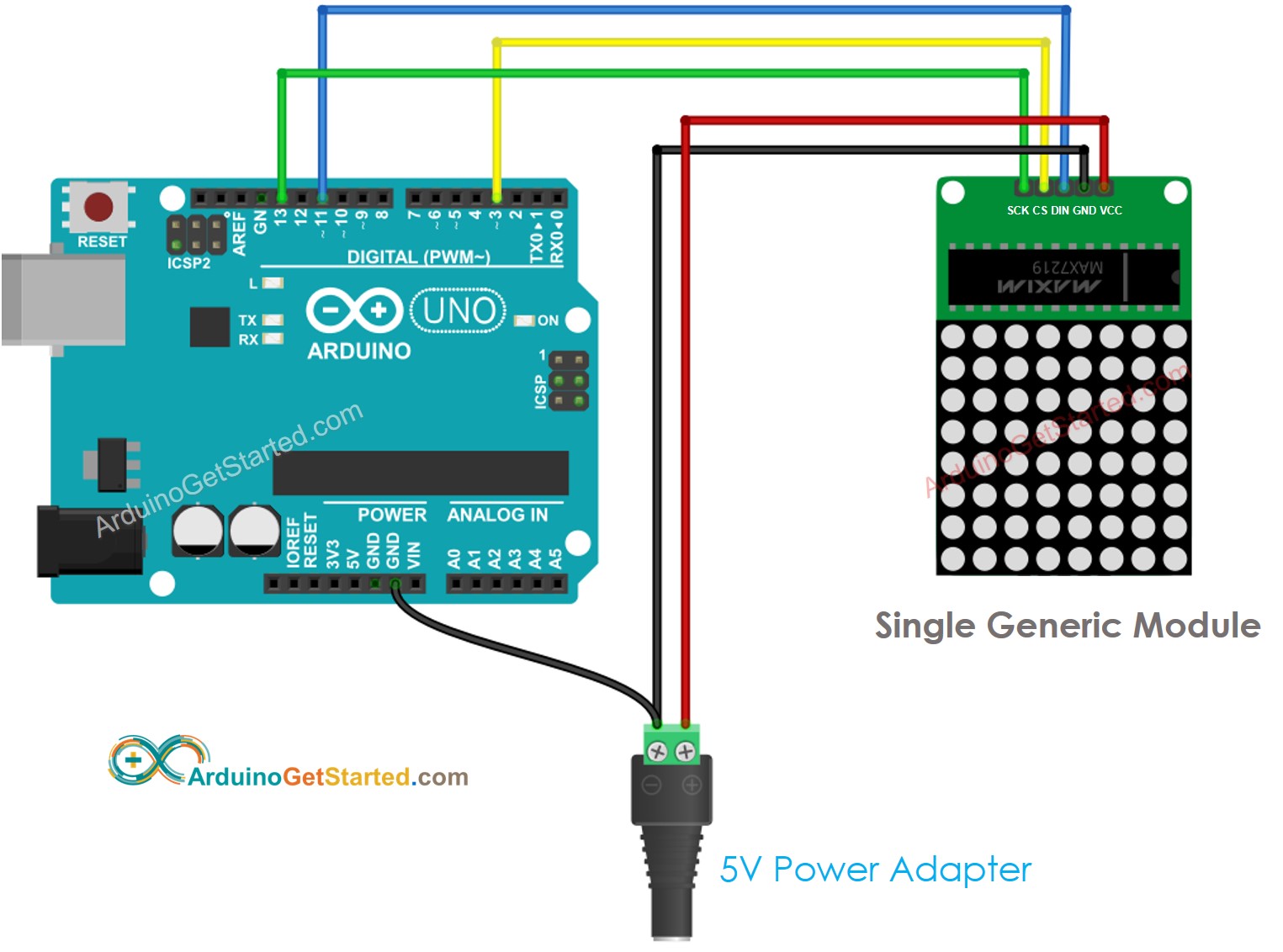
Diagrama de ligação do Arduino com matriz de LED 8x8 genérica

This image is created using Fritzing. Click to enlarge image

Se a matriz de LED for pronta, com vários blocos:

  • Conecte o grupo de pinos de entrada ao Arduino
  • Deixe o grupo de pinos de saída desconectado
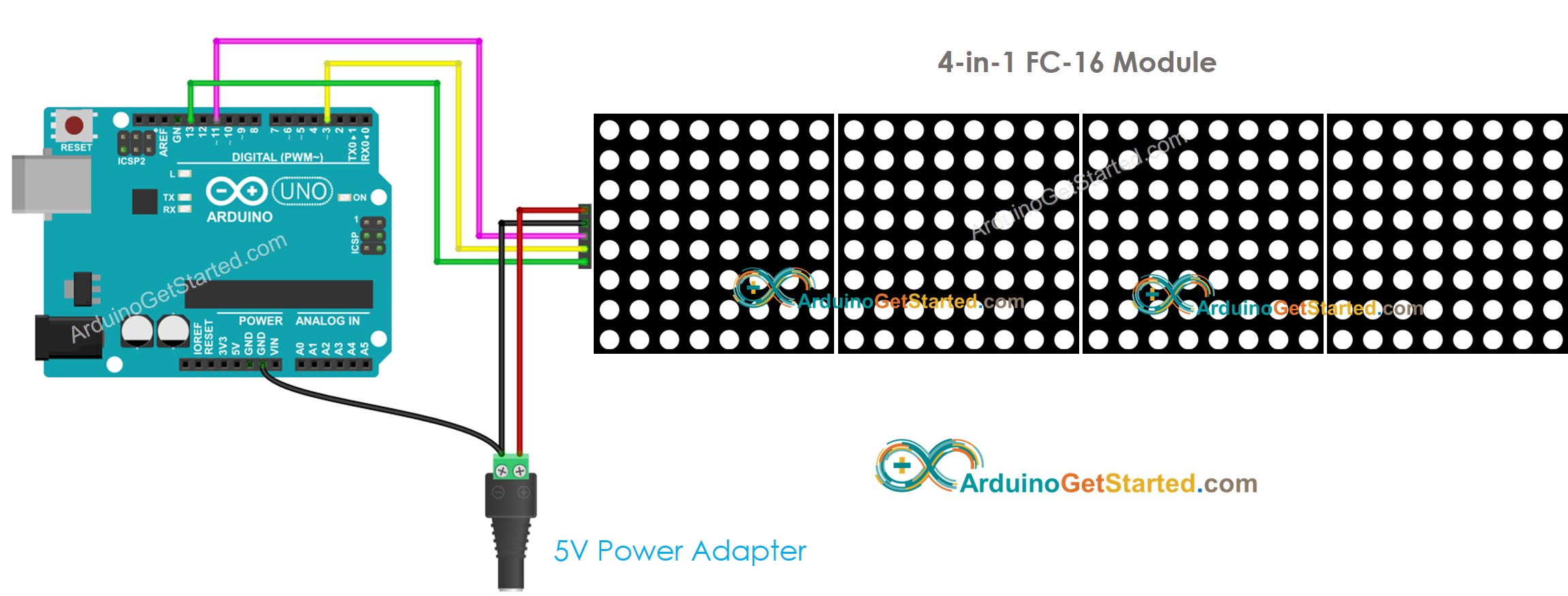
Diagrama de ligação do Arduino com display de matriz de LED

This image is created using Fritzing. Click to enlarge image

Se a matriz de LED for montada por você com vários blocos:

  • Conecte o grupo de pinos de entrada do primeiro bloco ao Arduino
  • Conecte o grupo de pinos de saída de cada bloco ao grupo de pinos de entrada do próximo bloco
  • Deixe o grupo de pinos de saída do último bloco desconectado
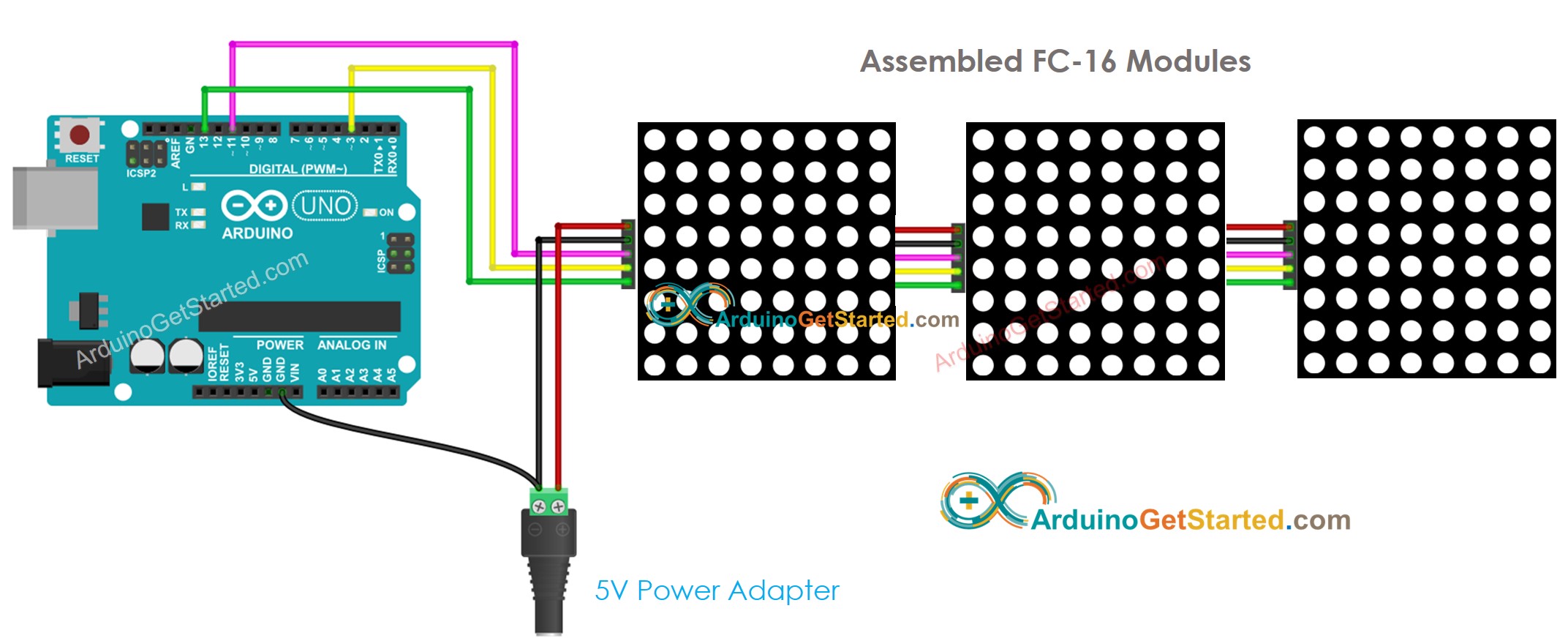
Diagrama de ligação do Arduino com matriz de LED 32x8 FC-16

This image is created using Fritzing. Click to enlarge image
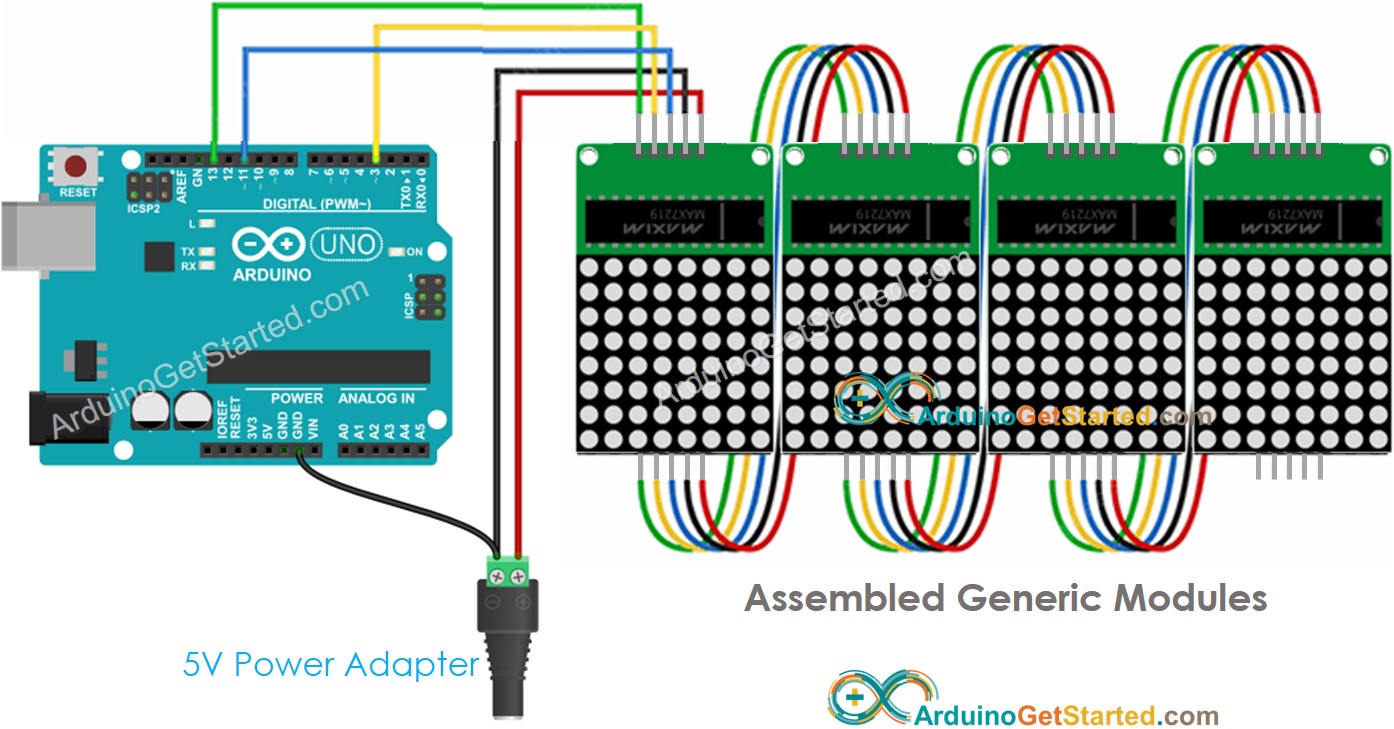
Diagrama de ligação do Arduino com matriz de LED 32x8 genérica

This image is created using Fritzing. Click to enlarge image

Como o display consome muita corrente (até 1A no brilho máximo):

  • Não use a alimentação do pino 5V do Arduino.
  • Use uma fonte de alimentação externa de 5V. O Arduino e a matriz de LED podem compartilhar a alimentação de uma fonte de alimentação de 5V

Como o Arduino se conecta à matriz de LED pelos pinos SPI:

  • Os pinos 13 (SCK) e 11 (MOSI) do Arduino Uno devem ser usados. Se você estiver usando outra placa Arduino, consulte a documentação oficial para encontrar os pinos SPI equivalentes.
  • O pino 3 (CS) pode ser trocado por qualquer pino

Como Programar a Matriz de LED

Não é fácil controlar a matriz de LED. Felizmente, existem bibliotecas que facilitam isso. Abaixo está um passo a passo de como escrever o código Arduino para controlar a matriz de LED

  • Inclua as bibliotecas:
#include <MD_Parola.h> #include <MD_MAX72xx.h>
  • Especifique qual hardware está sendo usado: GENERIC_HW ou FC16_HW.
#define HARDWARE_TYPE MD_MAX72XX::FC16_HW
  • Defina quantos blocos de LED são usados. Por exemplo, uma matriz de LED 4 em 1 tem 4 blocos.
#define MAX_DEVICES 4
  • Defina o pino que se conecta ao pino CS da matriz de LED. Por exemplo, o pino D3
#define CS_PIN 3
  • Crie uma nova instância da classe MD_Parola para o display de matriz de LED.
MD_Parola ledMatrix = MD_Parola(HARDWARE_TYPE, CS_PIN, MAX_DEVICES);
  • Código na função setup():
void setup() { ledMatrix.begin(); // initialize the object ledMatrix.setIntensity(0); // set the brightness of the LED matrix display (from 0 to 15) ledMatrix.displayClear(); // clear led matrix display }
  • Mostrar texto, números e efeitos animados: veja a próxima parte

Arduino - Código da Matriz de LED

O código abaixo é para o display de matriz de LED 32x8 FC-16 (4 blocos). Mas você pode adaptá-lo facilmente para 8x8, 16x8, 64x8...

/* * Este código de Arduino foi desenvolvido por pt.newbiely.com * Este código de Arduino é disponibilizado ao público sem nenhuma restrição. * Para tutoriais completos e diagramas de ligação, visite: * https://pt.newbiely.com/tutorials/arduino/arduino-led-matrix */ #include <MD_Parola.h> #include <MD_MAX72xx.h> #define HARDWARE_TYPE MD_MAX72XX::FC16_HW #define MAX_DEVICES 4 // 4 blocks #define CS_PIN 3 // create an instance of the MD_Parola class MD_Parola ledMatrix = MD_Parola(HARDWARE_TYPE, CS_PIN, MAX_DEVICES); void setup() { ledMatrix.begin(); // initialize the object ledMatrix.setIntensity(15); // set the brightness of the LED matrix display (from 0 to 15) ledMatrix.displayClear(); // clear LED matrix display } void loop() { ledMatrix.setTextAlignment(PA_LEFT); ledMatrix.print("Left"); // display text delay(2000); ledMatrix.setTextAlignment(PA_CENTER); ledMatrix.print("Center"); // display text delay(2000); ledMatrix.setTextAlignment(PA_RIGHT); ledMatrix.print("Right"); // display text delay(2000); ledMatrix.setTextAlignment(PA_CENTER); ledMatrix.setInvert(true); ledMatrix.print("Invert"); // display text inverted delay(2000); ledMatrix.setInvert(false); ledMatrix.print(1234); // display number delay(2000); }

Passos Rápidos

  • Conecte o Arduino à matriz de LED conforme o diagrama de ligação acima
  • Conecte o Arduino ao PC por meio do cabo USB
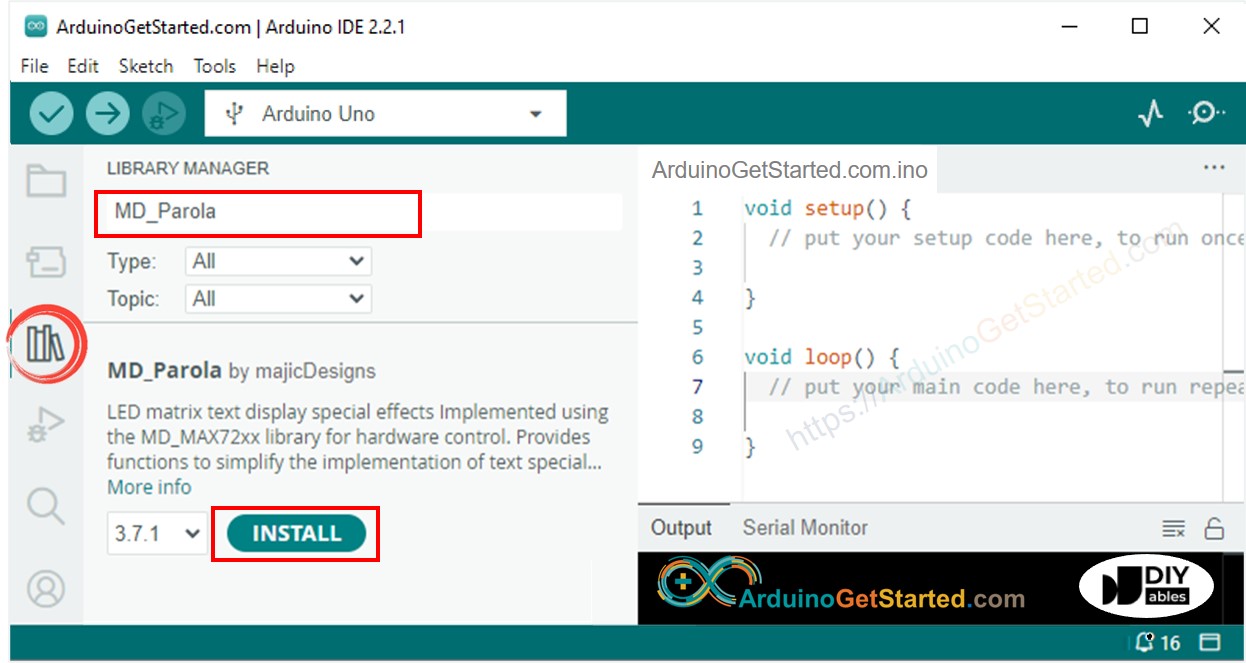
  • Vá até o ícone Libraries na barra esquerda do Arduino IDE.
  • Pesquise “MD_Parola” e encontre a biblioteca MD_Parola
  • Clique no botão Install.
Biblioteca MD_Parola para Arduino
  • Será pedido que você instale a biblioteca MD_MAX72XX como dependência. Clique no botão Install All.
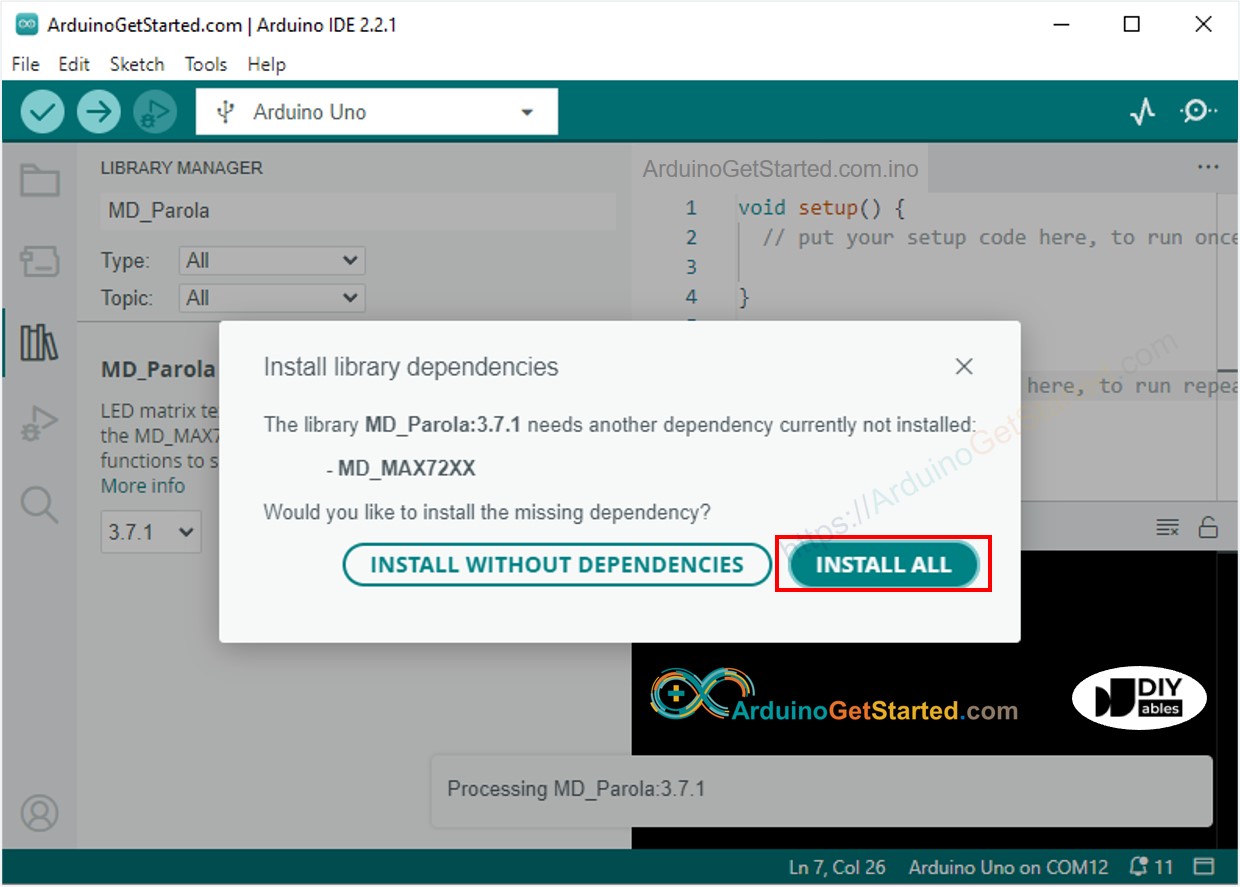
Biblioteca MD_MAX72XX para Arduino
  • Copie o código acima e abra-o com o Arduino IDE
  • Clique no botão Upload no Arduino IDE para carregar o código no Arduino
  • Veja o display de matriz de LED

Código Arduino para Matriz de LED – Texto Rolando

Quando você quer mostrar uma mensagem longa demais para caber no display de matriz de LED, você pode usar a técnica do efeito de texto rolando.

O código Arduino abaixo mostra como fazer uma mensagem rolar no display de matriz de LED.

/* * Este código de Arduino foi desenvolvido por pt.newbiely.com * Este código de Arduino é disponibilizado ao público sem nenhuma restrição. * Para tutoriais completos e diagramas de ligação, visite: * https://pt.newbiely.com/tutorials/arduino/arduino-led-matrix */ #include <MD_Parola.h> #include <MD_MAX72xx.h> #define HARDWARE_TYPE MD_MAX72XX::FC16_HW #define MAX_DEVICES 4 // 4 blocks #define CS_PIN 3 // create an instance of the MD_Parola class MD_Parola ledMatrix = MD_Parola(HARDWARE_TYPE, CS_PIN, MAX_DEVICES); void setup() { ledMatrix.begin(); // initialize the object ledMatrix.setIntensity(15); // set the brightness of the LED matrix display (from 0 to 15) ledMatrix.displayClear(); // clear led matrix display ledMatrix.displayScroll("Hello, DIYables", PA_CENTER, PA_SCROLL_LEFT, 100); } void loop() { if (ledMatrix.displayAnimate()) { ledMatrix.displayReset(); } }

Para mais efeitos de texto, visite a Referência da Biblioteca MD_Parola.

Vídeo

O vídeo de demonstração abaixo usa o seguinte código:

/* * Este código de Arduino foi desenvolvido por pt.newbiely.com * Este código de Arduino é disponibilizado ao público sem nenhuma restrição. * Para tutoriais completos e diagramas de ligação, visite: * https://pt.newbiely.com/tutorials/arduino/arduino-led-matrix */ #include <MD_MAX72xx.h> #include <SPI.h> // ============================================================ // MAX7219 // ============================================================ #define HARDWARE_TYPE MD_MAX72XX::FC16_HW #define MAX_DEVICES 4 #define CS_PIN 9 MD_MAX72XX mx = MD_MAX72XX(HARDWARE_TYPE, CS_PIN, MAX_DEVICES); // ============================================================ // BUTTONS // ============================================================ #define BTN_LEFT 2 #define BTN_RIGHT 3 #define BTN_ROTATE 4 #define BUZZER_PIN 6 // ============================================================ // GAME BOARD // ============================================================ #define BOARD_W 8 #define BOARD_H 32 bool board[BOARD_H][BOARD_W]; // ============================================================ // TIMING // ============================================================ unsigned long lastFallTime = 0; const unsigned long NORMAL_FALL = 700; const unsigned long SOFT_DROP_FALL = 80; #define LONG_PRESS_TIME 400 // ============================================================ // SCORE // ============================================================ unsigned long score = 0; unsigned int lines = 0; unsigned int level = 1; unsigned long highScore = 0; // ============================================================ // GAME STATE // ============================================================ bool gameOver = false; bool gameStarted = false; // ============================================================ // TETROMINO DEFINITIONS // ============================================================ struct Point { int x; int y; }; struct Tetromino { Point block[4]; uint8_t color; }; Tetromino pieces[7] = { // I { {{0,0}, {1,0}, {2,0}, {3,0}}, 0 }, // O { {{0,0}, {1,0}, {0,1}, {1,1}}, 1 }, // T { {{1,0}, {0,1}, {1,1}, {2,1}}, 2 }, // L { {{0,0}, {0,1}, {0,2}, {1,2}}, 3 }, // J { {{1,0}, {1,1}, {1,2}, {0,2}}, 4 }, // S { {{1,0}, {2,0}, {0,1}, {1,1}}, 5 }, // Z { {{0,0}, {1,0}, {1,1}, {2,1}}, 6 } }; // ============================================================ // CURRENT PIECE // ============================================================ int currentPiece; int currentX; int currentY; int rotationState = 0; // ============================================================ // BUTTON STATE // ============================================================ bool lastLeftState = HIGH; bool lastRightState = HIGH; bool lastRotateState = HIGH; unsigned long rotatePressTime = 0; bool softDrop = false; bool rotateHandled = false; // ============================================================ // DISPLAY COORDINATE MAPPING // ============================================================ void setPixel(int x, int y, bool state) { if (x < 0 || x >= BOARD_W || y < 0 || y >= BOARD_H) { return; } // Reverse vertical direction int physicalColumn = (BOARD_H - 1) - y; int physicalRow = x; mx.setPoint( physicalRow, physicalColumn, state ); } // ============================================================ // CLEAR DISPLAY // ============================================================ void clearDisplay() { mx.clear(); } // ============================================================ // DRAW BOARD // ============================================================ void drawBoard() { clearDisplay(); // Draw fixed blocks for (int y = 0; y < BOARD_H; y++) { for (int x = 0; x < BOARD_W; x++) { if (board[y][x]) { setPixel( x, y, true ); } } } // Draw falling piece drawCurrentPiece(); } // ============================================================ // GET ROTATED BLOCK POSITION // ============================================================ Point getRotatedPoint( Point p, int rotation ) { Point r; switch (rotation % 4) { case 0: r.x = p.x; r.y = p.y; break; case 1: r.x = -p.y; r.y = p.x; break; case 2: r.x = -p.x; r.y = -p.y; break; case 3: r.x = p.y; r.y = -p.x; break; } return r; } // ============================================================ // CHECK COLLISION // ============================================================ bool checkCollision( int pieceX, int pieceY, int rotation ) { for (int i = 0; i < 4; i++) { Point p = getRotatedPoint( pieces[currentPiece].block[i], rotation ); int x = pieceX + p.x; int y = pieceY + p.y; // Left / Right wall if (x < 0 || x >= BOARD_W) { return true; } // Bottom if (y >= BOARD_H) { return true; } // Existing block if (y >= 0 && board[y][x]) { return true; } } return false; } // ============================================================ // DRAW CURRENT PIECE // ============================================================ void drawCurrentPiece() { for (int i = 0; i < 4; i++) { Point p = getRotatedPoint( pieces[currentPiece].block[i], rotationState ); int x = currentX + p.x; int y = currentY + p.y; if (x >= 0 && x < BOARD_W && y >= 0 && y < BOARD_H) { setPixel( x, y, true ); } } } // ============================================================ // RANDOM PIECE // ============================================================ void spawnPiece() { currentPiece = random(0, 7); rotationState = 0; currentX = 3; currentY = 0; // I piece if (currentPiece == 0) { currentX = 2; } // Game over if piece cannot spawn if (checkCollision( currentX, currentY, rotationState)) { gameOver = true; if (score > highScore) { highScore = score; } soundGameOver(); } } // ============================================================ // LOCK PIECE // ============================================================ void lockPiece() { for (int i = 0; i < 4; i++) { Point p = getRotatedPoint( pieces[currentPiece].block[i], rotationState ); int x = currentX + p.x; int y = currentY + p.y; if (x >= 0 && x < BOARD_W && y >= 0 && y < BOARD_H) { board[y][x] = true; } } soundLock(); // Check completed lines clearLines(); // New piece spawnPiece(); lastFallTime = millis(); } // ============================================================ // CLEAR LINES // ============================================================ void clearLines() { int cleared = 0; for (int y = BOARD_H - 1; y >= 0; y--) { bool full = true; for (int x = 0; x < BOARD_W; x++) { if (!board[y][x]) { full = false; break; } } if (full) { cleared++; // Move rows down for (int yy = y; yy > 0; yy--) { for (int x = 0; x < BOARD_W; x++) { board[yy][x] = board[yy - 1][x]; } } // Clear top row for (int x = 0; x < BOARD_W; x++) { board[0][x] = false; } // Check same row again y++; } } // Scoring if (cleared > 0) { lines += cleared; switch (cleared) { case 1: score += 100 * level; break; case 2: score += 300 * level; break; case 3: score += 500 * level; break; case 4: score += 800 * level; break; } // Increase level every 10 lines level = (lines / 10) + 1; soundLineClear(cleared); } } // ============================================================ // MOVE LEFT // ============================================================ void moveLeft() { if (gameOver) { return; } if (!checkCollision( currentX - 1, currentY, rotationState)) { currentX--; drawBoard(); soundLeft(); } } // ============================================================ // MOVE RIGHT // ============================================================ void moveRight() { if (gameOver) { return; } if (!checkCollision( currentX + 1, currentY, rotationState)) { currentX++; drawBoard(); soundRight(); } } // ============================================================ // ROTATE // ============================================================ void rotatePiece() { if (gameOver) { return; } int newRotation = (rotationState + 1) % 4; // Normal rotation if (!checkCollision( currentX, currentY, newRotation)) { rotationState = newRotation; drawBoard(); return; } // Wall kick LEFT if (!checkCollision( currentX - 1, currentY, newRotation)) { currentX--; rotationState = newRotation; drawBoard(); return; } // Wall kick RIGHT if (!checkCollision( currentX + 1, currentY, newRotation)) { currentX++; rotationState = newRotation; drawBoard(); return; } } // ============================================================ // MOVE DOWN // ============================================================ bool moveDown() { if (gameOver) { return false; } if (!checkCollision( currentX, currentY + 1, rotationState)) { currentY++; return true; } // Cannot move further lockPiece(); return false; } // ============================================================ // SOFT DROP // ============================================================ void handleSoftDrop() { if (gameOver) { return; } static unsigned long lastSoftDrop = 0; if (millis() - lastSoftDrop >= SOFT_DROP_FALL) { lastSoftDrop = millis(); if (moveDown()) { score += 1; } drawBoard(); } } // ============================================================ // NORMAL FALL // ============================================================ void handleNormalFall() { if (gameOver) { return; } unsigned long fallSpeed; fallSpeed = NORMAL_FALL - ((level - 1) * 50); if (fallSpeed < 100) { fallSpeed = 100; } if (millis() - lastFallTime >= fallSpeed) { lastFallTime = millis(); moveDown(); drawBoard(); } } // ============================================================ // BUTTON HANDLING // ============================================================ void handleButtons() { bool leftState = digitalRead(BTN_LEFT); bool rightState = digitalRead(BTN_RIGHT); bool rotateState = digitalRead(BTN_ROTATE); // ========================================================== // LEFT // ========================================================== if (leftState == LOW && lastLeftState == HIGH) { moveLeft(); } // ========================================================== // RIGHT // ========================================================== if (rightState == LOW && lastRightState == HIGH) { moveRight(); } // ========================================================== // ROTATE BUTTON PRESSED // ========================================================== if (rotateState == LOW && lastRotateState == HIGH) { rotatePressTime = millis(); rotateHandled = false; } // ========================================================== // ROTATE BUTTON HELD // ========================================================== if (rotateState == LOW) { if (!rotateHandled && millis() - rotatePressTime >= LONG_PRESS_TIME) { rotateHandled = true; softDrop = true; } } // ========================================================== // ROTATE BUTTON RELEASED // ========================================================== if (rotateState == HIGH && lastRotateState == LOW) { unsigned long pressDuration = millis() - rotatePressTime; // Short press = ROTATE if (pressDuration < LONG_PRESS_TIME && !rotateHandled) { rotatePiece(); soundRotate(); } // Stop soft drop softDrop = false; } lastLeftState = leftState; lastRightState = rightState; lastRotateState = rotateState; } // ============================================================ // START MUSIC // ============================================================ // // Arcade-style startup melody. // // Không dùng tone liên tục. // Mỗi nốt kết thúc trước khi nốt tiếp theo bắt đầu. // ============================================================ void playStartMusic() { clearDisplay(); // ---------------------------------------------------------- // Intro LED sweep // ---------------------------------------------------------- for (int y = 0; y < BOARD_H; y++) { for (int x = 0; x < BOARD_W; x++) { setPixel( x, y, true ); } // Melody notes during sweep if (y == 0) { tone(BUZZER_PIN, 523, 100); } if (y == 4) { tone(BUZZER_PIN, 659, 100); } if (y == 8) { tone(BUZZER_PIN, 784, 100); } if (y == 12) { tone(BUZZER_PIN, 1047, 150); } if (y == 18) { tone(BUZZER_PIN, 784, 100); } if (y == 22) { tone(BUZZER_PIN, 1047, 100); } if (y == 26) { tone(BUZZER_PIN, 1319, 180); } delay(18); } delay(100); clearDisplay(); // ---------------------------------------------------------- // READY melody // ---------------------------------------------------------- tone(BUZZER_PIN, 784, 120); delay(150); tone(BUZZER_PIN, 988, 120); delay(150); tone(BUZZER_PIN, 1175, 120); delay(150); tone(BUZZER_PIN, 1568, 250); delay(300); clearDisplay(); noTone(BUZZER_PIN); } // ============================================================ // LEFT SOUND // ============================================================ void soundLeft() { tone( BUZZER_PIN, 650, 70 ); } // ============================================================ // RIGHT SOUND // ============================================================ void soundRight() { tone( BUZZER_PIN, 850, 70 ); } // ============================================================ // ROTATE SOUND // ============================================================ void soundLock() { tone(BUZZER_PIN, 450, 120); delay(130); tone(BUZZER_PIN, 300, 100); } // ============================================================ // ROTATE SOUND // ============================================================ void soundRotate() { tone( BUZZER_PIN, 1200, 100 ); } // ============================================================ // LINE CLEAR SOUND // ============================================================ void soundLineClear(int count) { if (count == 1) { tone( BUZZER_PIN, 1000, 120 ); delay(150); tone( BUZZER_PIN, 1400, 160 ); } else if (count == 2) { tone( BUZZER_PIN, 1000, 100 ); delay(120); tone( BUZZER_PIN, 1300, 100 ); delay(120); tone( BUZZER_PIN, 1700, 180 ); } else { tone( BUZZER_PIN, 1200, 100 ); delay(120); tone( BUZZER_PIN, 1500, 100 ); delay(120); tone( BUZZER_PIN, 1800, 100 ); delay(120); tone( BUZZER_PIN, 2200, 250 ); } } // ============================================================ // GAME OVER SOUND // ============================================================ void soundGameOver() { tone( BUZZER_PIN, 700, 180 ); delay(210); tone( BUZZER_PIN, 500, 180 ); delay(210); tone( BUZZER_PIN, 350, 220 ); delay(250); tone( BUZZER_PIN, 220, 450 ); delay(500); noTone(BUZZER_PIN); } // ============================================================ // GAME OVER ANIMATION // ============================================================ void gameOverAnimation() { for (int i = 0; i < 4; i++) { drawBoard(); delay(250); clearDisplay(); delay(250); } } // ============================================================ // RESET GAME // ============================================================ void resetGame() { for (int y = 0; y < BOARD_H; y++) { for (int x = 0; x < BOARD_W; x++) { board[y][x] = false; } } score = 0; lines = 0; level = 1; gameOver = false; spawnPiece(); lastFallTime = millis(); drawBoard(); } // ============================================================ // SETUP // ============================================================ void setup() { Serial.begin(115200); // Buttons pinMode( BTN_LEFT, INPUT_PULLUP ); pinMode( BTN_RIGHT, INPUT_PULLUP ); pinMode( BTN_ROTATE, INPUT_PULLUP ); // Buzzer pinMode( BUZZER_PIN, OUTPUT ); // MAX7219 mx.begin(); mx.control( MD_MAX72XX::INTENSITY, 5 ); mx.control( MD_MAX72XX::UPDATE, true ); mx.clear(); // Random seed randomSeed( analogRead(A0) ); // ========================================================== // START MUSIC // ========================================================== playStartMusic(); // ========================================================== // START GAME // ========================================================== resetGame(); gameStarted = true; } // ============================================================ // MAIN LOOP // ============================================================ void loop() { if (!gameStarted) { return; } // ========================================================== // GAME OVER // ========================================================== if (gameOver) { gameOverAnimation(); delay(500); // Restart resetGame(); return; } // ========================================================== // INPUT // ========================================================== handleButtons(); // ========================================================== // SOFT DROP // ========================================================== if (softDrop) { handleSoftDrop(); } else { handleNormalFall(); } }

※ NOSSAS MENSAGENS

  • Fique à vontade para compartilhar o link deste tutorial. Porém, por favor, não use nosso conteúdo em outros sites. Investimos muito esforço e tempo para criar este conteúdo, por favor respeite nosso trabalho!