
Arduino - MP3 Player

Neste tutorial, vamos aprender a fazer um MP3 player usando Arduino, módulo MP3 player, Cartão Micro SD e alto-falante. Os arquivos MP3 (músicas ou áudios gravados) ficam armazenados no Cartão Micro SD. Então, o Arduino pode controlar o módulo MP3 player para ler uma música selecionada do Cartão SD, convertê-la em sinal de áudio e enviar o sinal para o alto-falante. Em detalhes, vamos aprender:

Depois, você pode modificar o código para adicionar um potenciômetro ou um encoder rotativo para alterar o volume.

Sobre o Módulo Serial MP3 Player e o Alto-falante

Pinagem do Módulo Serial MP3 Player

Um módulo serial MP3 player tem três interfaces:

  • A interface com o Arduino inclui 4 pinos:
    • Pino RX: pino de dados, precisa ser conectado a um pino TX do Arduino (Serial por Hardware ou por Software)
    • Pino TX: pino de dados, precisa ser conectado a um pino RX do Arduino (Serial por Hardware ou por Software)
    • Pino VCC: pino de alimentação, precisa ser conectado ao VCC (5V)
    • Pino GND: pino de alimentação, precisa ser conectado ao GND (0V)
  • A interface com o alto-falante é um conector fêmea de saída Aux de 3,5 mm.
  • A interface com o Cartão Micro SD é um soquete de Cartão Micro SD na parte de trás do módulo.
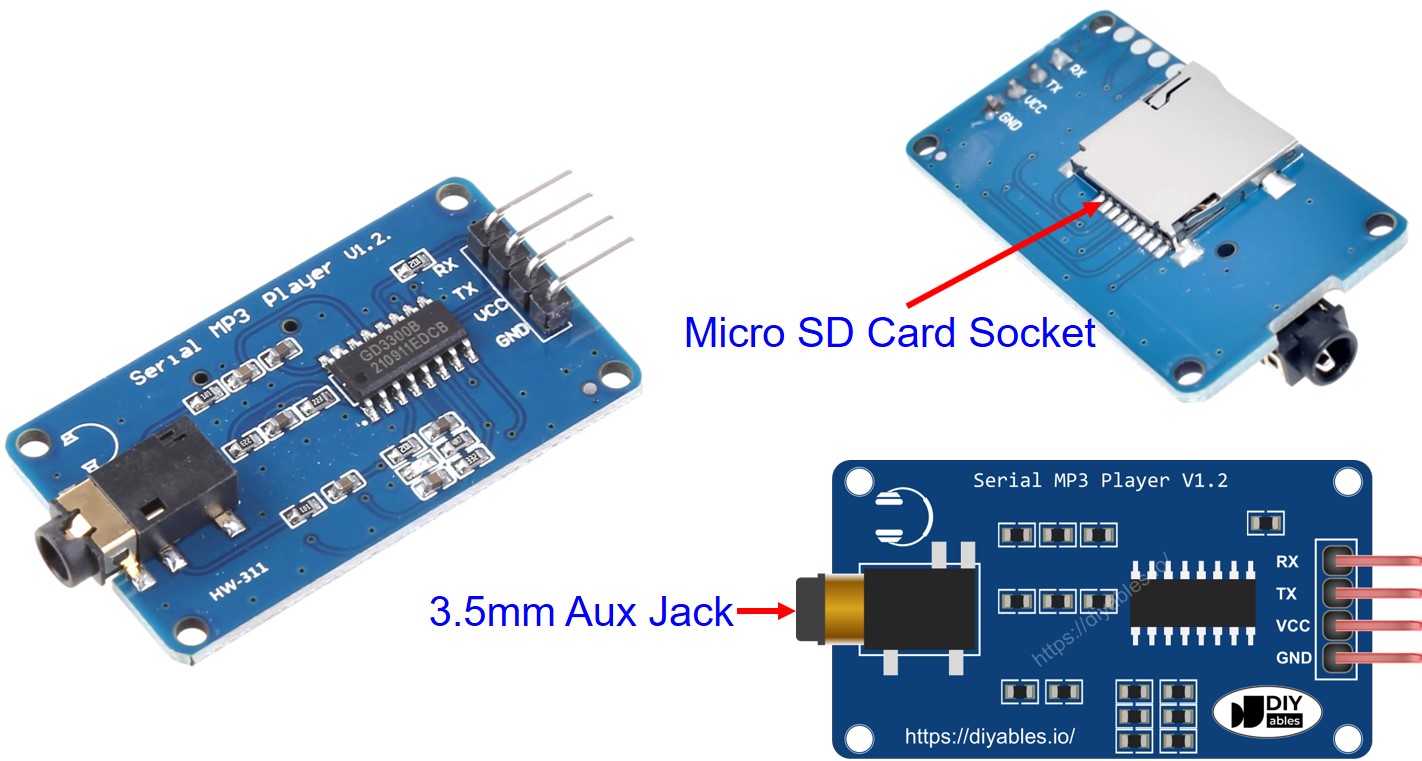
Pinagem do Módulo Serial MP3 Player
image source: diyables.io

Pinagem do Alto-falante

Um alto-falante geralmente tem duas interfaces:

  • Interface de sinal de áudio: é um conector macho Aux de 3,5 mm que se conecta ao módulo MP3 player
  • Interface de alimentação: pode ser USB, fonte de alimentação de 5V ou qualquer outra interface de alimentação

Como Funciona

O que precisamos preparar:

  • Armazenar previamente no Cartão Micro SD uma lista de músicas ou áudios gravados que queremos tocar.
  • Inserir o Cartão Micro SD no módulo MP3 player
  • Conectar o módulo MP3 player ao Arduino
  • Conectar o alto-falante ao módulo MP3 player
  • Conectar o alto-falante a uma fonte de energia.

Cada arquivo MP3 armazenado no Cartão Micro SD terá um índice. O índice é a ordem em que a música foi armazenada, começando em 0.

Depois, podemos programar o Arduino para enviar comandos ao módulo MP3 player. Ele suporta os seguintes comandos:

  • Tocar
  • Pausar
  • Tocar a próxima
  • Tocar a anterior
  • Alterar o volume

Quando o módulo MP3 player recebe o comando, ele lê o arquivo MP3 do Cartão Micro SD, converte o arquivo MP3 em sinal de áudio e envia o sinal de áudio para o alto-falante pela interface Aux de 3,5 mm.

Diagrama de Ligação
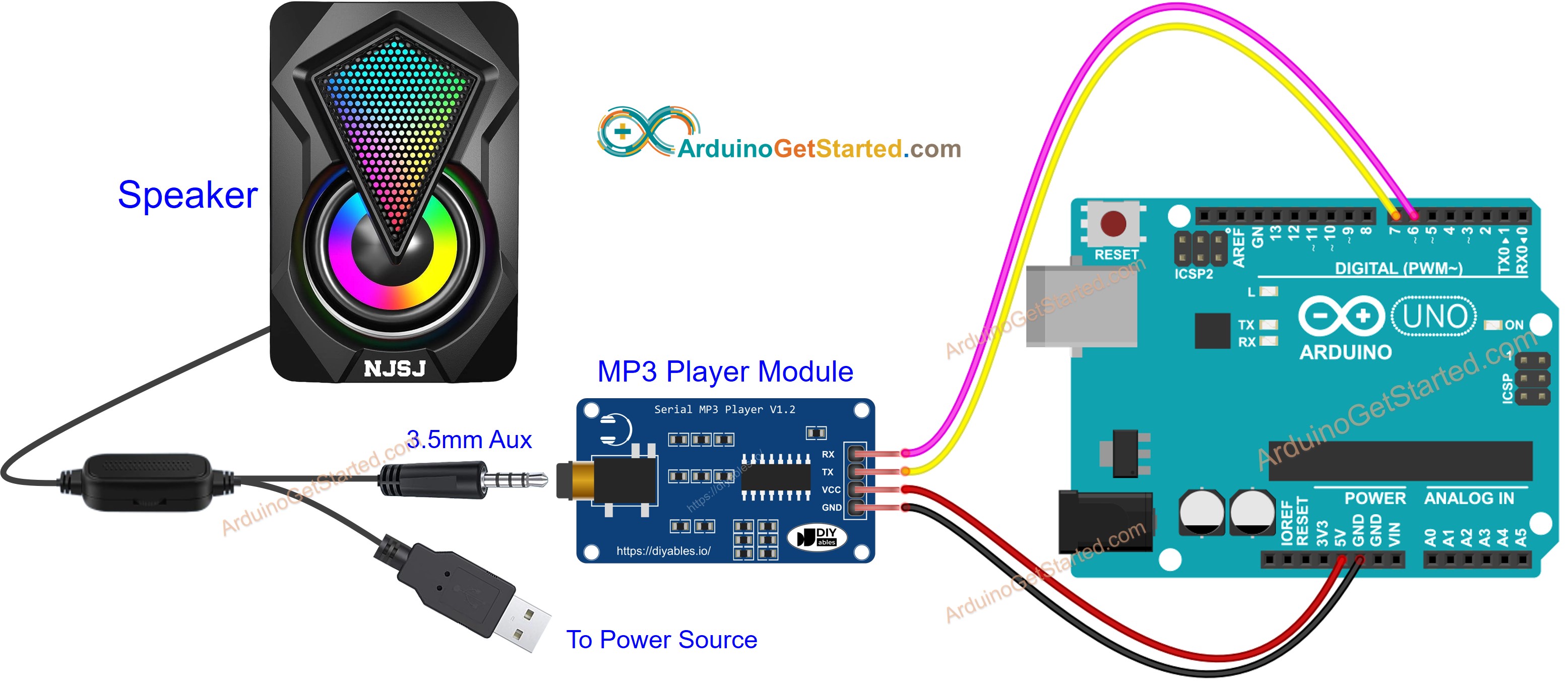
Diagrama de Ligação do módulo MP3 player com Arduino

This image is created using Fritzing. Click to enlarge image

Código Arduino - Tocar Música

O código abaixo toca a primeira música armazenada no Cartão Micro SD.

/* * Este código de Arduino foi desenvolvido por pt.newbiely.com * Este código de Arduino é disponibilizado ao público sem nenhuma restrição. * Para tutoriais completos e diagramas de ligação, visite: * https://pt.newbiely.com/tutorials/arduino/arduino-mp3-player */ #include <SoftwareSerial.h> #define CMD_PLAY_NEXT 0x01 #define CMD_PLAY_PREV 0x02 #define CMD_PLAY_W_INDEX 0x03 #define CMD_SET_VOLUME 0x06 #define CMD_SEL_DEV 0x09 #define CMD_PLAY_W_VOL 0x22 #define CMD_PLAY 0x0D #define CMD_PAUSE 0x0E #define CMD_SINGLE_CYCLE 0x19 #define DEV_TF 0x02 #define SINGLE_CYCLE_ON 0x00 #define SINGLE_CYCLE_OFF 0x01 #define ARDUINO_RX 7 // Arduino Pin connected to the TX of the Serial MP3 Player module #define ARDUINO_TX 6 // Arduino Pin connected to the RX of the Serial MP3 Player module SoftwareSerial mp3(ARDUINO_RX, ARDUINO_TX); void setup() { Serial.begin(9600); mp3.begin(9600); delay(500); // wait chip initialization is complete mp3_command(CMD_SEL_DEV, DEV_TF); // select the TF card delay(200); // wait for 200ms mp3_command(CMD_PLAY, 0x0000); // Play mp3 //mp3_command(CMD_PAUSE, 0x0000); // Pause mp3 //mp3_command(CMD_PLAY_NEXT, 0x0000); // Play next mp3 //mp3_command(CMD_PLAY_PREV, 0x0000); // Play previous mp3 //mp3_command(CMD_SET_VOLUME, 30); // Change volume to 30 } void loop() { } void mp3_command(int8_t command, int16_t dat) { int8_t frame[8] = { 0 }; frame[0] = 0x7e; // starting byte frame[1] = 0xff; // version frame[2] = 0x06; // the number of bytes of the command without starting byte and ending byte frame[3] = command; // frame[4] = 0x00; // 0x00 = no feedback, 0x01 = feedback frame[5] = (int8_t)(dat >> 8); // data high byte frame[6] = (int8_t)(dat); // data low byte frame[7] = 0xef; // ending byte for (uint8_t i = 0; i < 8; i++) { mp3.write(frame[i]); } }

Passos Rápidos

  • Siga as instruções da seção Como Funciona
  • Copie o código acima e abra com a Arduino IDE
  • Clique no botão Upload na Arduino IDE para carregar o código no Arduino
  • Aproveite a música

Código Arduino - Tocar Música com Botões de Controle

O código abaixo é uma melhoria do código anterior. Ele adiciona quatro botões para você interagir com o MP3 player.

/* * Este código de Arduino foi desenvolvido por pt.newbiely.com * Este código de Arduino é disponibilizado ao público sem nenhuma restrição. * Para tutoriais completos e diagramas de ligação, visite: * https://pt.newbiely.com/tutorials/arduino/arduino-mp3-player */ #include <SoftwareSerial.h> #include <ezButton.h> #define CMD_PLAY_NEXT 0x01 #define CMD_PLAY_PREV 0x02 #define CMD_PLAY_W_INDEX 0x03 #define CMD_SET_VOLUME 0x06 #define CMD_SEL_DEV 0x09 #define CMD_PLAY_W_VOL 0x22 #define CMD_PLAY 0x0D #define CMD_PAUSE 0x0E #define CMD_SINGLE_CYCLE 0x19 #define DEV_TF 0x02 #define SINGLE_CYCLE_ON 0x00 #define SINGLE_CYCLE_OFF 0x01 #define ARDUINO_RX 7 // Arduino Pin connected to the TX of the Serial MP3 Player module #define ARDUINO_TX 6 // Arduino Pin connected to the RX of the Serial MP3 Player module SoftwareSerial mp3(ARDUINO_RX, ARDUINO_TX); ezButton button_play(2); // create ezButton object that attach to pin 2 ezButton button_pause(3); // create ezButton object that attach to pin 3 ezButton button_next(4); // create ezButton object that attach to pin 4 ezButton button_prev(5); // create ezButton object that attach to pin 5 void setup() { Serial.begin(9600); mp3.begin(9600); delay(500); // wait chip initialization is complete mp3_command(CMD_SEL_DEV, DEV_TF); // select the TF card delay(200); // wait for 200ms button_play.setDebounceTime(50); // set debounce time to 50 milliseconds button_pause.setDebounceTime(50); // set debounce time to 50 milliseconds button_next.setDebounceTime(50); // set debounce time to 50 milliseconds button_prev.setDebounceTime(50); // set debounce time to 50 milliseconds } void loop() { button_play.loop(); // MUST call the loop() function first button_pause.loop(); // MUST call the loop() function first button_next.loop(); // MUST call the loop() function first button_prev.loop(); // MUST call the loop() function first if (button_play.isPressed()) { Serial.println("Play mp3"); mp3_command(CMD_PLAY, 0x0000); } if (button_pause.isPressed()) { Serial.println("Pause mp3"); mp3_command(CMD_PAUSE, 0x0000); } if (button_next.isPressed()) { Serial.println("Play next mp3"); mp3_command(CMD_PLAY_NEXT, 0x0000); } if (button_prev.isPressed()) { Serial.println("Play previous mp3"); mp3_command(CMD_PLAY_PREV, 0x0000); } } void mp3_command(int8_t command, int16_t dat) { int8_t frame[8] = { 0 }; frame[0] = 0x7e; // starting byte frame[1] = 0xff; // version frame[2] = 0x06; // the number of bytes of the command without starting byte and ending byte frame[3] = command; // frame[4] = 0x00; // 0x00 = no feedback, 0x01 = feedback frame[5] = (int8_t)(dat >> 8); // data high byte frame[6] = (int8_t)(dat); // data low byte frame[7] = 0xef; // ending byte for (uint8_t i = 0; i < 8; i++) { mp3.write(frame[i]); } }

O diagrama de ligação para o código acima:
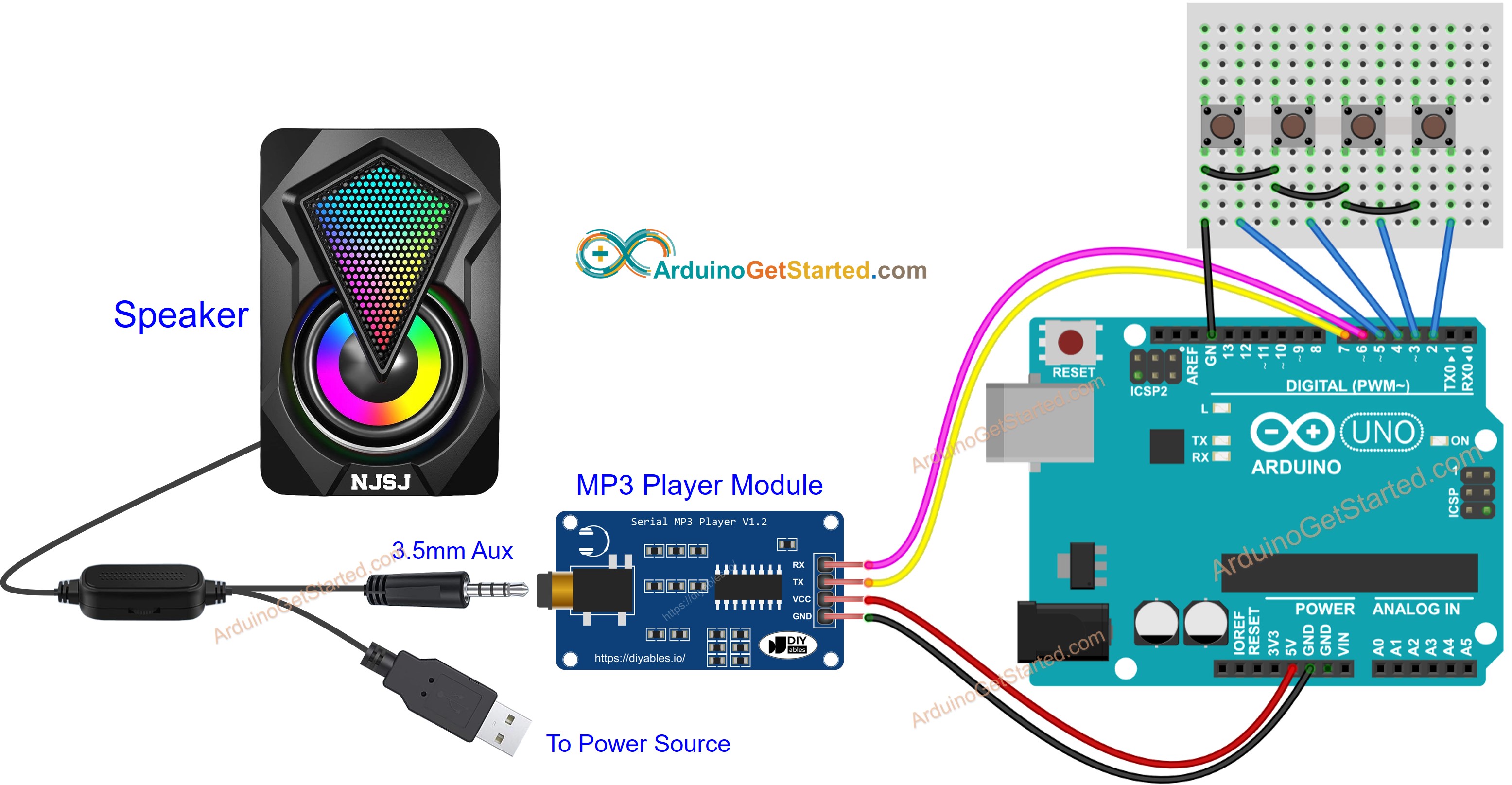
Diagrama de Ligação do MP3 player e alto-falante com Arduino

This image is created using Fritzing. Click to enlarge image

Agora, você pode modificar o projeto para adicionar mais funções, por exemplo:

Vídeo

Referências de Funções

※ NOSSAS MENSAGENS

  • Fique à vontade para compartilhar o link deste tutorial. Porém, por favor, não use nosso conteúdo em outros sites. Investimos muito esforço e tempo para criar este conteúdo, por favor respeite nosso trabalho!