Arduino UNO R4 - Módulo de Display TFT LCD Redondo Circular de 1,28 Polegada

Pronto para dar vida ao seu projeto com Arduino UNO R4 com imagens dinâmicas? Neste tutorial, vamos mostrar como usar um Arduino UNO R4 com um Módulo de Display TFT LCD Redondo Circular de 1,28 Polegada com driver GC9A01 para criar displays visuais envolventes. Este TFT redondo é ideal para smartwatches, medidores e interfaces compactas.

Você vai aprender a:

Display TFT LCD Redondo Circular de 1,28 Polegada com Arduino UNO R4

Para facilitar o aprendizado, incluímos sketches de exemplo para o Arduino UNO R4:

Sobre o Módulo de Display TFT LCD Redondo Circular de 1,28 Polegada

O Módulo de Display TFT LCD redondo de 1,28 polegada é compacto, colorido e projetado para saída visual dinâmica em aplicações circulares. Ele é alimentado pelo driver GC9A01 e funciona perfeitamente com a biblioteca DIYables_TFT_Round no Arduino UNO R4.

  • Display: TFT LCD IPS de 1,28 polegada, em formato circular
  • Resolução: 240x240 pixels (grade quadrada, área de display redonda)
  • CI Driver: GC9A01
  • Interface: SPI de 4 fios para comunicação em alta velocidade
  • Cores: 65K RGB (formato RGB565)
  • Aplicações: Smartwatches, relógios, medidores, interfaces de usuário personalizadas
  • Biblioteca: Suporta a biblioteca DIYables_TFT_Round para exibir texto, imagens e gráficos com o Arduino UNO R4

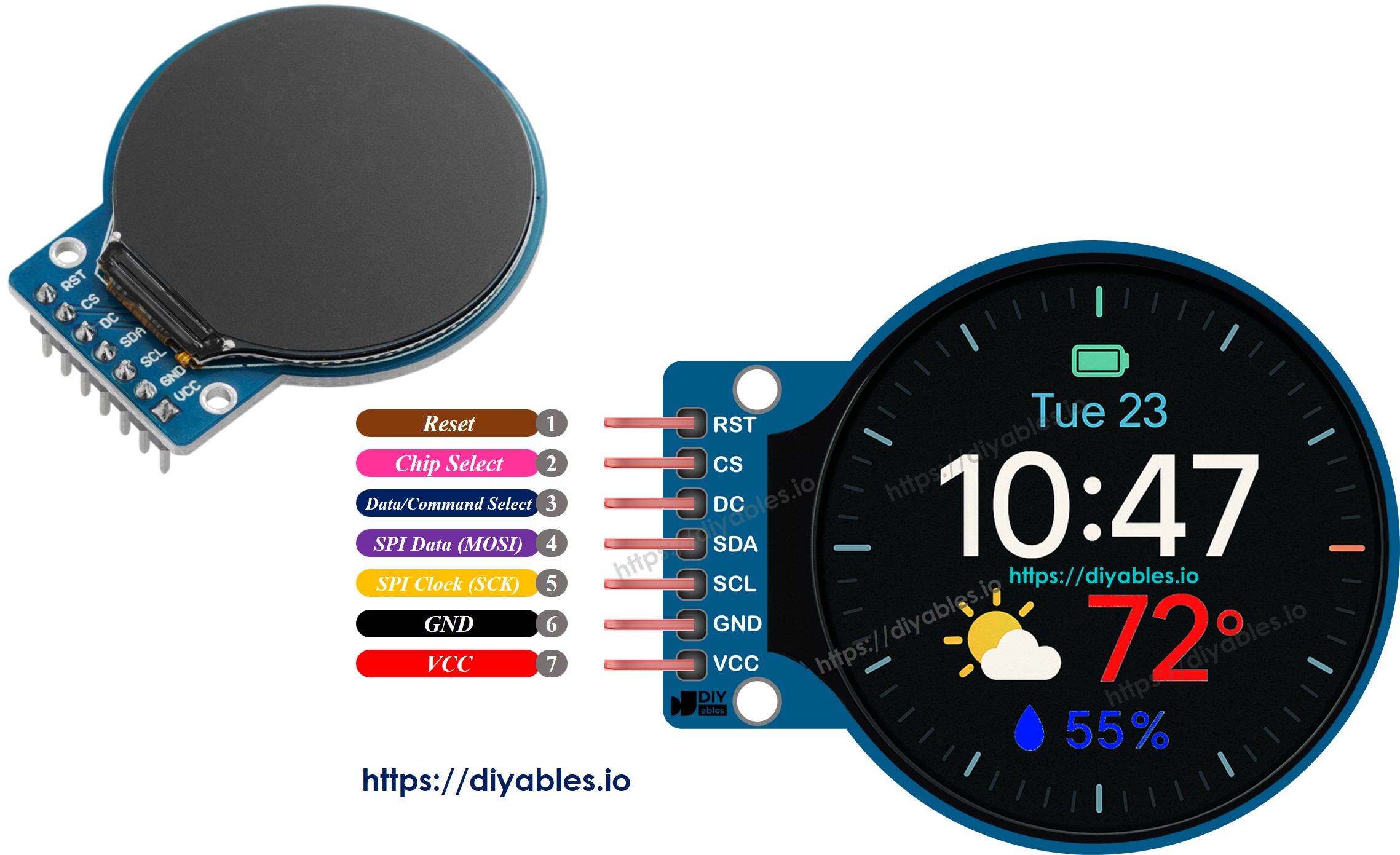
Pinagem

O módulo de display TFT LCD redondo de 1,28 polegada com driver GC9A01 tem sete pinos:

  • VCC: Conecte à alimentação de 3,3V ou 5V
  • GND: Conecte ao GND (0V)
  • CS: Pino Chip Select para ativar o display
  • DC: Seletor de Dados/Comando (LOW = comando, HIGH = dados)
  • SDA: Linha de dados SPI (MOSI)
  • SCL: Linha de clock SPI
  • RST: Reinicia o módulo de display
Pinagem do TFT LCD Redondo Circular de 1,28 Polegada

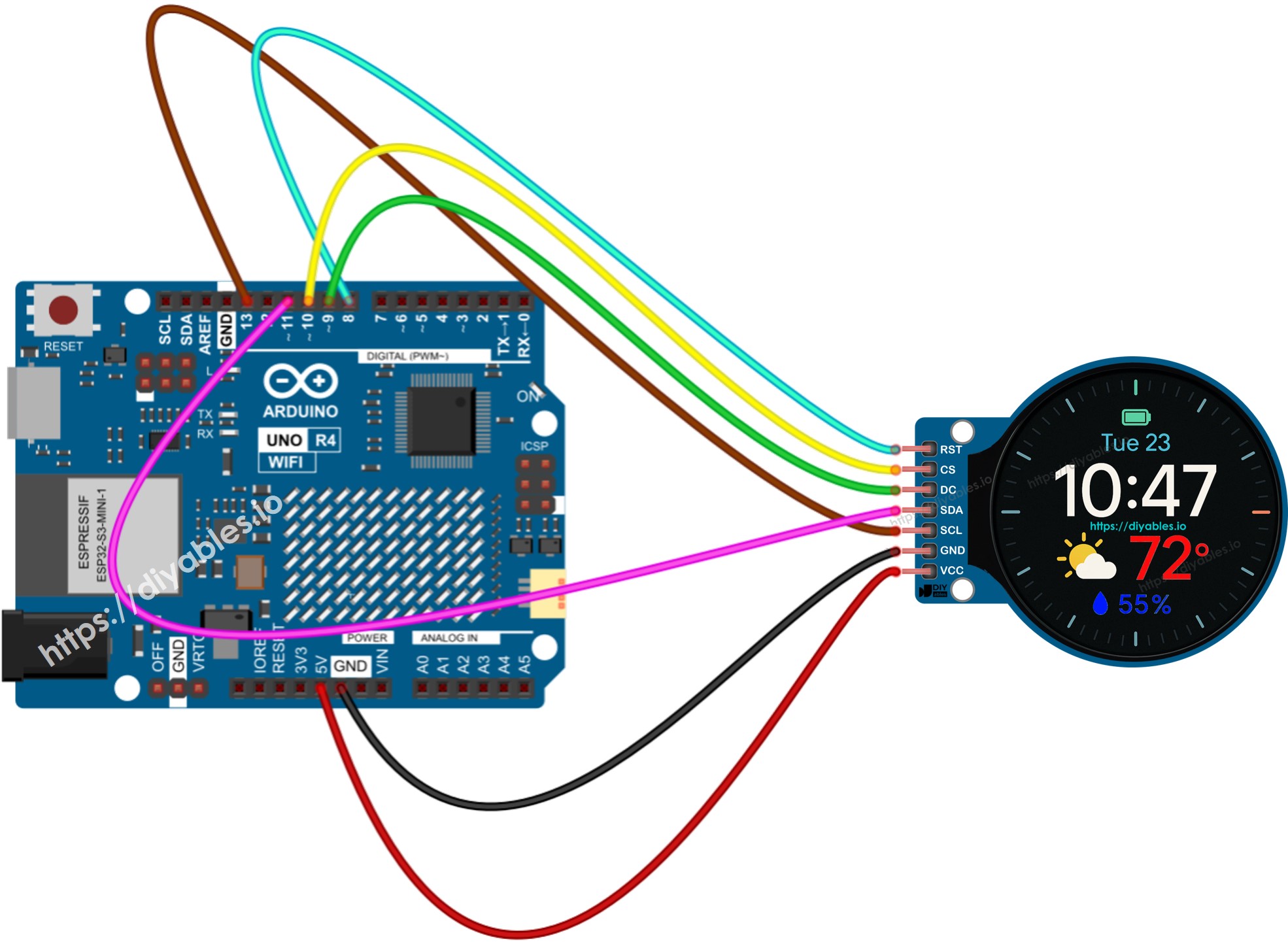
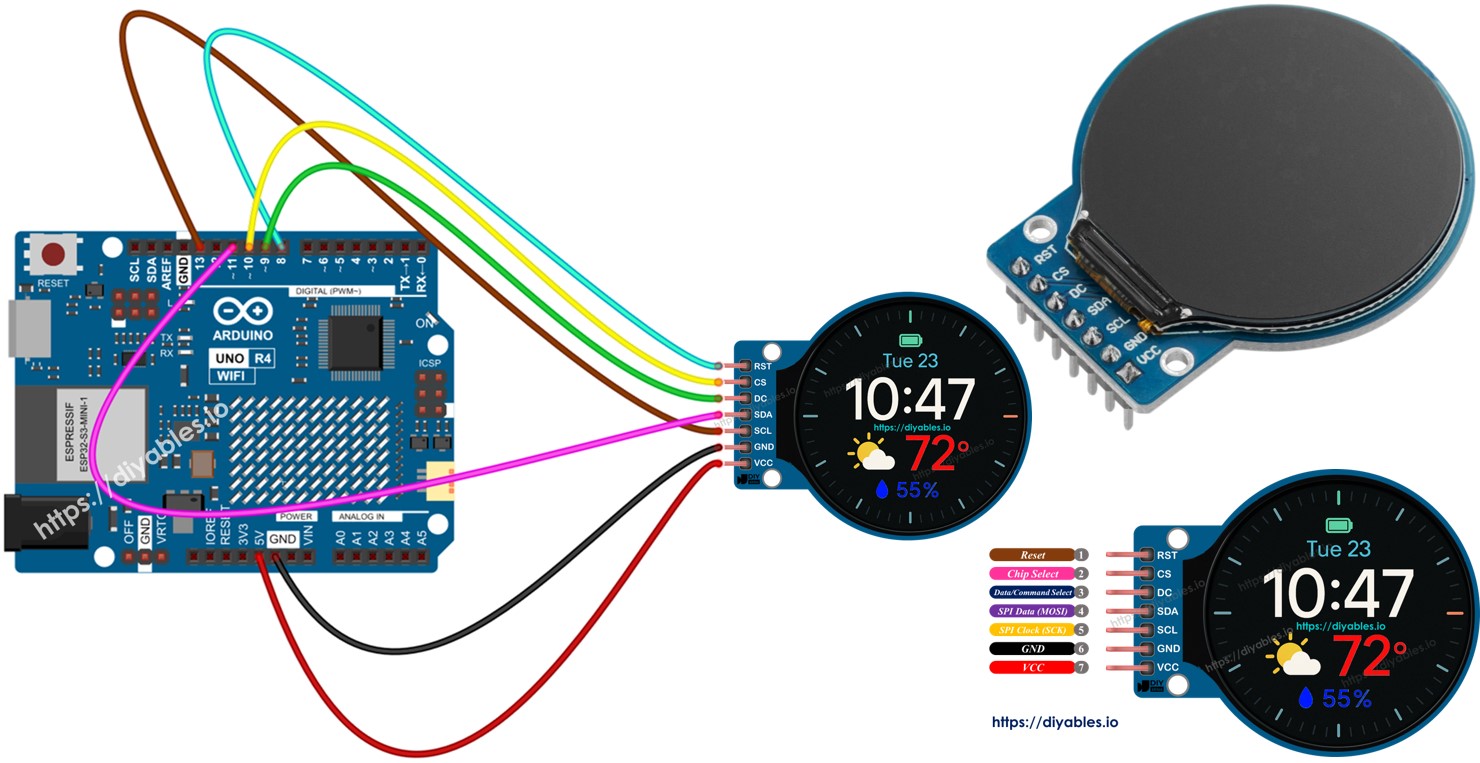
Diagrama de Ligação

O diagrama de ligação a seguir mostra como conectar o Módulo de Display TFT LCD Redondo de 1,28 Polegada a um Arduino UNO R4.

Diagrama de ligação do Display TFT LCD Redondo Circular de 1,28 Polegada com Arduino UNO R4

This image is created using Fritzing. Click to enlarge image

Veja A melhor forma de alimentar o Arduino Uno R4 e outros componentes.

Pino do TFT LCD Arduino UNO R4 Descrição
VCC 5V Alimentação (3,3V ou 5V)
GND GND Terra
SCL D13 Clock SPI
SDA D11 MOSI SPI
DC D9 Dados/Comando
CS D10 Chip Select
RST D8 Reset (opcional)

Código Arduino UNO R4

Os sketches de exemplo do Arduino UNO R4 a seguir estão incluídos neste tutorial para demonstrar os principais recursos do Módulo de Display TFT LCD Redondo de 1,28 Polegada. Cada um vem com o código completo e instruções passo a passo:

  • DrawImage.ino – Exibe uma imagem bitmap da memória flash do Arduino UNO R4.
  • DrawImageSDcard.ino – Carrega e exibe uma imagem de um cartão SD.
  • DrawShapes.ino – Usa código do Arduino UNO R4 para desenhar formas geométricas.
  • ShowTextAndNumber.ino – Exibe texto e números com estilos diferentes.
  • UseExternalFont.ino – Renderiza fontes externas para texto avançado.
  • ClockWatch.ino – Desenha um relógio analógico e digital com atualizações suaves.

Vamos explorar um por um!

Código Arduino UNO R4 - Exibir Texto, Números Inteiros e Float no Display TFT LCD Redondo de 1,28 Polegada

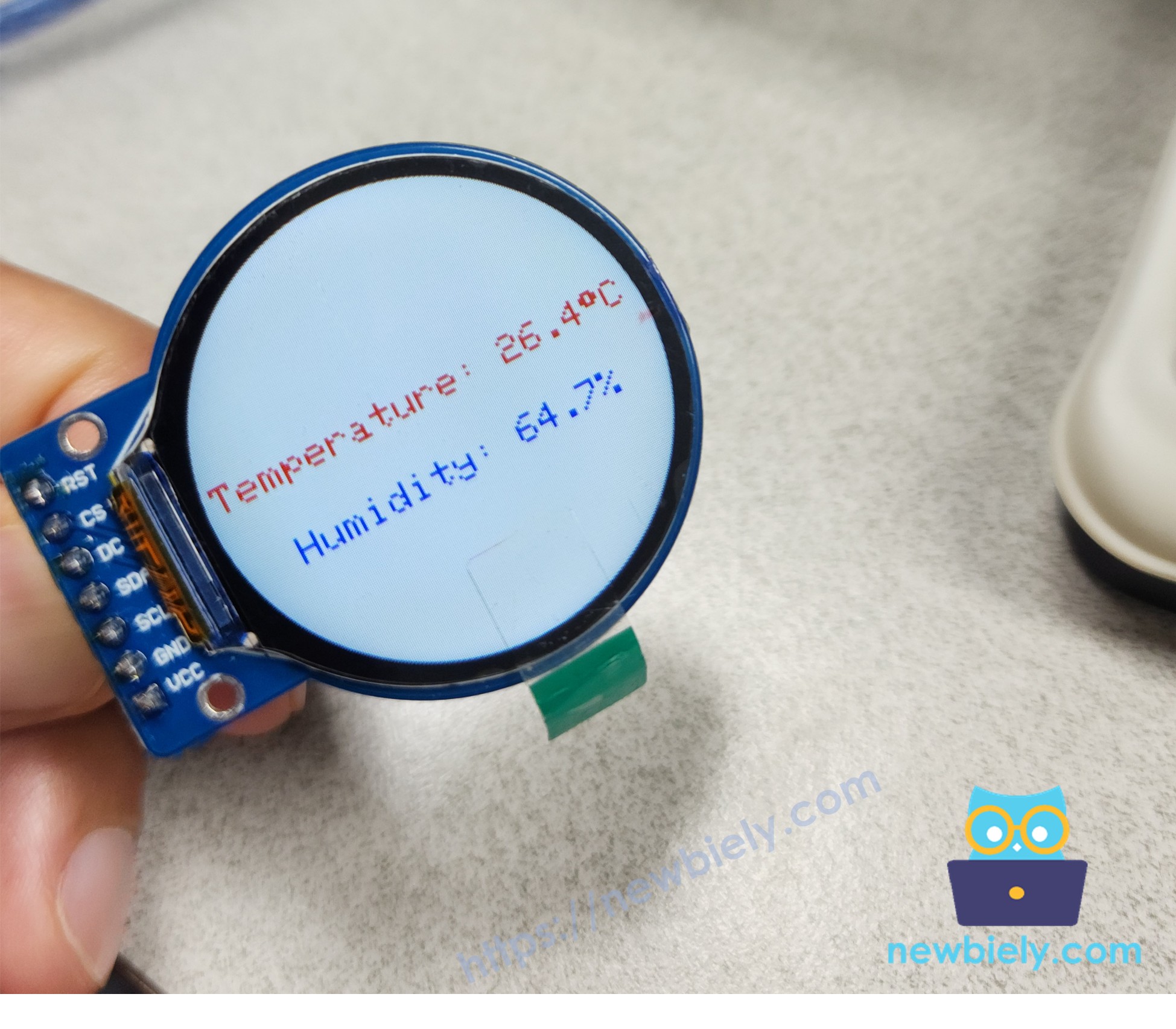
Este exemplo ilustra o procedimento para renderizar texto e dados numéricos no módulo de display TFT LCD circular de 1,28 polegada por meio da biblioteca DIYables_TFT_Round.

/* * Este código de Arduino UNO R4 foi desenvolvido por pt.newbiely.com * Este código de Arduino UNO R4 é disponibilizado ao público sem nenhuma restrição. * Para tutoriais completos e diagramas de ligação, visite: * https://pt.newbiely.com/tutorials/arduino-uno-r4/arduino-uno-r4-round-circular-tft-lcd-display */ #include <DIYables_TFT_Round.h> #define RED DIYables_TFT::colorRGB(255, 0, 0) #define BLUE DIYables_TFT::colorRGB(0, 0, 255) #define WHITE DIYables_TFT::colorRGB(255, 255, 255) #define PIN_RST 8 // The Arduino Uno R4 pin connected to the RST pin of the circular TFT display #define PIN_DC 9 // The Arduino Uno R4 pin connected to the DC pin of the circular TFT display #define PIN_CS 10 // The Arduino Uno R4 pin connected to the CS pin of the circular TFT display DIYables_TFT_GC9A01_Round TFT_display(PIN_RST, PIN_DC, PIN_CS); void setup() { Serial.println(F("Arduino TFT LCD Display - show text and number")); TFT_display.begin(); // Set the rotation (0 to 3) TFT_display.setRotation(1); // Rotate screen 90 degrees TFT_display.fillScreen(WHITE); TFT_display.setTextSize(2); // Adjust text size as needed // Sample temperature value float temperature = 26.4; float humidity = 64.7; // Display temperature with degree symbol TFT_display.setTextColor(RED); TFT_display.setCursor(5, 100); // Set cursor position (x, y) TFT_display.print("Temperature: "); TFT_display.print(temperature, 1); // Print temperature with 1 decimal place TFT_display.print(char(247)); TFT_display.println("C"); // Display humidity TFT_display.setTextColor(BLUE); TFT_display.setCursor(30, 140); // Set cursor position (x, y) TFT_display.print("Humidity: "); TFT_display.print(humidity, 1); // Print humidity with 1 decimal place TFT_display.print("%"); } void loop(void) { }

Passos Rápidos

Siga estas instruções passo a passo:

  • Se esta é a primeira vez que você usa o Arduino Uno R4 WiFi/Minima, consulte o tutorial sobre como configurar o ambiente do Arduino Uno R4 WiFi/Minima na Arduino IDE.
  • Ligue os componentes conforme o diagrama fornecido.
  • Conecte a placa Arduino Uno R4 ao seu computador usando um cabo USB.
  • Abra a Arduino IDE no seu computador.
  • Selecione a placa Arduino Uno R4 apropriada (por exemplo, Arduino Uno R4 WiFi) e a porta COM.
  • Conecte o Módulo de Display TFT LCD Redondo de 1,28 Polegada ao Arduino UNO R4 UNO conforme o diagrama de ligação fornecido.
  • Conecte a placa Arduino UNO R4 ao seu computador com um cabo USB.
  • Abra a Arduino IDE, selecione a placa correta (Arduino UNO R4 UNO) e a porta.
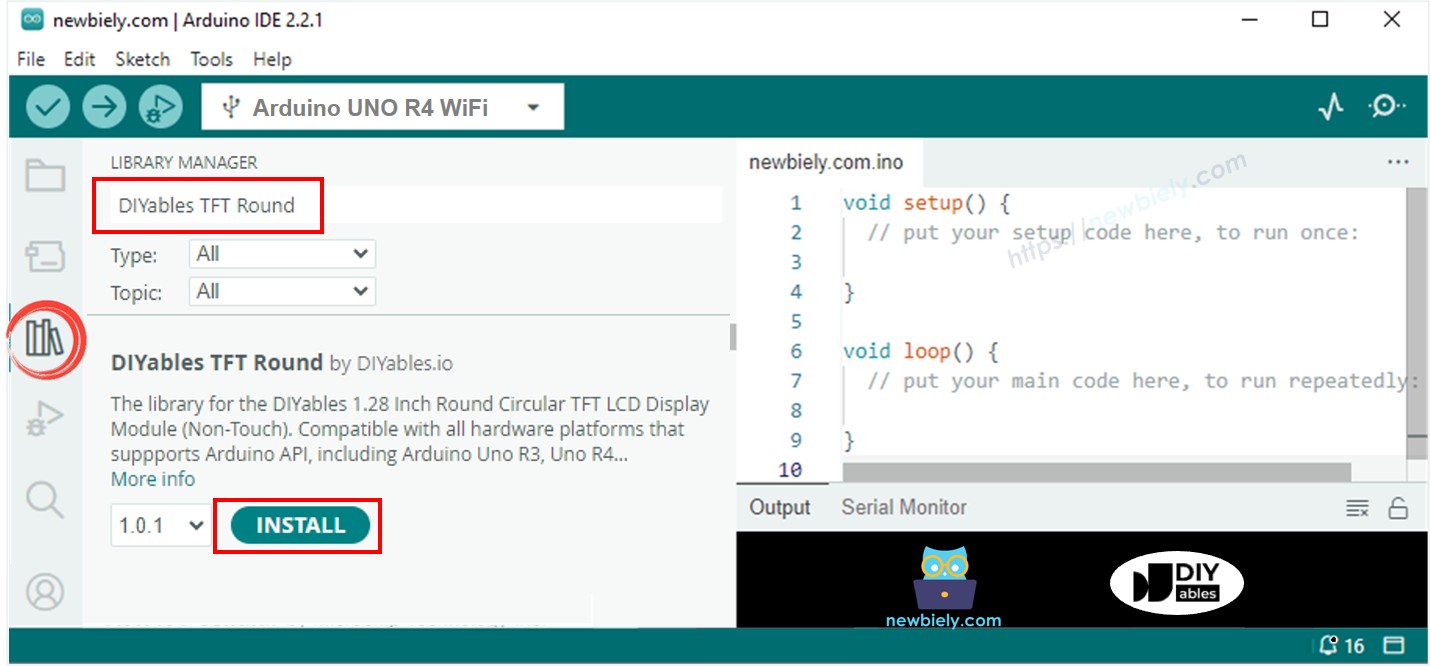
  • Vá até o ícone Libraries na barra esquerda da Arduino IDE.
  • Pesquise “DIYables TFT Round” e encontre a biblioteca DIYables_TFT_Round da DIYables.
  • Clique no botão Install para instalar a biblioteca.
Instalação da biblioteca do TFT LCD para Arduino UNO R4
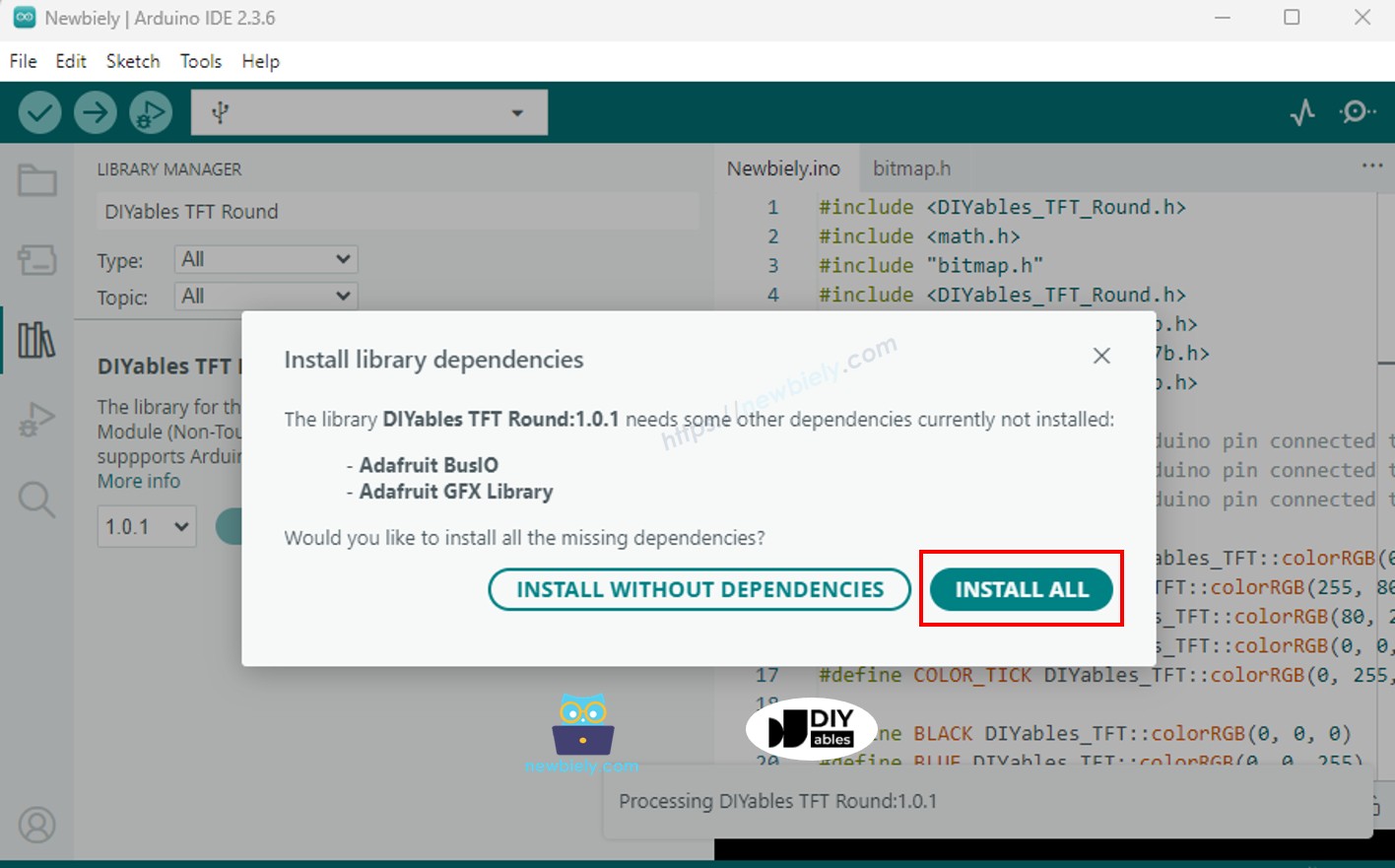
  • Pode ser que seja pedido que você instale dependências de biblioteca adicionais.
  • Clique no botão Install All para instalar todas as dependências de biblioteca.
Instalação das dependências do TFT LCD para Arduino UNO R4
  • Copie o código acima e cole-o no editor da Arduino IDE.
  • Clique no botão Upload na Arduino IDE para carregar o código no Arduino UNO R4.

Dê uma olhada no display TFT LCD redondo de 1,28 polegada mostrando texto e números. A fonte padrão é simples, mas você pode melhorá-la com fontes externas, como descrito na próxima seção.

Tela do Display TFT LCD Redondo Circular com Arduino UNO R4 mostrando texto e número

Usando Fontes Externas no Display TFT LCD Redondo de 1,28 Polegada

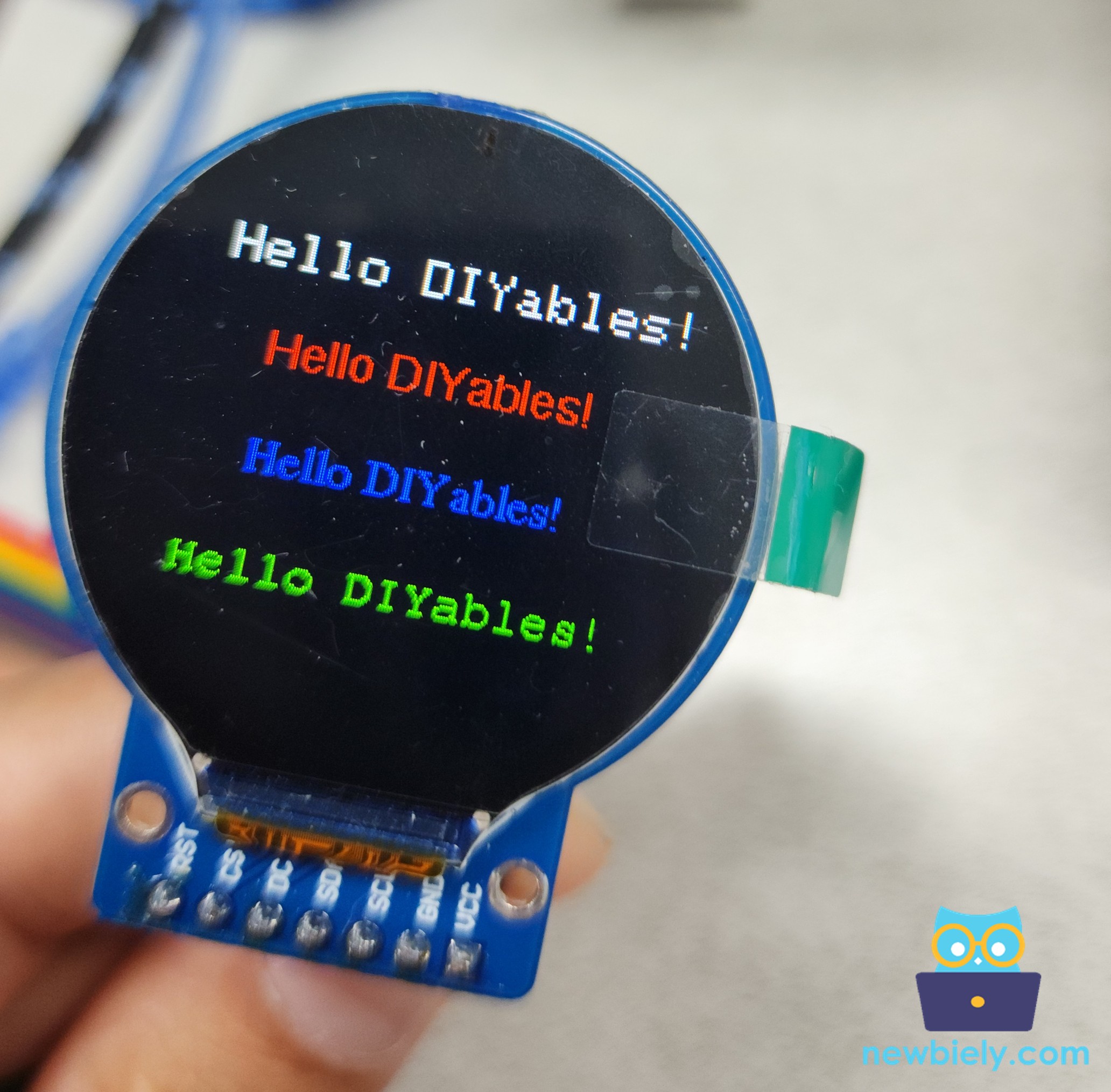
A biblioteca DIYables_TFT_Round facilita a integração de fontes personalizadas da biblioteca Adafruit GFX para otimizar a renderização de texto no display TFT LCD redondo de 1,28 polegada. O sketch fornecido demonstra a renderização de texto usando várias fontes personalizadas, cores e posições no display circular de 240x240 pixels.

Para usar uma fonte personalizada:

  • Identifique a pasta da biblioteca Adafruit GFX, instalada como dependência da biblioteca DIYables_TFT_Round.
  • Selecione um arquivo de fonte, como FreeSans9pt7b.h, na subpasta Fonts dentro da biblioteca.
  • Incorpore a fonte escolhida ao seu código do Arduino UNO R4:
#include <Fonts/FreeSans9pt7b.h>
  • Na função setup(), defina a fonte:
tft.setFont(&FreeSans9pt7b);

O código do Arduino UNO R4 a seguir traz um exemplo completo que ilustra o uso de várias fontes externas.

/* * Este código de Arduino UNO R4 foi desenvolvido por pt.newbiely.com * Este código de Arduino UNO R4 é disponibilizado ao público sem nenhuma restrição. * Para tutoriais completos e diagramas de ligação, visite: * https://pt.newbiely.com/tutorials/arduino-uno-r4/arduino-uno-r4-round-circular-tft-lcd-display */ #include <DIYables_TFT_Round.h> #include <Fonts/FreeSans9pt7b.h> #include <Fonts/FreeSerif9pt7b.h> #include <Fonts/FreeMono9pt7b.h> #define PIN_RST 8 // The Arduino Uno R4 pin connected to the RST pin of the circular TFT display #define PIN_DC 9 // The Arduino Uno R4 pin connected to the DC pin of the circular TFT display #define PIN_CS 10 // The Arduino Uno R4 pin connected to the CS pin of the circular TFT display DIYables_TFT_GC9A01_Round TFT_display(PIN_RST, PIN_DC, PIN_CS); void setup() { Serial.println(F("Arduino TFT LCD Display - Use external font")); TFT_display.begin(); TFT_display.fillScreen(DIYables_TFT::colorRGB(0, 0, 0)); // black TFT_display.setTextColor(DIYables_TFT::colorRGB(255, 255, 255)); // White text TFT_display.setTextSize(2); TFT_display.setCursor(40, 50); TFT_display.print("Hello DIYables!"); // default font TFT_display.setTextSize(1); TFT_display.setFont(&FreeSans9pt7b); TFT_display.setTextColor(DIYables_TFT::colorRGB(255, 0, 0)); // Red text TFT_display.setCursor(60, 100); TFT_display.print("Hello DIYables!"); // FreeSans9pt7b font TFT_display.setFont(&FreeSerif9pt7b); TFT_display.setTextColor(DIYables_TFT::colorRGB(0, 0, 255)); // Blue text TFT_display.setCursor(60, 140); TFT_display.print("Hello DIYables!"); // FreeSerif9pt7b font TFT_display.setFont(&FreeMono9pt7b); TFT_display.setTextColor(DIYables_TFT::colorRGB(0, 255, 0)); // Green text TFT_display.setCursor(40, 180); TFT_display.print("Hello DIYables!"); // FreeMono9pt7b font } void loop(void) { }

Passos Rápidos

  • Copie o código acima e cole-o no editor da Arduino IDE.
  • Clique no botão Upload na Arduino IDE para carregar o código no Arduino UNO R4.
  • Você verá a tela exibir o seguinte:
Tela do Display TFT LCD Redondo Circular com Arduino UNO R4 com fonte externa

Observação: Algumas fontes personalizadas podem não ter suporte para caracteres especiais, como o símbolo de grau (°), ao contrário da fonte padrão. Verifique a compatibilidade da fonte escolhida com os requisitos específicos do seu projeto.

Código Arduino UNO R4 – Desenhar Formas no Display TFT LCD Redondo de 1,28 Polegada

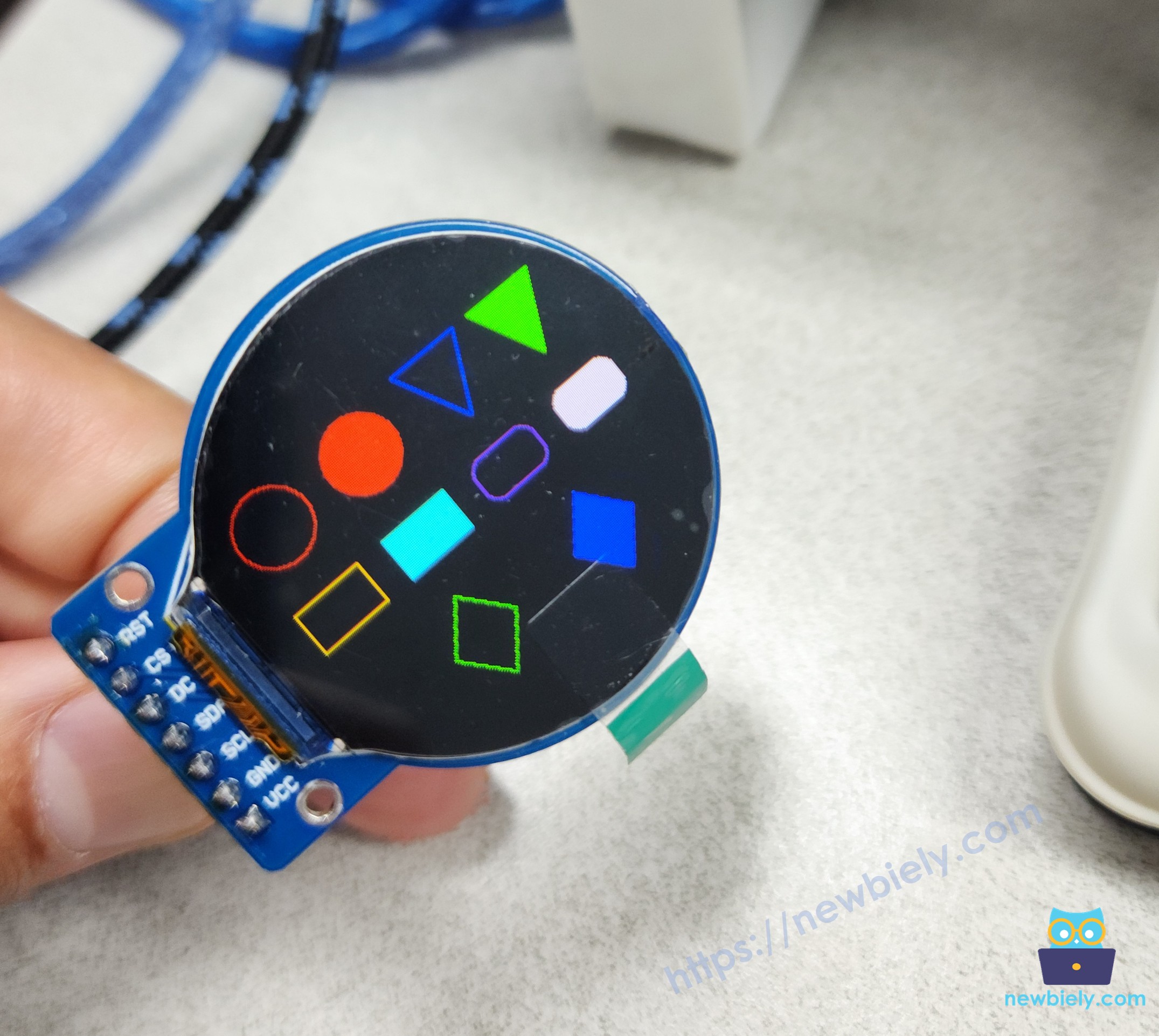
Este exemplo ilustra o processo de renderizar formas geométricas fundamentais no módulo de display TFT LCD redondo de 1,28 polegada usando a biblioteca DIYables_TFT_Round. O sketch gera círculos, triângulos, retângulos, retângulos arredondados e losangos vibrantes em várias regiões da tela, alternando a cada 10 segundos.

/* * Este código de Arduino UNO R4 foi desenvolvido por pt.newbiely.com * Este código de Arduino UNO R4 é disponibilizado ao público sem nenhuma restrição. * Para tutoriais completos e diagramas de ligação, visite: * https://pt.newbiely.com/tutorials/arduino-uno-r4/arduino-uno-r4-round-circular-tft-lcd-display */ #include <DIYables_TFT_Round.h> #define BLACK DIYables_TFT::colorRGB(0, 0, 0) #define BLUE DIYables_TFT::colorRGB(0, 0, 255) #define RED DIYables_TFT::colorRGB(255, 0, 0) #define GREEN DIYables_TFT::colorRGB(0, 255, 0) #define ORANGE DIYables_TFT::colorRGB(255, 165, 0) #define PINK DIYables_TFT::colorRGB(255, 192, 203) #define VIOLET DIYables_TFT::colorRGB(148, 0, 211) #define TURQUOISE DIYables_TFT::colorRGB(64, 224, 208) #define WHITE DIYables_TFT::colorRGB(255, 255, 255) #define PIN_RST 8 // The Arduino Uno R4 pin connected to the RST pin of the circular TFT display #define PIN_DC 9 // The Arduino Uno R4 pin connected to the DC pin of the circular TFT display #define PIN_CS 10 // The Arduino Uno R4 pin connected to the CS pin of the circular TFT display DIYables_TFT_GC9A01_Round TFT_display(PIN_RST, PIN_DC, PIN_CS); // Helper to draw a filled diamond void fillDiamond(int cx, int cy, int h, int v, uint16_t color) { int x0 = cx, y0 = cy - v; int x1 = cx + h, y1 = cy; int x2 = cx, y2 = cy + v; int x3 = cx - h, y3 = cy; TFT_display.fillTriangle(x0, y0, x1, y1, x2, y2, color); TFT_display.fillTriangle(x0, y0, x2, y2, x3, y3, color); } void setup() { TFT_display.begin(); TFT_display.setRotation(1); } void loop() { TFT_display.fillScreen(BLACK); // Outlined circle (top left) TFT_display.drawCircle(35, 70, 20, RED); // Filled circle (top center) TFT_display.fillCircle(90, 70, 20, RED); // Outlined triangle (top right) TFT_display.drawTriangle(125, 50, 165, 50, 145, 90, BLUE); // Filled triangle (top far right) TFT_display.fillTriangle(175, 50, 215, 50, 195, 90, GREEN); // Outlined rectangle (middle left) TFT_display.drawRect(15, 110, 40, 25, ORANGE); // Filled rectangle (middle center) TFT_display.fillRect(70, 110, 40, 25, TURQUOISE); // Outlined round rectangle (middle right) TFT_display.drawRoundRect(125, 110, 40, 25, 8, VIOLET); // Filled round rectangle (middle far right) TFT_display.fillRoundRect(180, 110, 40, 25, 8, PINK); // Outlined diamond shape (bottom left) int cx1 = 80, cy1 = 180, h1 = 20, v1 = 25; TFT_display.drawLine(cx1, cy1 - v1, cx1 + h1, cy1, GREEN); TFT_display.drawLine(cx1 + h1, cy1, cx1, cy1 + v1, GREEN); TFT_display.drawLine(cx1, cy1 + v1, cx1 - h1, cy1, GREEN); TFT_display.drawLine(cx1 - h1, cy1, cx1, cy1 - v1, GREEN); // Filled diamond shape (bottom right) int cx2 = 160, cy2 = 180, h2 = 20, v2 = 25; fillDiamond(cx2, cy2, h2, v2, BLUE); delay(10000); }

Passos Rápidos

  • Copie o código acima e cole-o no editor da Arduino IDE.
  • Clique no botão Upload na Arduino IDE para carregar o código no Arduino UNO R4.

Observe o display TFT LCD redondo de 1,28 polegada, que renderiza círculos, triângulos, retângulos, retângulos arredondados e losangos, com atualizações a cada 10 segundos.

Tela do Display TFT LCD Redondo Circular com Arduino UNO R4 desenhando formas

Observação: Note que a tela parece mais nítida e brilhante na vida real; a iluminação na foto mudou a aparência dela.

Código Arduino UNO R4 – Exibir Imagem no Display TFT LCD Redondo de 1,28 Polegada

Existem dois métodos para armazenar e exibir imagens no módulo de display TFT LCD redondo de 1,28 polegada:

  1. Converter imagens (PNG, JPG) em um array de bitmap, armazená-lo no código do Arduino UNO R4 e renderizá-lo no TFT.
  • Vantagem: Velocidade de renderização rápida.
  • Desvantagem: Alto consumo de memória, o que restringe o tamanho e a quantidade de imagens.
  1. Converter imagens (PNG, JPG) para o formato bitmap (.bmp) e armazená-las em um cartão microSD, com o Arduino UNO R4 programado para recuperá-las e exibi-las.
  • Exige um cartão microSD e um módulo de cartão SD (conectado a pinos como CS no 7, MOSI no 11, MISO no 12, SCK no 13).
  • Vantagem: Acomoda imagens maiores e em maior quantidade.
  • Desvantagem: Velocidade de renderização mais lenta.

A seguir, exploramos os dois métodos.

Armazenar Imagens como Arrays de Bitmap no Código

/* * Este código de Arduino UNO R4 foi desenvolvido por pt.newbiely.com * Este código de Arduino UNO R4 é disponibilizado ao público sem nenhuma restrição. * Para tutoriais completos e diagramas de ligação, visite: * https://pt.newbiely.com/tutorials/arduino-uno-r4/arduino-uno-r4-round-circular-tft-lcd-display */ #include <DIYables_TFT_Round.h> #include "bitmap.h" #define WHITE DIYables_TFT::colorRGB(255, 255, 255) #define PIN_RST 8 // The Arduino Uno R4 pin connected to the RST pin of the circular TFT display #define PIN_DC 9 // The Arduino Uno R4 pin connected to the DC pin of the circular TFT display #define PIN_CS 10 // The Arduino Uno R4 pin connected to the CS pin of the circular TFT display DIYables_TFT_GC9A01_Round TFT_display(PIN_RST, PIN_DC, PIN_CS); int img_width = 120; int img_height = 53; uint16_t SCREEN_WIDTH; uint16_t SCREEN_HEIGHT; void setup() { Serial.begin(9600); Serial.println(F("Arduino TFT LCD Display")); TFT_display.begin(); SCREEN_WIDTH = TFT_display.width(); SCREEN_HEIGHT = TFT_display.height(); int x = (SCREEN_WIDTH - img_width) / 2; int y = (SCREEN_HEIGHT - img_height) / 2; TFT_display.fillScreen(WHITE); TFT_display.drawRGBBitmap(x, y, myBitmap, img_width, img_height); } void loop(void) { delay(2000); TFT_display.invertDisplay(true); delay(2000); TFT_display.invertDisplay(false); }

Passos Rápidos

  • Copie o código acima e cole-o no editor da Arduino IDE. Suponha que o nome do arquivo seja DrawImage.ino
  • Crie o arquivo bitmap.h na Arduino IDE da seguinte forma:
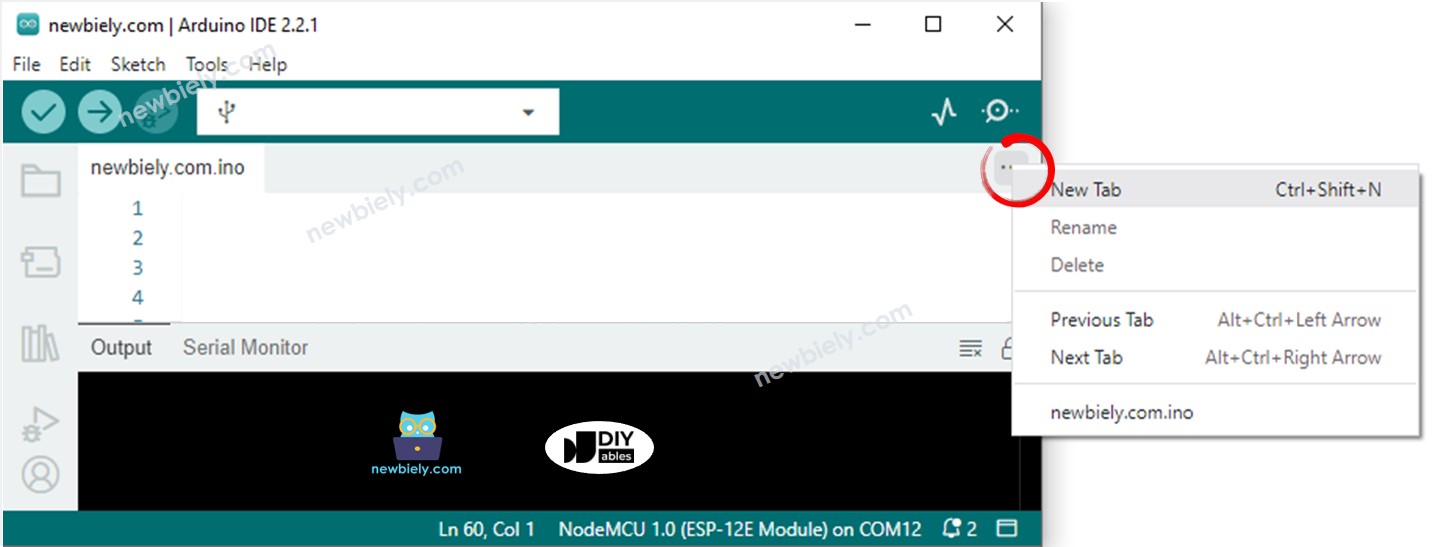
    • Clicando no botão abaixo do ícone do Serial Monitor e escolhendo New Tab, ou usando Ctrl+Shift+N.
    A Arduino IDE 2 adiciona um arquivo
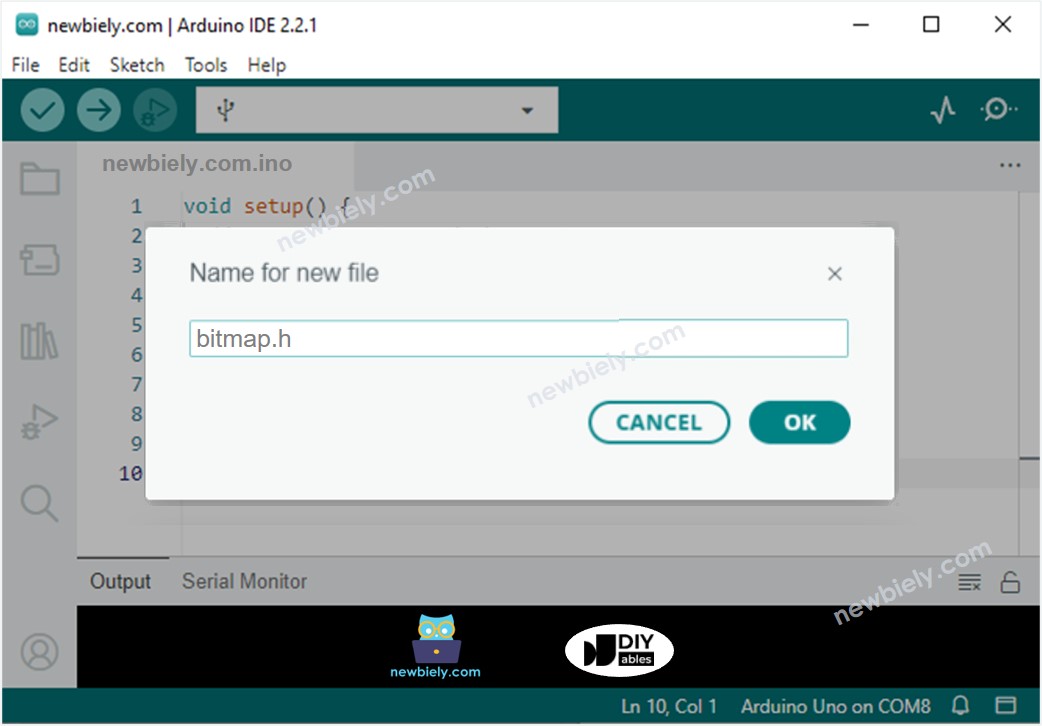
    • Dando ao arquivo o nome bitmap.h e clicando em OK.
    A Arduino IDE 2 adiciona o arquivo bitmap.h
    • Copie o código abaixo e cole-o no arquivo bitmap.h criado. Este código contém o array de bitmap do logotipo da DIYables.
    const uint16_t myBitmap[] PROGMEM = {0xffff, 0xffff, 0xffff, 0xffff, 0xffff, 0xffff, 0xffff, 0xffff, 0xffff, 0xffff, 0xffff, 0xffff, 0xffff, 0xffff, 0xffff, 0xffff, 0xffff, 0xffff, 0xffff, 0xffff, 0xef5d, 0x0000, 0x0000, 0x0000, 0x0000, 0x0000, 0x0000, 0x0000, 0x0000, 0x0000, 0x0000, 0x0000, 0x0000, 0x0000, 0x0000, 0x0000, 0x0000, 0x0000, 0x0000, 0x0000, 0x0000, 0x0000, 0x0000, 0x0000, 0x0000, 0x0000, 0x0000, 0x0000, 0x0000, 0x0000, 0x0000, 0x0000, 0x0000, 0x0000, 0x0000, 0xffff, 0xffff, 0xffff, 0xffff, 0xbdf7, 0x0000, 0x0000, 0x0000, 0x0000, 0x0000, 0x0000, 0x0000, 0x0000, 0x0000, 0x0000, 0x0000, 0x0000, 0x0000, 0x18c3, 0xbdf7, 0xbdf7, 0xe73c, 0xffff, 0xffff, 0xffff, 0xffff, 0xffff, 0xffff, 0xffff, 0xffff, 0xffff, 0xffff, 0xffdf, 0x0000, 0x0000, 0x0000, 0x0000, 0x0000, 0xffdf, 0xffff, 0xffff, 0x2124, 0x0000, 0x0000, 0x0000, 0x0000, 0x0000, 0xdedb, 0xffff, 0xffff, 0xffff, 0xffff, 0xffff, 0xffff, 0xffff, 0xffff, 0xffff, 0xffff, 0xffff, 0x0841, 0x0000, 0x0000, 0x0000, 0x0000, 0x3186, 0xffff, 0xffff, 0xffff, 0xffff, 0xffff, 0xffff, 0xffff, 0xffff, 0xffff, 0xffff, 0xffff, 0xffff, 0xffff, 0xffff, 0xffff, 0xffff, 0xffff, 0xffff, 0xffff, 0xffff, 0xef5d, 0x0000, 0x0000, 0x0000, 0x0000, 0x0000, 0x0000, 0x0000, 0x0000, 0x0000, 0x0000, 0x0000, 0x0000, 0x0000, 0x0000, 0x0000, 0x0000, 0x0000, 0x0000, 0x0000, 0x0000, 0x0000, 0x0000, 0x0000, 0x0000, 0x0000, 0x0000, 0x0000, 0x0000, 0x0000, 0x0000, 0x0000, 0x0000, 0x0000, 0x0000, 0xffff, 0xffff, 0xffff, 0xffff, 0xbdf7, 0x0000, 0x0000, 0x0000, 0x0000, 0x0000, 0x0000, 0x0000, 0x0000, 0x0000, 0x0000, 0x0000, 0x0000, 0x0000, 0x0000, 0x0000, 0x0000, 0x2124, 0x528a, 0xffff, 0xffff, 0xffff, 0xffff, 0xffff, 0xffff, 0xffff, 0xffff, 0xffff, 0xffdf, 0x0000, 0x0000, 0x0000, 0x0000, 0x0000, 0xffdf, 0xffff, 0xffff, 0x8c71, 0x0000, 0x0000, 0x0000, 0x0000, 0x0000, 0x632c, 0xffff, 0xffff, 0xffff, 0xffff, 0xffff, 0xffff, 0xffff, 0xffff, 0xffff, 0xffff, 0x630c, 0x0000, 0x0000, 0x0000, 0x0000, 0x3186, 0xf79e, 0xffff, 0xffff, 0xffff, 0xffff, 0xffff, 0xffff, 0xffff, 0xffff, 0xffff, 0xffff, 0xffff, 0xffff, 0xffff, 0xffff, 0xffff, 0xffff, 0xffff, 0xffff, 0xffff, 0xffff, 0xef5d, 0x0000, 0x0000, 0x0000, 0x0000, 0x0000, 0x0000, 0x0000, 0x0000, 0x0000, 0x0000, 0x0000, 0x0000, 0x0000, 0x0000, 0x0000, 0x0000, 0x0000, 0x0000, 0x0000, 0x0000, 0x0000, 0x0000, 0x0000, 0x0000, 0x0000, 0x0000, 0x0000, 0x0000, 0x0000, 0x0000, 0x0000, 0x0000, 0x0000, 0x0000, 0xffff, 0xffff, 0xffff, 0xffff, 0xbdf7, 0x0000, 0x0000, 0x0000, 0x0000, 0x0000, 0x0000, 0x0000, 0x0000, 0x0000, 0x0000, 0x0000, 0x0000, 0x0000, 0x0000, 0x0000, 0x0000, 0x0000, 0x0000, 0x0000, 0xbdf7, 0xffff, 0xffff, 0xffff, 0xffff, 0xffff, 0xffff, 0xffff, 0xffdf, 0x0000, 0x0000, 0x0000, 0x0000, 0x0000, 0xffdf, 0xffff, 0xffff, 0xffff, 0x528a, 0x0000, 0x0000, 0x0000, 0x0000, 0x0000, 0xe71c, 0xffff, 0xffff, 0xffff, 0xffff, 0xffff, 0xffff, 0xffff, 0xffff, 0xef5d, 0x2124, 0x0000, 0x0000, 0x0000, 0x0000, 0x73ae, 0xffff, 0xffff, 0xffff, 0xffff, 0xffff, 0xffff, 0xffff, 0xffff, 0xffff, 0xffff, 0xffff, 0xffff, 0xffff, 0xffff, 0xffff, 0xffff, 0xffff, 0xffff, 0xffff, 0xffff, 0xffff, 0xef5d, 0x0000, 0x0000, 0x0000, 0x0000, 0x0000, 0x0000, 0x0000, 0x0000, 0x0000, 0x0000, 0x0000, 0x0000, 0x0000, 0x0000, 0x0000, 0x0000, 0x0000, 0x0000, 0x0000, 0x0000, 0x0000, 0x0000, 0x0000, 0x0000, 0x0000, 0x0000, 0x0000, 0x0000, 0x0000, 0x0000, 0x0000, 0x0000, 0x0000, 0x0000, 0xffff, 0xffff, 0xffff, 0xffff, 0xbdf7, 0x0000, 0x0000, 0x0000, 0x0000, 0x0000, 0x0000, 0x0000, 0x0000, 0x0000, 0x0000, 0x0000, 0x0000, 0x0000, 0x0000, 0x0000, 0x0000, 0x0000, 0x0000, 0x0000, 0x0020, 0xad55, 0xffff, 0xffff, 0xffff, 0xffff, 0xffff, 0xffff, 0xffdf, 0x0000, 0x0000, 0x0000, 0x0000, 0x0000, 0xffdf, 0xffff, 0xffff, 0xffff, 0xffff, 0x0000, 0x0000, 0x0000, 0x0000, 0x0000, 0x3186, 0xffff, 0xffff, 0xffff, 0xffff, 0xffff, 0xffff, 0xffff, 0xffff, 0x4a69, 0x0000, 0x0000, 0x0000, 0x0000, 0x0000, 0xffff, 0xffff, 0xffff, 0xffff, 0xffff, 0xffff, 0xffff, 0xffff, 0xffff, 0xffff, 0xffff, 0xffff, 0xffff, 0xffff, 0xffff, 0xffff, 0xffff, 0xffff, 0xffff, 0xffff, 0xffff, 0xffff, 0xef5d, 0x0000, 0x0000, 0x0000, 0x0000, 0x0000, 0x0000, 0x0000, 0x0000, 0x0000, 0x0000, 0x0000, 0x0000, 0x0000, 0x0000, 0x0000, 0x0000, 0x0000, 0x0000, 0x0000, 0x0000, 0x0000, 0x0000, 0x0000, 0x0000, 0x0000, 0x0000, 0x0000, 0x0000, 0x0000, 0x0000, 0x0000, 0x0000, 0x0000, 0x0000, 0xffff, 0xffff, 0xffff, 0xffff, 0xbdf7, 0x0000, 0x0000, 0x0000, 0x0000, 0x0000, 0x4a49, 0x4a49, 0x4a49, 0x4a49, 0x4a49, 0x4a49, 0x4a49, 0x4a49, 0x0000, 0x0000, 0x0000, 0x0000, 0x0000, 0x0000, 0x0000, 0x0000, 0xbdd7, 0xffff, 0xffff, 0xffff, 0xffff, 0xffff, 0xffdf, 0x0000, 0x0000, 0x0000, 0x0000, 0x0000, 0xffdf, 0xffff, 0xffff, 0xffff, 0xffff, 0x9492, 0x0000, 0x0000, 0x0000, 0x0000, 0x0000, 0x630c, 0xffff, 0xffff, 0xffff, 0xffff, 0xffff, 0xffff, 0xc618, 0x0000, 0x0000, 0x0000, 0x0000, 0x10a2, 0xd6ba, 0xffff, 0xffff, 0xffff, 0xffff, 0xffff, 0xffff, 0xffff, 0xffff, 0xffff, 0xffff, 0xffff, 0xffff, 0xffff, 0xffff, 0xffff, 0xffff, 0xffff, 0xffff, 0xffff, 0xffff, 0xffff, 0xffff, 0xef5d, 0x0000, 0x0000, 0x0000, 0x0000, 0x0000, 0x0000, 0x0000, 0x0000, 0x0000, 0x0000, 0x0000, 0x0000, 0x0000, 0x0000, 0x0000, 0x0000, 0x0000, 0x0000, 0x0000, 0x0000, 0x0000, 0x0000, 0x0000, 0x0000, 0x0000, 0x0000, 0x0000, 0x0000, 0x0000, 0x0000, 0x0000, 0x0000, 0x0000, 0x0000, 0xffff, 0xffff, 0xffff, 0xffff, 0xbdf7, 0x0000, 0x0000, 0x0000, 0x0000, 0x0000, 0xffff, 0xffff, 0xffff, 0xffff, 0xffff, 0xffff, 0xffff, 0xffff, 0xce79, 0xb596, 0x0000, 0x0000, 0x0000, 0x0000, 0x0000, 0x0000, 0x1082, 0xffff, 0xffff, 0xffff, 0xffff, 0xffff, 0xffdf, 0x0000, 0x0000, 0x0000, 0x0000, 0x0000, 0xffdf, 0xffff, 0xffff, 0xffff, 0xffff, 0xef5d, 0x1082, 0x0000, 0x0000, 0x0000, 0x0000, 0x1082, 0xe73c, 0xffff, 0xffff, 0xffff, 0xffff, 0xffff, 0x2965, 0x0000, 0x0000, 0x0000, 0x0000, 0x4228, 0xffff, 0xffff, 0xffff, 0xffff, 0xffff, 0xffff, 0xffff, 0xffff, 0xffff, 0xffff, 0xffff, 0xffff, 0xffff, 0xffff, 0xffff, 0xffff, 0xffff, 0xffff, 0xffff, 0xffff, 0xffff, 0xffff, 0xffff, 0xef5d, 0x0000, 0x0000, 0x0000, 0x0000, 0x0000, 0x0000, 0x0000, 0x0000, 0x0000, 0x0000, 0x0000, 0x0000, 0x0000, 0x0000, 0x0000, 0x0000, 0x0000, 0x0000, 0x0000, 0x0000, 0x0000, 0x0000, 0x0000, 0x0000, 0x0000, 0x0000, 0x0000, 0x0000, 0x0000, 0x0000, 0x0000, 0x0000, 0x0000, 0x0000, 0xffff, 0xffff, 0xffff, 0xffff, 0xbdf7, 0x0000, 0x0000, 0x0000, 0x0000, 0x0000, 0xffff, 0xffff, 0xffff, 0xffff, 0xffff, 0xffff, 0xffff, 0xffff, 0xffff, 0xffff, 0xef5d, 0x18e3, 0x0000, 0x0000, 0x0000, 0x0000, 0x0000, 0x8c71, 0xffff, 0xffff, 0xffff, 0xffff, 0xffdf, 0x0000, 0x0000, 0x0000, 0x0000, 0x0000, 0xffdf, 0xffff, 0xffff, 0xffff, 0xffff, 0xffff, 0xffff, 0x0000, 0x0000, 0x0000, 0x0000, 0x0000, 0x9cd3, 0xffff, 0xffff, 0xffff, 0xffff, 0x9cf3, 0x0000, 0x0000, 0x0000, 0x0000, 0x0000, 0xffff, 0xffff, 0xffff, 0xffff, 0xffff, 0xffff, 0xffff, 0xffff, 0xffff, 0xffff, 0xffff, 0xffff, 0xffff, 0xffff, 0xffff, 0xffff, 0xffff, 0xffff, 0xffff, 0xffff, 0xffff, 0xffff, 0xffff, 0xffff, 0xef5d, 0x0000, 0x0000, 0x0000, 0x0000, 0x0000, 0x0000, 0x0000, 0x0000, 0x0000, 0x0000, 0x0000, 0x0000, 0x0000, 0x0000, 0x0000, 0x0000, 0x0000, 0x0000, 0x0000, 0x0000, 0x0000, 0x0000, 0x0000, 0x0000, 0x0000, 0x0000, 0x0000, 0x0000, 0x0000, 0x0000, 0x0000, 0x0000, 0x0000, 0x0000, 0xffff, 0xffff, 0xffff, 0xffff, 0xbdf7, 0x0000, 0x0000, 0x0000, 0x0000, 0x0000, 0xffff, 0xffff, 0xffff, 0xffff, 0xffff, 0xffff, 0xffff, 0xffff, 0xffff, 0xffff, 0xffff, 0xe71c, 0x0000, 0x0000, 0x0000, 0x0000, 0x0000, 0x18c3, 0xffff, 0xffff, 0xffff, 0xffff, 0xffdf, 0x0000, 0x0000, 0x0000, 0x0000, 0x0000, 0xffdf, 0xffff, 0xffff, 0xffff, 0xffff, 0xffff, 0xffff, 0x7bcf, 0x0000, 0x0000, 0x0000, 0x0000, 0x0000, 0x7bef, 0xffff, 0xffff, 0xffff, 0x10a2, 0x0000, 0x0000, 0x0000, 0x0000, 0xa534, 0xffff, 0xffff, 0xffff, 0xffff, 0xffff, 0xffff, 0xffff, 0xffff, 0xffff, 0xffff, 0xffff, 0xffff, 0xffff, 0xffff, 0xffff, 0xffff, 0xffff, 0xffff, 0xffff, 0xffff, 0xffff, 0xffff, 0xffff, 0xffff, 0xef5d, 0x0000, 0x0000, 0x0000, 0x0000, 0x0000, 0x0000, 0x0000, 0x0000, 0x0000, 0x0000, 0x0000, 0x0000, 0x0000, 0x0000, 0x0000, 0x0000, 0x0000, 0x0000, 0x0000, 0x0000, 0x0000, 0x0000, 0x0000, 0x0000, 0x0000, 0x0000, 0x0000, 0x0000, 0x0000, 0x0000, 0x0000, 0x0000, 0x0000, 0x0000, 0xffff, 0xffff, 0xffff, 0xffff, 0xbdf7, 0x0000, 0x0000, 0x0000, 0x0000, 0x0000, 0xffff, 0xffff, 0xffff, 0xffff, 0xffff, 0xffff, 0xffff, 0xffff, 0xffff, 0xffff, 0xffff, 0xffff, 0x4a69, 0x0000, 0x0000, 0x0000, 0x0000, 0x0000, 0xffff, 0xffff, 0xffff, 0xffff, 0xffdf, 0x0000, 0x0000, 0x0000, 0x0000, 0x0000, 0xffdf, 0xffff, 0xffff, 0xffff, 0xffff, 0xffff, 0xffff, 0xbdd7, 0x0841, 0x0000, 0x0000, 0x0000, 0x0000, 0x39e7, 0xf79e, 0xffff, 0x2945, 0x0000, 0x0000, 0x0000, 0x0000, 0x4a69, 0xffff, 0xffff, 0xffff, 0xffff, 0xffff, 0xffff, 0xffff, 0xffff, 0xffff, 0xffff, 0xffff, 0xffff, 0xffff, 0xffff, 0xffff, 0xffff, 0xffff, 0xffff, 0xffff, 0xffff, 0xffff, 0xffff, 0xffff, 0xffff, 0xffff, 0xef5d, 0x0000, 0x0000, 0x0000, 0x0000, 0x0000, 0x0000, 0x0000, 0x0000, 0x0000, 0x0000, 0x0000, 0x0000, 0x0000, 0x0000, 0x0000, 0x0000, 0x0000, 0x0000, 0x0000, 0x0000, 0x0000, 0x0000, 0x0000, 0x0000, 0x0000, 0x0000, 0x0000, 0x0000, 0x0000, 0x0000, 0x0000, 0x0000, 0x0000, 0x0000, 0xffff, 0xffff, 0xffff, 0xffff, 0xbdf7, 0x0000, 0x0000, 0x0000, 0x0000, 0x0000, 0xffff, 0xffff, 0xffff, 0xffff, 0xffff, 0xffff, 0xffff, 0xffff, 0xffff, 0xffff, 0xffff, 0xffff, 0xe73c, 0x0000, 0x0000, 0x0000, 0x0000, 0x0000, 0x31a6, 0xffff, 0xffff, 0xffff, 0xffdf, 0x0000, 0x0000, 0x0000, 0x0000, 0x0000, 0xffdf, 0xffff, 0xffff, 0xffff, 0xffff, 0xffff, 0xffff, 0xffff, 0xdedb, 0x0000, 0x0000, 0x0000, 0x0000, 0x0000, 0xdedb, 0xb5b6, 0x0020, 0x0000, 0x0000, 0x0000, 0x0000, 0xe71c, 0xffff, 0xffff, 0xffff, 0xffff, 0xffff, 0xffff, 0xffff, 0xffff, 0xffff, 0xffff, 0xffff, 0xffff, 0xffff, 0xffff, 0xffff, 0xffff, 0xffff, 0xffff, 0xffff, 0xffff, 0xffff, 0xffff, 0xffff, 0xffff, 0xffff, 0xef5d, 0x0000, 0x0000, 0x0000, 0x0000, 0x0000, 0x0000, 0x0000, 0x0000, 0x0000, 0x0000, 0x0000, 0x0000, 0x0000, 0x0000, 0x0000, 0x0000, 0x0000, 0x0000, 0x0000, 0x0000, 0x0000, 0x0000, 0x0000, 0x0000, 0x0000, 0x0000, 0x0000, 0x0000, 0x0000, 0x0000, 0x0000, 0x0000, 0x0000, 0x0000, 0xffff, 0xffff, 0xffff, 0xffff, 0xbdf7, 0x0000, 0x0000, 0x0000, 0x0000, 0x0000, 0xffff, 0xffff, 0xffff, 0xffff, 0xffff, 0xffff, 0xffff, 0xffff, 0xffff, 0xffff, 0xffff, 0xffff, 0xe73c, 0x0841, 0x0000, 0x0000, 0x0000, 0x0000, 0x0861, 0xffff, 0xffff, 0xffff, 0xffdf, 0x0000, 0x0000, 0x0000, 0x0000, 0x0000, 0xffdf, 0xffff, 0xffff, 0xffff, 0xffff, 0xffff, 0xffff, 0xffff, 0xffff, 0x31a6, 0x0000, 0x0000, 0x0000, 0x0000, 0x0000, 0x6b6d, 0x0000, 0x0000, 0x0000, 0x0000, 0x4a49, 0xffff, 0xffff, 0xffff, 0xffff, 0xffff, 0xffff, 0x2124, 0x2124, 0x2124, 0x2124, 0xffff, 0xffff, 0xffff, 0xffff, 0xffff, 0xffff, 0xffff, 0xffff, 0xffff, 0xffff, 0xffff, 0xffff, 0xffff, 0xffff, 0xffff, 0xffff, 0xef5d, 0x0000, 0x0000, 0x0000, 0x0000, 0x0000, 0x0000, 0x0000, 0x0000, 0x0000, 0x0000, 0x0000, 0x0000, 0x0000, 0x0000, 0x0000, 0x0000, 0x0000, 0x0000, 0x0000, 0x0000, 0x0000, 0x0000, 0x0000, 0x0000, 0x0000, 0x0000, 0x0000, 0x0000, 0x0000, 0x0000, 0x0000, 0x0000, 0x0000, 0x0000, 0xffff, 0xffff, 0xffff, 0xffff, 0xbdf7, 0x0000, 0x0000, 0x0000, 0x0000, 0x0000, 0xffff, 0xffff, 0xffff, 0xffff, 0xffff, 0xffff, 0xffff, 0xffff, 0xffff, 0xffff, 0xffff, 0xffff, 0xffff, 0x5aeb, 0x0000, 0x0000, 0x0000, 0x0000, 0x0861, 0xffff, 0xffff, 0xffff, 0xffdf, 0x0000, 0x0000, 0x0000, 0x0000, 0x0000, 0xffdf, 0xffff, 0xffff, 0xffff, 0xffff, 0xffff, 0xffff, 0xffff, 0xffff, 0x9cd3, 0x0000, 0x0000, 0x0000, 0x0000, 0x0000, 0x0000, 0x0000, 0x0000, 0x0000, 0x4228, 0xffdf, 0xffff, 0xffff, 0xffff, 0xffff, 0xffff, 0xffff, 0x0000, 0x0000, 0x0000, 0x0000, 0x0000, 0x0000, 0x2104, 0xa514, 0xffff, 0xffff, 0xffff, 0xffff, 0xffff, 0xffff, 0xffff, 0xffff, 0xffff, 0xffff, 0xffff, 0xffff, 0xef5d, 0x0000, 0x0000, 0x0000, 0x0000, 0x0000, 0x0000, 0x0000, 0x0000, 0x0000, 0x0000, 0x0000, 0x0000, 0x0000, 0x0000, 0x0000, 0x0000, 0x0000, 0x0000, 0x0000, 0x0000, 0x0000, 0x0000, 0x0000, 0x0000, 0x0000, 0x0000, 0x0000, 0x0000, 0x0000, 0x0000, 0x0000, 0x0000, 0x0000, 0x0000, 0xffff, 0xffff, 0xffff, 0xffff, 0xbdf7, 0x0000, 0x0000, 0x0000, 0x0000, 0x0000, 0xffff, 0xffff, 0xffff, 0xffff, 0xffff, 0xffff, 0xffff, 0xffff, 0xffff, 0xffff, 0xffff, 0xffff, 0xffdf, 0x528a, 0x0000, 0x0000, 0x0000, 0x0000, 0x0861, 0xffff, 0xffff, 0xffff, 0xffdf, 0x0000, 0x0000, 0x0000, 0x0000, 0x0000, 0xffdf, 0xffff, 0xffff, 0xffff, 0xffff, 0xffff, 0xffff, 0xffff, 0xffff, 0xffff, 0x6b6d, 0x0000, 0x0000, 0x0000, 0x0000, 0x0000, 0x0000, 0x0000, 0x0000, 0x9492, 0xffff, 0xffff, 0xffff, 0xffff, 0xffff, 0xffff, 0xffff, 0x0000, 0x0000, 0x0000, 0x0000, 0x0000, 0x0000, 0x0000, 0x0000, 0x18e3, 0xb5b6, 0xffff, 0xffff, 0xffff, 0xffff, 0xffff, 0xffff, 0xffff, 0xffff, 0xffff, 0xffff, 0xef5d, 0x0000, 0x0000, 0x0000, 0x0000, 0x0000, 0x0000, 0x0000, 0x0000, 0x0000, 0x0000, 0x0000, 0x0000, 0x0000, 0x0000, 0x0000, 0x0000, 0x0000, 0x0000, 0x0000, 0x0000, 0x0000, 0x0000, 0x0000, 0x0000, 0x0000, 0x0000, 0x0000, 0x0000, 0x0000, 0x0000, 0x0000, 0x0000, 0x0000, 0x0000, 0xffff, 0xffff, 0xffff, 0xffff, 0xbdf7, 0x0000, 0x0000, 0x0000, 0x0000, 0x0000, 0xffff, 0xffff, 0xffff, 0xffff, 0xffff, 0xffff, 0xffff, 0xffff, 0xffff, 0xffff, 0xffff, 0xffff, 0xe73c, 0x0020, 0x0000, 0x0000, 0x0000, 0x0000, 0x0861, 0xffff, 0xffff, 0xffff, 0xffdf, 0x0000, 0x0000, 0x0000, 0x0000, 0x0000, 0xffdf, 0xffff, 0xffff, 0xffff, 0xffff, 0xffff, 0xffff, 0xffff, 0xffff, 0xffff, 0xffff, 0x0000, 0x0000, 0x0000, 0x0000, 0x0000, 0x0000, 0x0000, 0x0000, 0xffff, 0xffff, 0xffff, 0xffff, 0xffff, 0xffff, 0xffff, 0xffff, 0x0000, 0x0000, 0x0000, 0x0000, 0x0000, 0x0000, 0x0000, 0x0000, 0x0000, 0x0000, 0x18c3, 0xdefb, 0xffff, 0xffff, 0xffff, 0xffff, 0xffff, 0xffff, 0xffff, 0xffff, 0xef5d, 0x0000, 0x0000, 0x0000, 0x0000, 0x0000, 0x0000, 0x0000, 0x0000, 0x0000, 0x0000, 0x0000, 0x0000, 0x0000, 0x0000, 0x0000, 0x0000, 0x0000, 0x0000, 0x0000, 0x0000, 0x0000, 0x0000, 0x0000, 0x0000, 0x0000, 0x0000, 0x0000, 0x0000, 0x0000, 0x0000, 0x0000, 0x0000, 0x0000, 0x0000, 0xffff, 0xffff, 0xffff, 0xffff, 0xbdf7, 0x0000, 0x0000, 0x0000, 0x0000, 0x0000, 0xffff, 0xffff, 0xffff, 0xffff, 0xffff, 0xffff, 0xffff, 0xffff, 0xffff, 0xffff, 0xffff, 0xffff, 0xe73c, 0x0000, 0x0000, 0x0000, 0x0000, 0x0000, 0x6b6d, 0xffff, 0xffff, 0xffff, 0xffdf, 0x0000, 0x0000, 0x0000, 0x0000, 0x0000, 0xffdf, 0xffff, 0xffff, 0xffff, 0xffff, 0xffff, 0xffff, 0xffff, 0xffff, 0xffff, 0xffff, 0x9cf3, 0x0000, 0x0000, 0x0000, 0x0000, 0x0000, 0x18e3, 0xe71c, 0xffff, 0xffff, 0xffff, 0xffff, 0xffff, 0xffff, 0xffff, 0xffff, 0x0000, 0x0000, 0x0000, 0x0000, 0x0000, 0x0000, 0x0000, 0x0000, 0x0000, 0x0000, 0x0000, 0x1082, 0x39e7, 0xffff, 0xffff, 0xffff, 0xffff, 0xffff, 0xffff, 0xffff, 0xef5d, 0x0000, 0x0000, 0x0000, 0x0000, 0x0000, 0x0000, 0x0000, 0x0000, 0x0000, 0x0000, 0x0000, 0x0000, 0x0000, 0x0000, 0x0000, 0x0000, 0x0000, 0x0000, 0x0000, 0x0000, 0x0000, 0x0000, 0x0000, 0x0000, 0x0000, 0x0000, 0x0000, 0x0000, 0x0000, 0x0000, 0x0000, 0x0000, 0x0000, 0x0000, 0xffff, 0xffff, 0xffff, 0xffff, 0xbdf7, 0x0000, 0x0000, 0x0000, 0x0000, 0x0000, 0xffff, 0xffff, 0xffff, 0xffff, 0xffff, 0xffff, 0xffff, 0xffff, 0xffff, 0xffff, 0xffff, 0xffff, 0x18c3, 0x0000, 0x0000, 0x0000, 0x0000, 0x0000, 0xffff, 0xffff, 0xffff, 0xffff, 0xffdf, 0x0000, 0x0000, 0x0000, 0x0000, 0x0000, 0xffdf, 0xffff, 0xffff, 0xffff, 0xffff, 0xffff, 0xffff, 0xffff, 0xffff, 0xffff, 0xffff, 0xf7be, 0x18e3, 0x0000, 0x0000, 0x0000, 0x0000, 0x528a, 0xffff, 0xffff, 0xffff, 0xffff, 0xffff, 0xffff, 0xffff, 0xffff, 0xffff, 0x0000, 0x0000, 0x0000, 0x0000, 0x0000, 0x0000, 0x0000, 0x0000, 0x0000, 0x0000, 0x0000, 0x0000, 0x0000, 0x630c, 0xffff, 0xffff, 0xffff, 0xffff, 0xffff, 0xffff, 0xef5d, 0x0000, 0x0000, 0x0000, 0x0000, 0x0000, 0x0000, 0x0000, 0x0000, 0x0000, 0x0000, 0x0000, 0x0000, 0x0000, 0x0000, 0x0000, 0x0000, 0x0000, 0x0000, 0x0000, 0x0000, 0x0000, 0x0000, 0x0000, 0x0000, 0x0000, 0x0000, 0x0000, 0x0000, 0x0000, 0x0000, 0x0000, 0x0000, 0x0000, 0x0000, 0xffff, 0xffff, 0xffff, 0xffff, 0xbdf7, 0x0000, 0x0000, 0x0000, 0x0000, 0x0000, 0xffff, 0xffff, 0xffff, 0xffff, 0xffff, 0xffff, 0xffff, 0xffff, 0xffff, 0xffff, 0xffff, 0xbdf7, 0x0000, 0x0000, 0x0000, 0x0000, 0x0000, 0x18e3, 0xffff, 0xffff, 0xffff, 0xffff, 0xffdf, 0x0000, 0x0000, 0x0000, 0x0000, 0x0000, 0xffdf, 0xffff, 0xffff, 0xffff, 0xffff, 0xffff, 0xffff, 0xffff, 0xffff, 0xffff, 0xffff, 0xffff, 0x2104, 0x0000, 0x0000, 0x0000, 0x0000, 0x52aa, 0xffff, 0xffff, 0xffff, 0xffff, 0xffff, 0xffff, 0xffff, 0xffff, 0xffff, 0x0000, 0x0000, 0x0000, 0x0000, 0x0000, 0x0000, 0x0000, 0x0000, 0x0000, 0x0000, 0x0000, 0x0000, 0x0000, 0x0000, 0x31a6, 0xffff, 0xffff, 0xffff, 0xffff, 0xffff, 0xef5d, 0x0000, 0x0000, 0x0000, 0x0000, 0x0000, 0x0000, 0x0000, 0x0000, 0x0000, 0x0000, 0x0000, 0x0000, 0x0000, 0x0000, 0x0000, 0x0000, 0x0000, 0x0000, 0x0000, 0x0000, 0x0000, 0x0000, 0x0000, 0x0000, 0x0000, 0x0000, 0x0000, 0x0000, 0x0000, 0x0000, 0x0000, 0x0000, 0x0000, 0x0000, 0xffff, 0xffff, 0xffff, 0xffff, 0xbdf7, 0x0000, 0x0000, 0x0000, 0x0000, 0x0000, 0xffff, 0xffff, 0xffff, 0xffff, 0xffff, 0xffff, 0xffff, 0xffff, 0xffff, 0xffff, 0xe71c, 0x0841, 0x0000, 0x0000, 0x0000, 0x0000, 0x0000, 0x8c51, 0xffff, 0xffff, 0xffff, 0xffff, 0xffdf, 0x0000, 0x0000, 0x0000, 0x0000, 0x0000, 0xffdf, 0xffff, 0xffff, 0xffff, 0xffff, 0xffff, 0xffff, 0xffff, 0xffff, 0xffff, 0xffff, 0xffff, 0x2104, 0x0000, 0x0000, 0x0000, 0x0000, 0x52aa, 0xffff, 0xffff, 0xffff, 0xffff, 0xffff, 0xffff, 0xffff, 0xffff, 0xffff, 0x0000, 0x0000, 0x0000, 0x0000, 0x0000, 0x0000, 0x0000, 0x0000, 0x0000, 0x0000, 0x0000, 0x0000, 0x0000, 0x0000, 0x0000, 0x5acb, 0xffff, 0xffff, 0xffff, 0xffff, 0xef5d, 0x0000, 0x0000, 0x0000, 0x0000, 0x0000, 0x0000, 0x0000, 0x0000, 0x0000, 0x0000, 0x0000, 0x0000, 0x0000, 0x0000, 0x0000, 0x0000, 0x0000, 0x0000, 0x0000, 0x0000, 0x0000, 0x0000, 0x0000, 0x0000, 0x0000, 0x0000, 0x0000, 0x0000, 0x0000, 0x0000, 0x0000, 0x0000, 0x0000, 0x0000, 0xffff, 0xffff, 0xffff, 0xffff, 0xbdf7, 0x0000, 0x0000, 0x0000, 0x0000, 0x0000, 0xffff, 0xffff, 0xffff, 0xffff, 0xffff, 0xffff, 0xffff, 0xffff, 0xc618, 0x9492, 0x0000, 0x0000, 0x0000, 0x0000, 0x0000, 0x0000, 0x1082, 0xffff, 0xffff, 0xffff, 0xffff, 0xffff, 0xffdf, 0x0000, 0x0000, 0x0000, 0x0000, 0x0000, 0xffdf, 0xffff, 0xffff, 0xffff, 0xffff, 0xffff, 0xffff, 0xffff, 0xffff, 0xffff, 0xffff, 0xffff, 0x2104, 0x0000, 0x0000, 0x0000, 0x0000, 0x52aa, 0xffff, 0xffff, 0xffff, 0xffff, 0xffff, 0xffff, 0xffff, 0xffff, 0xffff, 0x0000, 0x0000, 0x0000, 0x0000, 0x0000, 0x0000, 0x0000, 0x0000, 0x0000, 0x0000, 0x0000, 0x0000, 0x0000, 0x0000, 0x0000, 0x0000, 0xffff, 0xffff, 0xffff, 0xffff, 0xef5d, 0x0000, 0x0000, 0x0000, 0x0000, 0x0000, 0x0000, 0x0000, 0x0000, 0x0000, 0x0000, 0x0000, 0x0000, 0x0000, 0x0000, 0x0000, 0x0000, 0x0000, 0x0000, 0x0000, 0x0000, 0x0000, 0x0000, 0x0000, 0x0000, 0x0000, 0x0000, 0x0000, 0x0000, 0x0000, 0x0000, 0x0000, 0x0000, 0x0000, 0x0000, 0xffff, 0xffff, 0xffff, 0xffff, 0xbdf7, 0x0000, 0x0000, 0x0000, 0x0000, 0x0000, 0x1082, 0x1082, 0x1082, 0x1082, 0x1082, 0x1082, 0x1082, 0x1082, 0x0020, 0x0000, 0x0000, 0x0000, 0x0000, 0x0000, 0x0000, 0x0000, 0xef7d, 0xffff, 0xffff, 0xffff, 0xffff, 0xffff, 0xffdf, 0x0000, 0x0000, 0x0000, 0x0000, 0x0000, 0xffdf, 0xffff, 0xffff, 0xffff, 0xffff, 0xffff, 0xffff, 0xffff, 0xffff, 0xffff, 0xffff, 0xffff, 0x2104, 0x0000, 0x0000, 0x0000, 0x0000, 0x52aa, 0xffff, 0xffff, 0xffff, 0xffff, 0xffff, 0xffff, 0xffff, 0xffff, 0xffff, 0x0000, 0x0000, 0x0000, 0x0000, 0x0000, 0x0000, 0x0000, 0x0000, 0x0000, 0x0000, 0x0000, 0x0000, 0x0000, 0x0000, 0x0000, 0x0000, 0x1082, 0xd69a, 0xffff, 0xffff, 0xef5d, 0x0000, 0x0000, 0x0000, 0x0000, 0x0000, 0x0000, 0x0000, 0x0000, 0x0000, 0x0000, 0x0000, 0x0000, 0x0000, 0x0000, 0x0000, 0x0000, 0x0000, 0x0000, 0x0000, 0x0000, 0x0000, 0x0000, 0x0000, 0x0000, 0x0000, 0x0000, 0x0000, 0x0000, 0x0000, 0x0000, 0x0000, 0x0000, 0x0000, 0x0000, 0xffff, 0xffff, 0xffff, 0xffff, 0xbdf7, 0x0000, 0x0000, 0x0000, 0x0000, 0x0000, 0x0000, 0x0000, 0x0000, 0x0000, 0x0000, 0x0000, 0x0000, 0x0000, 0x0000, 0x0000, 0x0000, 0x0000, 0x0000, 0x0000, 0x0841, 0xc618, 0xffff, 0xffff, 0xffff, 0xffff, 0xffff, 0xffff, 0xffdf, 0x0000, 0x0000, 0x0000, 0x0000, 0x0000, 0xffdf, 0xffff, 0xffff, 0xffff, 0xffff, 0xffff, 0xffff, 0xffff, 0xffff, 0xffff, 0xffff, 0xffff, 0x2104, 0x0000, 0x0000, 0x0000, 0x0000, 0x52aa, 0xffff, 0xffff, 0xffff, 0xffff, 0xffff, 0xffff, 0xffff, 0xffff, 0xffff, 0x0000, 0x0000, 0x0000, 0x0000, 0x0000, 0x0000, 0x0000, 0x0000, 0x0000, 0x0000, 0x0000, 0x0000, 0x0000, 0x0000, 0x0000, 0x0000, 0x0000, 0x9cd3, 0xffff, 0xffff, 0xef5d, 0x0000, 0x0000, 0x0000, 0x0000, 0x0000, 0x0000, 0x0000, 0x0000, 0x0000, 0x0000, 0x0000, 0x0000, 0x0000, 0x0000, 0x0000, 0x0000, 0x0000, 0x0000, 0x0000, 0x0000, 0x0000, 0x0000, 0x0000, 0x0000, 0x0000, 0x0000, 0x0000, 0x0000, 0x0000, 0x0000, 0x0000, 0x0000, 0x0000, 0x0000, 0xffff, 0xffff, 0xffff, 0xffff, 0xbdf7, 0x0000, 0x0000, 0x0000, 0x0000, 0x0000, 0x0000, 0x0000, 0x0000, 0x0000, 0x0000, 0x0000, 0x0000, 0x0000, 0x0000, 0x0000, 0x0000, 0x0000, 0x0000, 0x0000, 0xf7be, 0xffff, 0xffff, 0xffff, 0xffff, 0xffff, 0xffff, 0xffff, 0xffdf, 0x0000, 0x0000, 0x0000, 0x0000, 0x0000, 0xffdf, 0xffff, 0xffff, 0xffff, 0xffff, 0xffff, 0xffff, 0xffff, 0xffff, 0xffff, 0xffff, 0xffff, 0x2104, 0x0000, 0x0000, 0x0000, 0x0000, 0x52aa, 0xffff, 0xffff, 0xffff, 0xffff, 0xffff, 0xffff, 0xffff, 0xffff, 0xffff, 0x0000, 0x0000, 0x0000, 0x0000, 0x0000, 0x0000, 0x0000, 0x0000, 0x0000, 0x0000, 0x0000, 0x0000, 0x0000, 0x0000, 0x0000, 0x0000, 0x0000, 0x0000, 0xffff, 0xffff, 0xef5d, 0x0000, 0x0000, 0x0000, 0x0000, 0x0000, 0x0000, 0x0000, 0x0000, 0x0000, 0x0000, 0x0000, 0x0000, 0x0000, 0x0000, 0x0000, 0x0000, 0x0000, 0x0000, 0x0000, 0x0000, 0x0000, 0x0000, 0x0000, 0x0000, 0x0000, 0x0000, 0x0000, 0x0000, 0x0000, 0x0000, 0x0000, 0x0000, 0x0000, 0x0000, 0xffff, 0xffff, 0xffff, 0xffff, 0xbdf7, 0x0000, 0x0000, 0x0000, 0x0000, 0x0000, 0x0000, 0x0000, 0x0000, 0x0000, 0x0000, 0x0000, 0x0000, 0x0000, 0x0000, 0x0000, 0x0000, 0x4a49, 0x8430, 0xffff, 0xffff, 0xffff, 0xffff, 0xffff, 0xffff, 0xffff, 0xffff, 0xffff, 0xffdf, 0x0000, 0x0000, 0x0000, 0x0000, 0x0000, 0xffdf, 0xffff, 0xffff, 0xffff, 0xffff, 0xffff, 0xffff, 0xffff, 0xffff, 0xffff, 0xffff, 0xffff, 0x2104, 0x0000, 0x0000, 0x0000, 0x0000, 0x52aa, 0xffff, 0xffff, 0xffff, 0xffff, 0xffff, 0xffff, 0xffff, 0xffff, 0xffff, 0x0000, 0x0000, 0x0000, 0x0000, 0x0000, 0x0000, 0x0000, 0x0000, 0x0000, 0x0000, 0x0000, 0x0000, 0x0000, 0x0000, 0x0000, 0x0000, 0x0000, 0x0000, 0x18e3, 0xffff, 0xef5d, 0x0000, 0x0000, 0x0000, 0x0000, 0x0000, 0x0000, 0x0000, 0x0000, 0x0000, 0x0000, 0x0000, 0x0000, 0x0000, 0x0000, 0x0000, 0x0000, 0x0000, 0x0000, 0x0000, 0x0000, 0x0000, 0x0000, 0x0000, 0x0000, 0x0000, 0x0000, 0x0000, 0x0000, 0x0000, 0x0000, 0x0000, 0x0000, 0x0000, 0x0000, 0xffff, 0xffff, 0xffff, 0xffff, 0xbdf7, 0x0000, 0x0000, 0x0000, 0x0000, 0x0000, 0x0000, 0x0000, 0x0000, 0x0000, 0x0000, 0x0000, 0x0000, 0x0000, 0x0000, 0x9cf3, 0xffdf, 0xffff, 0xffff, 0xffff, 0xffff, 0xffff, 0xffff, 0xffff, 0xffff, 0xffff, 0xffff, 0xffff, 0xffdf, 0x0000, 0x0000, 0x0000, 0x0000, 0x0000, 0xffdf, 0xffff, 0xffff, 0xffff, 0xffff, 0xffff, 0xffff, 0xffff, 0xffff, 0xffff, 0xffff, 0xffff, 0x2104, 0x0000, 0x0000, 0x0000, 0x0000, 0x52aa, 0xffff, 0xffff, 0xffff, 0xffff, 0xffff, 0xffff, 0xffff, 0xffff, 0xffff, 0x0000, 0x0000, 0x0000, 0x0000, 0x0000, 0x0000, 0x0000, 0x0000, 0x0000, 0x0000, 0x0000, 0x0000, 0x0000, 0x0000, 0x0000, 0x0000, 0x0000, 0x0000, 0x0861, 0xce79, 0xef5d, 0x0000, 0x0000, 0x0000, 0x0000, 0x0000, 0x0000, 0x0000, 0x0000, 0x0000, 0x0000, 0x0000, 0x0000, 0x0000, 0x0000, 0x0000, 0x0000, 0x0000, 0x0000, 0x0000, 0x0000, 0x0000, 0x0000, 0x0000, 0x0000, 0x0000, 0x0000, 0x0000, 0x0000, 0x0000, 0x0000, 0x0000, 0x0000, 0x0000, 0x0000, 0xffff, 0xffff, 0xffff, 0xffff, 0xffff, 0xffff, 0xffff, 0xffff, 0xffff, 0xffff, 0xffff, 0xffff, 0xffff, 0xffff, 0xffff, 0xffff, 0xffff, 0xffff, 0xffff, 0xffff, 0xffff, 0xffff, 0xffff, 0xffff, 0xffff, 0xffff, 0xffff, 0xffff, 0xffff, 0xffff, 0xffff, 0xffff, 0xffff, 0xffff, 0xffff, 0xffff, 0xffff, 0xffff, 0xffff, 0xffff, 0xffff, 0xffff, 0xffff, 0xffff, 0xffff, 0xffff, 0xffff, 0xffff, 0xffff, 0xffff, 0xffff, 0xffff, 0xffff, 0xffff, 0xffff, 0xffff, 0xffff, 0xffff, 0xffff, 0xffff, 0xffff, 0xffff, 0xffff, 0xffff, 0xffff, 0x0000, 0x0000, 0x0000, 0x0000, 0x0000, 0x0000, 0x0000, 0x0000, 0x0000, 0x0000, 0x0000, 0x0000, 0x0000, 0x0000, 0x0000, 0x0000, 0x0000, 0x0000, 0x0000, 0x94b2, 0xef5d, 0x0000, 0x0000, 0x0000, 0x0000, 0x0000, 0x0000, 0x0000, 0x0000, 0x0000, 0x0000, 0x0000, 0x0000, 0x0000, 0x0000, 0x0000, 0x0000, 0x0000, 0x0000, 0x0000, 0x0000, 0x0000, 0x0000, 0x0000, 0x0000, 0x0000, 0x0000, 0x0000, 0x0000, 0x0000, 0x0000, 0x0000, 0x0000, 0x0000, 0x0000, 0xffff, 0xffff, 0xffff, 0xffff, 0xffff, 0xffff, 0xffff, 0xffff, 0xffff, 0xffff, 0xffff, 0xffff, 0xffff, 0xffff, 0xffff, 0xffff, 0xffff, 0xffff, 0xffff, 0xffff, 0xffff, 0xffff, 0xffff, 0xffff, 0xffff, 0xffff, 0xffff, 0xffff, 0xffff, 0xffff, 0xffff, 0xffff, 0xffff, 0xffff, 0xffff, 0xffff, 0xffff, 0xffff, 0xffff, 0xffff, 0xffff, 0xffff, 0xffff, 0xffff, 0xffff, 0xffff, 0xffff, 0xffff, 0xffff, 0xffff, 0xffff, 0xffff, 0xffff, 0xffff, 0xffff, 0xffff, 0xffff, 0xffff, 0xffff, 0xffff, 0xffff, 0xffff, 0xffff, 0xffff, 0xffff, 0x0000, 0x0000, 0x0000, 0x0000, 0x0000, 0x0000, 0x0000, 0x0000, 0x0000, 0x0000, 0x0000, 0x0000, 0x0000, 0x0000, 0x0000, 0x0000, 0x0000, 0x0000, 0x0000, 0x4a49, 0xef5d, 0x0000, 0x0000, 0x0000, 0x0000, 0x0000, 0x0000, 0x0000, 0x0000, 0x0000, 0x0000, 0x0000, 0x0000, 0x0000, 0x0000, 0x0000, 0x0000, 0x0000, 0x0000, 0x0000, 0x0000, 0x0000, 0x0000, 0x0000, 0x0000, 0x0000, 0x0000, 0x0000, 0x0000, 0x0000, 0x0000, 0x0000, 0x0000, 0x0000, 0x0000, 0xffff, 0xffff, 0xffff, 0xffff, 0xffff, 0xffff, 0xffff, 0xffff, 0xffff, 0xffff, 0xffff, 0xffff, 0xffff, 0xffff, 0xffff, 0xffff, 0xffff, 0xffff, 0xffff, 0xffff, 0xffff, 0xffff, 0xffff, 0xffff, 0xffff, 0xffff, 0xffff, 0xffff, 0xffff, 0xffff, 0xffff, 0xffff, 0xffff, 0xffff, 0xffff, 0xffff, 0xffff, 0xffff, 0xffff, 0xffff, 0xffff, 0xffff, 0xffff, 0xffff, 0xffff, 0xffff, 0xffff, 0xffff, 0xffff, 0xffff, 0xffff, 0xffff, 0xffff, 0xffff, 0xffff, 0xffff, 0xffff, 0xffff, 0xffff, 0xffff, 0xffff, 0xffff, 0xffff, 0xffff, 0xffff, 0x0000, 0x0000, 0x0000, 0x0000, 0x0000, 0x0000, 0x0000, 0x0000, 0x0000, 0x0000, 0x0000, 0x0000, 0x0000, 0x0000, 0x0000, 0x0000, 0x0000, 0x0000, 0x0000, 0x0000, 0xef5d, 0x0000, 0x0000, 0x0000, 0x0000, 0x0000, 0x0000, 0x0000, 0x0000, 0x0000, 0x0000, 0x0000, 0x0000, 0x0000, 0x0000, 0x0000, 0x0000, 0x0000, 0x0000, 0x0000, 0x0000, 0x0000, 0x0000, 0x0000, 0x0000, 0x0000, 0x0000, 0x0000, 0x0000, 0x0000, 0x0000, 0x0000, 0x0000, 0x0000, 0x0000, 0xffff, 0xffff, 0xffff, 0xffff, 0xffff, 0xffff, 0xffff, 0xffff, 0xffff, 0xffff, 0xffff, 0xffff, 0xffff, 0xffff, 0xffff, 0xffff, 0xffff, 0xffff, 0xffff, 0xffff, 0xffff, 0xffff, 0xffff, 0xffff, 0xffff, 0xffff, 0xffff, 0xffff, 0xffff, 0xffff, 0xffff, 0xffff, 0xffff, 0xffff, 0xffff, 0xffff, 0xffff, 0xffff, 0xffff, 0xffff, 0xffff, 0xffff, 0xffff, 0xffff, 0xffff, 0xffff, 0xffff, 0xffff, 0xffff, 0xffff, 0xffff, 0xffff, 0xffff, 0xffff, 0xffff, 0xffff, 0xffff, 0xffff, 0xffff, 0xffff, 0xffff, 0xffff, 0xffff, 0xffff, 0xffff, 0x0000, 0x0000, 0x0000, 0x0000, 0x0000, 0x0000, 0x0000, 0x0000, 0x0000, 0x0000, 0x0000, 0x0000, 0x0000, 0x0000, 0x0000, 0x0000, 0x0000, 0x0000, 0x0000, 0x0000, 0xef5d, 0x0000, 0x0000, 0x0000, 0x0000, 0x0000, 0x0000, 0x0000, 0x0000, 0x0000, 0x0000, 0x0000, 0x0000, 0x0000, 0x0000, 0x0000, 0x0000, 0x0000, 0x0000, 0x0000, 0x0000, 0x0000, 0x0000, 0x0000, 0x0000, 0x0000, 0x0000, 0x0000, 0x0000, 0x0000, 0x0000, 0x0000, 0x0000, 0x0000, 0x0000, 0xffff, 0xffff, 0xffff, 0xffff, 0xffff, 0xffff, 0xffff, 0xffff, 0xffff, 0xffff, 0xffff, 0xffff, 0xffff, 0xffff, 0xffff, 0xffff, 0xffff, 0xffff, 0xffff, 0xffff, 0xffff, 0xffff, 0xffff, 0xffff, 0xffff, 0xffff, 0xffff, 0xffff, 0xffff, 0xffff, 0xffff, 0xffff, 0xffff, 0xffff, 0xffff, 0xffff, 0xffff, 0xffff, 0xffff, 0xffff, 0xffff, 0xffff, 0xffff, 0xffff, 0xffff, 0xffff, 0xffff, 0xffff, 0xffff, 0xffff, 0xffff, 0xffff, 0xffff, 0xffff, 0xffff, 0xffff, 0xffff, 0xffff, 0xffff, 0xffff, 0xffff, 0xffff, 0xffff, 0xffff, 0xffff, 0x0000, 0x0000, 0x0000, 0x0000, 0x0000, 0x0000, 0x0000, 0x0000, 0x0000, 0x0000, 0x0000, 0x0000, 0x0000, 0x0000, 0x0000, 0x0000, 0x0000, 0x0000, 0x0000, 0x0000, 0xef5d, 0x0000, 0x0000, 0x0000, 0x0000, 0x0000, 0x0000, 0x0000, 0x0000, 0x0000, 0x0000, 0x0000, 0x0000, 0x0000, 0x0000, 0x0000, 0x0000, 0x0000, 0x0000, 0x0000, 0x0000, 0x0000, 0x0000, 0x0000, 0x0000, 0x0000, 0x0000, 0x0000, 0x0000, 0x0000, 0x0000, 0x0000, 0x0000, 0x0000, 0x0000, 0xffff, 0xffff, 0xffff, 0xffff, 0xbdf7, 0x0000, 0x0000, 0x0000, 0x0000, 0x0000, 0x0000, 0x0000, 0x0000, 0x0000, 0x0000, 0x0000, 0x0000, 0x0000, 0x0000, 0x0000, 0x0000, 0x0000, 0x0000, 0x0000, 0x0000, 0x0000, 0x0000, 0x0000, 0x0000, 0x0000, 0x0000, 0x0000, 0x0000, 0x0000, 0x0000, 0x0000, 0x0000, 0x0000, 0x0000, 0x0000, 0x0000, 0x0000, 0x0000, 0x0000, 0x0000, 0x0000, 0x0000, 0x0000, 0x0000, 0x0000, 0x0000, 0x0000, 0x0000, 0x0000, 0x0000, 0x0000, 0x0000, 0x0000, 0x0000, 0x0000, 0x0000, 0x0000, 0x0000, 0x0000, 0x0000, 0x0000, 0x0000, 0x0000, 0x0000, 0x0000, 0x0000, 0x0000, 0x0000, 0x0000, 0x0000, 0x0000, 0x0000, 0x0000, 0x0000, 0x0000, 0x0000, 0x0000, 0x0000, 0x0000, 0x0000, 0xef5d, 0x0000, 0x0000, 0x0000, 0x0000, 0x0000, 0x0000, 0x0000, 0x0000, 0x0000, 0x0000, 0x0000, 0x0000, 0x0000, 0x0000, 0x0000, 0x0000, 0x0000, 0x0000, 0x0000, 0x0000, 0x0000, 0x0000, 0x0000, 0x0000, 0x0000, 0x0000, 0x0000, 0x0000, 0x0000, 0x0000, 0x0000, 0x0000, 0x0000, 0x0000, 0xffff, 0xffff, 0xffff, 0xffff, 0xbdf7, 0x0000, 0x0000, 0x0000, 0x0000, 0x0000, 0x0000, 0x0000, 0x0000, 0x0000, 0x0000, 0x0000, 0x0000, 0x0000, 0x0000, 0x0000, 0x0000, 0x0000, 0x0000, 0x0000, 0x0000, 0x0000, 0x0000, 0x0000, 0x0000, 0x0000, 0x0000, 0x0000, 0x0000, 0x0000, 0x0000, 0x0000, 0x0000, 0x0000, 0x0000, 0x0000, 0x0000, 0x0000, 0x0000, 0x0000, 0x0000, 0x0000, 0x0000, 0x0000, 0x0000, 0x0000, 0x0000, 0x0000, 0x0000, 0x0000, 0x0000, 0x0000, 0x0000, 0x0000, 0x0000, 0x0000, 0x0000, 0x0000, 0x0000, 0x0000, 0x0000, 0x0000, 0x0000, 0x0000, 0x0000, 0x0000, 0x0000, 0x0000, 0x0000, 0x0000, 0x0000, 0x0000, 0x0000, 0x0000, 0x0000, 0x0000, 0x0000, 0x0000, 0x0000, 0x0000, 0x0000, 0x0000, 0x0000, 0x0000, 0x0000, 0x0000, 0x0000, 0x0000, 0x0000, 0x0000, 0x0000, 0x0000, 0x0000, 0x0000, 0x0000, 0x0000, 0x0000, 0x0000, 0x0000, 0x0000, 0x0000, 0x0000, 0x0000, 0x0000, 0x0000, 0x0000, 0x0000, 0x0000, 0x0000, 0x0000, 0x0000, 0x0000, 0x0000, 0x0000, 0x0000, 0x18e3, 0xffff, 0xffff, 0xffff, 0xffff, 0xbdf7, 0x0000, 0x0000, 0x0000, 0x0000, 0x0000, 0x0000, 0x0000, 0x0000, 0x0000, 0x0000, 0x0000, 0x0000, 0x0000, 0x0000, 0x0000, 0x0000, 0x0000, 0x0000, 0x0000, 0x0000, 0x0000, 0x0000, 0x0000, 0x0000, 0x0000, 0x0000, 0x0000, 0x0000, 0x0000, 0x0000, 0x0000, 0x0000, 0x0000, 0x0000, 0x0000, 0x0000, 0x0000, 0x0000, 0x0000, 0x0000, 0x0000, 0x0000, 0x0000, 0x0000, 0x0000, 0x0000, 0x0000, 0x0000, 0x0000, 0x0000, 0x0000, 0x0000, 0x0000, 0x0000, 0x0000, 0x0000, 0x0000, 0x0000, 0x0000, 0x0000, 0x0000, 0x0000, 0x0000, 0x0000, 0x0000, 0x0000, 0x0000, 0x0000, 0x0000, 0x0000, 0x0000, 0x0000, 0x0000, 0x0000, 0x0000, 0x0000, 0x0000, 0x0000, 0x0000, 0x0000, 0x0000, 0x0000, 0x0000, 0x0000, 0x0000, 0x0000, 0x0000, 0x0000, 0x0000, 0x0000, 0x0000, 0x0000, 0x0000, 0x0000, 0x0000, 0x0000, 0x0000, 0x0000, 0x0000, 0x0000, 0x0000, 0x0000, 0x0000, 0x0000, 0x0000, 0x0000, 0x0000, 0x0000, 0x0000, 0x0000, 0x0000, 0x0000, 0x0000, 0x0000, 0xce59, 0xffff, 0xffff, 0xffff, 0xffff, 0xbdf7, 0x0000, 0x0000, 0x0000, 0x0000, 0x0000, 0x0000, 0x0000, 0x0000, 0x0000, 0x0000, 0x0000, 0x0000, 0x0000, 0x0000, 0x0000, 0x0000, 0x0000, 0x0000, 0x0000, 0x0000, 0x0000, 0x0000, 0x0000, 0x0000, 0x0000, 0x0000, 0x0000, 0x0000, 0x0000, 0x0000, 0x0000, 0x0000, 0x0000, 0x0000, 0x0000, 0x0000, 0x0000, 0x0000, 0x0000, 0x0000, 0x0000, 0x0000, 0x0000, 0x0000, 0x0000, 0x0000, 0x0000, 0x0000, 0x0000, 0x0000, 0x0000, 0x0000, 0x0000, 0x0000, 0x0000, 0x0000, 0x0000, 0x0000, 0x0000, 0x0000, 0x0000, 0x0000, 0x0000, 0x0000, 0x0000, 0x0000, 0x0000, 0x0000, 0x0000, 0x0000, 0x0000, 0x0000, 0x0000, 0x0000, 0x0000, 0x0000, 0x0000, 0x0000, 0x0000, 0x0000, 0xef5d, 0x0000, 0x0000, 0x0000, 0x0000, 0x0000, 0x0000, 0x0000, 0x0000, 0x0000, 0x0000, 0x0000, 0x0000, 0x0000, 0x0000, 0x0000, 0x0000, 0x0000, 0x0000, 0x0000, 0x0000, 0x0000, 0x0000, 0x0000, 0x0000, 0x0000, 0x0000, 0x0000, 0x0000, 0x0000, 0x0000, 0x0000, 0x0000, 0x0000, 0xce59, 0xffff, 0xffff, 0xffff, 0xffff, 0xbdf7, 0x0000, 0x0000, 0x0000, 0x0000, 0x0000, 0x0000, 0x0000, 0x0000, 0x0000, 0x0000, 0x0000, 0x0000, 0x0000, 0x0000, 0x0000, 0x0000, 0x0000, 0x1082, 0x1082, 0x0000, 0x0000, 0x0000, 0x0000, 0x0000, 0x0000, 0x0000, 0x0000, 0x0000, 0x0000, 0x0000, 0x1082, 0x1082, 0x0841, 0x0000, 0x0000, 0x0000, 0x0000, 0x0000, 0x0000, 0x0000, 0x0000, 0x0000, 0x0000, 0x0000, 0x0000, 0x0000, 0x0000, 0x0000, 0x0000, 0x0000, 0x0000, 0x0000, 0x0000, 0x0000, 0x0000, 0x0000, 0x0000, 0x0000, 0x0000, 0x0000, 0x0000, 0x0000, 0x0000, 0x0000, 0x0000, 0x0000, 0x0000, 0x0000, 0x0000, 0x0000, 0x0000, 0x0000, 0x0000, 0x0000, 0x0000, 0x0000, 0x0000, 0x0000, 0x0000, 0x0000, 0xef5d, 0x0000, 0x0000, 0x0000, 0x0000, 0x0000, 0x0000, 0x0000, 0x0000, 0x0000, 0x0000, 0x0000, 0x0000, 0x0000, 0x0000, 0x0000, 0x0000, 0x0000, 0x0000, 0x0000, 0x0000, 0x0000, 0x0000, 0x0000, 0x0000, 0x0000, 0x0000, 0x0000, 0x0000, 0x0000, 0x0000, 0x0000, 0x0000, 0x0000, 0xce59, 0xffff, 0xffff, 0xffff, 0xffff, 0xbdf7, 0x0000, 0x0000, 0x0000, 0x0000, 0x0000, 0x0000, 0x0000, 0x0000, 0x0000, 0x0000, 0x0000, 0x0000, 0x0000, 0x0000, 0x0000, 0x0000, 0x0000, 0xffff, 0xffff, 0x0000, 0x0000, 0x0000, 0x0000, 0x0000, 0x0000, 0x0000, 0x0000, 0x0000, 0x0000, 0x0000, 0xffff, 0xffff, 0x8430, 0x0000, 0x0000, 0x0000, 0x0000, 0x0000, 0x0000, 0x0000, 0x0000, 0x0000, 0x0000, 0x0000, 0x0000, 0x0000, 0x0000, 0x0000, 0x0000, 0x0000, 0x0000, 0x0000, 0x0000, 0x0000, 0x0000, 0x0000, 0x0000, 0x0000, 0x0000, 0x0000, 0x0000, 0x0000, 0x0000, 0x0000, 0x0000, 0x0000, 0x0000, 0x0000, 0x0000, 0x0000, 0x0000, 0x0000, 0x0000, 0x0000, 0x0000, 0x0000, 0x0000, 0x0000, 0x0000, 0x0000, 0xef5d, 0x0000, 0x0000, 0x0000, 0x0000, 0x0000, 0x0000, 0x0000, 0x0000, 0x0000, 0x0000, 0x0000, 0x0000, 0x0000, 0x0000, 0x0000, 0x0000, 0x0000, 0x0000, 0x0000, 0x0000, 0x0000, 0x0000, 0x0000, 0x0000, 0x0000, 0x0000, 0x0000, 0x0000, 0x0000, 0x0000, 0x0000, 0x0000, 0x0020, 0xce79, 0xffff, 0xffff, 0xffff, 0xffff, 0xbdf7, 0x0000, 0x0000, 0x0000, 0x0000, 0x0000, 0x0000, 0x0000, 0x0000, 0x0000, 0x0000, 0x0000, 0x0000, 0x0000, 0x0000, 0x0000, 0x0000, 0x0000, 0xffff, 0xffff, 0x0000, 0x0000, 0x0000, 0x0000, 0x0000, 0x0000, 0x0000, 0x0000, 0x0000, 0x0000, 0x0000, 0xffff, 0xffff, 0x8430, 0x0000, 0x0000, 0x0000, 0x0000, 0x0000, 0x0000, 0x0000, 0x0000, 0x0000, 0x0000, 0x0000, 0x0000, 0x0000, 0x0000, 0x0000, 0x0000, 0x0000, 0x0000, 0x0000, 0x0000, 0x0000, 0x0000, 0x0000, 0x0000, 0x0000, 0x0000, 0x0000, 0x0000, 0x0000, 0x0000, 0x0000, 0x0000, 0x0000, 0x0000, 0x0000, 0x0000, 0x0000, 0x0000, 0x0000, 0x0000, 0x0000, 0x0000, 0x0000, 0x0000, 0x0000, 0x0000, 0x0000, 0xef5d, 0x0000, 0x0000, 0x0000, 0x0000, 0x0000, 0x0000, 0x0000, 0x0000, 0x0000, 0x0000, 0x0000, 0x0000, 0x0000, 0x0000, 0x0000, 0x0000, 0x0000, 0x0000, 0x0000, 0x0000, 0x0000, 0x0000, 0x0000, 0x0000, 0x0000, 0x0000, 0x0000, 0x0000, 0x0000, 0x0000, 0x0000, 0x0000, 0x4a69, 0xffff, 0xffff, 0xffff, 0xffff, 0xffff, 0xbdf7, 0x0000, 0x0000, 0x0000, 0x0000, 0x0000, 0x0000, 0x0000, 0x0000, 0x0000, 0x0000, 0x0000, 0x0000, 0x0000, 0x0000, 0x0000, 0x0000, 0x0000, 0xffff, 0xffff, 0x0000, 0x0000, 0x0000, 0x0000, 0x0000, 0x0000, 0x0000, 0x0000, 0x0000, 0x0000, 0x0000, 0xffff, 0xffff, 0x8430, 0x0000, 0x0000, 0x0000, 0x0000, 0x0000, 0x0000, 0x0000, 0x0000, 0x0000, 0x0000, 0x0000, 0x0000, 0x0000, 0x0000, 0x0000, 0x0000, 0x0000, 0x0000, 0x0000, 0x0000, 0x0000, 0x0000, 0x0000, 0x0000, 0x0000, 0x0000, 0x0000, 0x0000, 0x0000, 0x0000, 0x0000, 0x0000, 0x0000, 0x0000, 0x0000, 0x0000, 0x0000, 0x0000, 0x0000, 0x0000, 0x0000, 0x0000, 0x0000, 0x0000, 0x0000, 0x0000, 0x1082, 0xef5d, 0x0000, 0x0000, 0x0000, 0x0000, 0x0000, 0x0000, 0x0000, 0x0000, 0x0000, 0x0000, 0x0000, 0x0000, 0x0000, 0x0000, 0x0000, 0x0000, 0x0000, 0x0000, 0x0000, 0x0000, 0x0000, 0x0000, 0x0000, 0x0000, 0x0000, 0x0000, 0x0000, 0x0000, 0x0000, 0x0000, 0x0000, 0x0000, 0x630c, 0xffff, 0xffff, 0xffff, 0xffff, 0xffff, 0xbdf7, 0x0000, 0x0000, 0x0000, 0x0000, 0x0000, 0x0000, 0x0000, 0x18c3, 0x18c3, 0x18c3, 0x18c3, 0x10a2, 0x0000, 0x0000, 0x0000, 0x0000, 0x0000, 0xffff, 0xffff, 0x0000, 0x0861, 0x18c3, 0x18c3, 0x18c3, 0x0861, 0x0000, 0x0000, 0x0000, 0x0000, 0x0000, 0xffff, 0xffff, 0x8430, 0x0000, 0x0000, 0x0000, 0x0000, 0x0000, 0x18c3, 0x18c3, 0x18c3, 0x18c3, 0x0000, 0x0000, 0x0000, 0x0000, 0x0000, 0x0000, 0x0841, 0x18c3, 0x18c3, 0x18c3, 0x18c3, 0x0020, 0x0000, 0x0000, 0x0000, 0x0000, 0x0000, 0x0000, 0x0000, 0x0000, 0x0000, 0x0000, 0x0000, 0x0000, 0x0000, 0x0000, 0x0000, 0x0000, 0x0000, 0x0000, 0x0000, 0x0000, 0x0000, 0x0000, 0x0000, 0x0000, 0x0000, 0x94b2, 0xef5d, 0x0000, 0x0000, 0x0000, 0x0000, 0x0000, 0x0000, 0x0000, 0x0000, 0x0000, 0x0000, 0x0000, 0x0000, 0x0000, 0x0000, 0x0000, 0x0000, 0x0000, 0x0000, 0x0000, 0x0000, 0x0000, 0x0000, 0x0000, 0x0000, 0x0000, 0x0000, 0x0000, 0x0000, 0x0000, 0x0000, 0x0000, 0x0000, 0xffff, 0xffff, 0xffff, 0xffff, 0xffff, 0xffff, 0xbdf7, 0x0000, 0x0000, 0x0000, 0x0000, 0x0000, 0x2104, 0x9cf3, 0xffff, 0xffff, 0xffff, 0xffff, 0xf79e, 0x9cf3, 0x0000, 0x0000, 0x0000, 0x0000, 0xffff, 0xffff, 0x0861, 0xce59, 0xffff, 0xffff, 0xffff, 0xce59, 0x94b2, 0x0000, 0x0000, 0x0000, 0x0000, 0xffff, 0xffff, 0x8430, 0x0000, 0x0000, 0x0000, 0x4228, 0x9cf3, 0xffff, 0xffff, 0xffff, 0xffff, 0x9cf3, 0x1082, 0x0000, 0x0000, 0x0000, 0x8430, 0xbdf7, 0xffff, 0xffff, 0xffff, 0xffff, 0xad75, 0x6b6d, 0x0000, 0x0000, 0x0000, 0x0000, 0x0000, 0x0000, 0x0000, 0x0000, 0x0000, 0x0000, 0x0000, 0x0000, 0x0000, 0x0000, 0x0000, 0x0000, 0x0000, 0x0000, 0x0000, 0x0000, 0x0000, 0x0000, 0x0000, 0x0000, 0xa514, 0xef5d, 0x0000, 0x0000, 0x0000, 0x0000, 0x0000, 0x0000, 0x0000, 0x0000, 0x0000, 0x0000, 0x0000, 0x0000, 0x0000, 0x0000, 0x0000, 0x0000, 0x0000, 0x0000, 0x0000, 0x0000, 0x0000, 0x0000, 0x0000, 0x0000, 0x0000, 0x0000, 0x0000, 0x0000, 0x0000, 0x0000, 0x0000, 0xce79, 0xffff, 0xffff, 0xffff, 0xffff, 0xffff, 0xffff, 0xbdf7, 0x0000, 0x0000, 0x0000, 0x0000, 0x0000, 0x8430, 0xffff, 0xe71c, 0xe71c, 0xe71c, 0xe71c, 0xffff, 0xffff, 0x18c3, 0x0000, 0x0000, 0x0000, 0xffff, 0xffff, 0xffff, 0xffff, 0xe71c, 0xe71c, 0xe71c, 0xffff, 0xffff, 0x8c51, 0x0000, 0x0000, 0x0000, 0xffff, 0xffff, 0x8430, 0x0000, 0x0000, 0x18e3, 0xffff, 0xffff, 0xe73c, 0xe71c, 0xe71c, 0xffdf, 0xffff, 0xffff, 0x1082, 0x0000, 0x5aeb, 0xffff, 0xffff, 0xe73c, 0xe71c, 0xe71c, 0xe71c, 0xffdf, 0x0000, 0x0000, 0x0000, 0x0000, 0x0000, 0x0000, 0x0000, 0x0000, 0x0000, 0x0000, 0x0000, 0x0000, 0x0000, 0x0000, 0x0000, 0x0000, 0x0000, 0x0000, 0x0000, 0x0000, 0x0000, 0x0000, 0x0000, 0x0000, 0x18c3, 0xffff, 0xef5d, 0x0000, 0x0000, 0x0000, 0x0000, 0x0000, 0x0000, 0x0000, 0x0000, 0x0000, 0x0000, 0x0000, 0x0000, 0x0000, 0x0000, 0x0000, 0x0000, 0x0000, 0x0000, 0x0000, 0x0000, 0x0000, 0x0000, 0x0000, 0x0000, 0x0000, 0x0000, 0x0000, 0x0000, 0x0000, 0x0000, 0x2965, 0xef5d, 0xffff, 0xffff, 0xffff, 0xffff, 0xffff, 0xffff, 0xbdf7, 0x0000, 0x0000, 0x0000, 0x0000, 0x0000, 0x1082, 0x5aeb, 0x0000, 0x0000, 0x0000, 0x0000, 0xe73c, 0xffff, 0xdefb, 0x0000, 0x0000, 0x0000, 0xffff, 0xffff, 0xf79e, 0x5aeb, 0x0000, 0x0000, 0x0020, 0xb5b6, 0xffff, 0xffff, 0x0000, 0x0000, 0x0000, 0xffff, 0xffff, 0x8430, 0x0000, 0x0000, 0xf79e, 0xffff, 0x6b4d, 0x10a2, 0x0000, 0x0000, 0x4a69, 0xef7d, 0xffff, 0x94b2, 0x0000, 0x5aeb, 0xffff, 0xc638, 0x0861, 0x0000, 0x0000, 0x0000, 0x4a69, 0x0000, 0x0000, 0x0000, 0x0000, 0x0000, 0x0000, 0x0000, 0x0000, 0x0000, 0x0000, 0x0000, 0x0000, 0x0000, 0x0000, 0x0000, 0x0000, 0x0000, 0x0000, 0x0000, 0x0000, 0x0000, 0x0000, 0x0000, 0x0000, 0xffff, 0xffff, 0xef5d, 0x0000, 0x0000, 0x0000, 0x0000, 0x0000, 0x0000, 0x0000, 0x0000, 0x0000, 0x0000, 0x0000, 0x0000, 0x0000, 0x0000, 0x0000, 0x0000, 0x0000, 0x0000, 0x0000, 0x0000, 0x0000, 0x0000, 0x0000, 0x0000, 0x0000, 0x0000, 0x0000, 0x0000, 0x0000, 0x0000, 0x6b4d, 0xffff, 0xffff, 0xffff, 0xffff, 0xffff, 0xffff, 0xffff, 0xbdf7, 0x0000, 0x0000, 0x0000, 0x0000, 0x0000, 0x0000, 0x0000, 0x0000, 0x18e3, 0x2124, 0x2124, 0x4228, 0xffff, 0xdefb, 0x0000, 0x0000, 0x0000, 0xffff, 0xffff, 0xd69a, 0x0000, 0x0000, 0x0000, 0x0000, 0x0000, 0xffff, 0xffff, 0xffdf, 0x0000, 0x0000, 0xffff, 0xffff, 0x8430, 0x0000, 0x73ae, 0xffff, 0xffff, 0x2124, 0x10a2, 0x10a2, 0x10a2, 0x10a2, 0x738e, 0xffff, 0xad55, 0x0020, 0x5aeb, 0xffff, 0xffff, 0x4a49, 0x2124, 0x0020, 0x0000, 0x0000, 0x0000, 0x0000, 0x0000, 0x0000, 0x0000, 0x0000, 0x0000, 0x0000, 0x0000, 0x0000, 0x0000, 0x0000, 0x0000, 0x0000, 0x0000, 0x0000, 0x0000, 0x0000, 0x0000, 0x0000, 0x0000, 0x0000, 0x0000, 0x632c, 0xffff, 0xffff, 0xef5d, 0x0000, 0x0000, 0x0000, 0x0000, 0x0000, 0x0000, 0x0000, 0x0000, 0x0000, 0x0000, 0x0000, 0x0000, 0x0000, 0x0000, 0x0000, 0x0000, 0x0000, 0x0000, 0x0000, 0x0000, 0x0000, 0x0000, 0x0000, 0x0000, 0x0000, 0x0000, 0x0000, 0x0000, 0x0000, 0x0000, 0xffff, 0xffff, 0xffff, 0xffff, 0xffff, 0xffff, 0xffff, 0xffff, 0xbdf7, 0x0000, 0x0000, 0x0000, 0x0000, 0x0000, 0x2104, 0xa534, 0xad75, 0xef5d, 0xffff, 0xffff, 0xffff, 0xffff, 0xdefb, 0x0000, 0x0000, 0x0000, 0xffff, 0xffff, 0x10a2, 0x0000, 0x0000, 0x0000, 0x0000, 0x0000, 0xffff, 0xffff, 0xffdf, 0x0000, 0x0000, 0xffff, 0xffff, 0x8430, 0x0000, 0x73ae, 0xffff, 0xffff, 0xe71c, 0xe71c, 0xe71c, 0xe71c, 0xe71c, 0xef7d, 0xffff, 0xffff, 0x2104, 0x2104, 0xe73c, 0xffff, 0xffff, 0xffff, 0xb5b6, 0xa534, 0xa534, 0x0000, 0x0000, 0x0000, 0x0000, 0x0000, 0x0000, 0x0000, 0x0000, 0x0000, 0x0000, 0x0000, 0x0000, 0x0000, 0x0000, 0x0000, 0x0000, 0x0000, 0x0000, 0x0000, 0x0000, 0x0000, 0x0000, 0x0020, 0xad55, 0xffff, 0xffff, 0xef5d, 0x0000, 0x0000, 0x0000, 0x0000, 0x0000, 0x0000, 0x0000, 0x0000, 0x0000, 0x0000, 0x0000, 0x0000, 0x0000, 0x0000, 0x0000, 0x0000, 0x0000, 0x0000, 0x0000, 0x0000, 0x0000, 0x0000, 0x0000, 0x0000, 0x0000, 0x0000, 0x0000, 0x0000, 0x0861, 0xdedb, 0xffff, 0xffff, 0xffff, 0xffff, 0xffff, 0xffff, 0xffff, 0xffff, 0xbdf7, 0x0000, 0x0000, 0x0000, 0x0000, 0x0000, 0xffff, 0xffff, 0xf7be, 0xd6ba, 0xd6ba, 0xd6ba, 0xdefb, 0xffff, 0xdefb, 0x0000, 0x0000, 0x0000, 0xffff, 0xffff, 0x2124, 0x0000, 0x0000, 0x0000, 0x0000, 0x0000, 0xffff, 0xffff, 0xffdf, 0x0000, 0x0000, 0xffff, 0xffff, 0x8430, 0x0000, 0x73ae, 0xffff, 0xffff, 0xdedb, 0xd6ba, 0xd6ba, 0xd6ba, 0xd6ba, 0xd6ba, 0xd6ba, 0xd6ba, 0x18e3, 0x0000, 0x0000, 0xd6ba, 0xd6ba, 0xd6ba, 0xffdf, 0xffff, 0xffff, 0xb596, 0x0000, 0x0000, 0x0000, 0x0000, 0x0000, 0x0000, 0x0000, 0x0000, 0x0000, 0x0000, 0x0000, 0x0000, 0x0000, 0x0000, 0x0000, 0x0000, 0x0000, 0x0000, 0x0000, 0x0000, 0x0000, 0xb5b6, 0xffff, 0xffff, 0xffff, 0xef5d, 0x0000, 0x0000, 0x0000, 0x0000, 0x0000, 0x0000, 0x0000, 0x0000, 0x0000, 0x0000, 0x0000, 0x0000, 0x0000, 0x0000, 0x0000, 0x0000, 0x0000, 0x0000, 0x0000, 0x0000, 0x0000, 0x0000, 0x0000, 0x0000, 0x0000, 0x0000, 0x0000, 0x0000, 0xc638, 0xffff, 0xffff, 0xffff, 0xffff, 0xffff, 0xffff, 0xffff, 0xffff, 0xffff, 0xbdf7, 0x0000, 0x0000, 0x0000, 0x0000, 0x0000, 0xffff, 0xffff, 0x4228, 0x0000, 0x0000, 0x0000, 0x2124, 0xffff, 0xdefb, 0x0000, 0x0000, 0x0000, 0xffff, 0xffff, 0xef5d, 0x0000, 0x0000, 0x0000, 0x0000, 0x0000, 0xffff, 0xffff, 0x6b6d, 0x0000, 0x0000, 0xffff, 0xffff, 0x8430, 0x0000, 0x2124, 0xf7be, 0xffff, 0x1082, 0x0000, 0x0000, 0x0000, 0x0000, 0x0000, 0x0000, 0x0000, 0x0000, 0x0000, 0x0000, 0x0000, 0x0000, 0x0000, 0x4228, 0x8c51, 0xffff, 0xbdd7, 0x0000, 0x0000, 0x0000, 0x0000, 0x0000, 0x0000, 0x0000, 0x0000, 0x0000, 0x0000, 0x0000, 0x0000, 0x0000, 0x0000, 0x0000, 0x0000, 0x0000, 0x0000, 0x0000, 0x0000, 0x18e3, 0xffff, 0xffff, 0xffff, 0xffff, 0xef5d, 0x0000, 0x0000, 0x0000, 0x0000, 0x0000, 0x0000, 0x0000, 0x0000, 0x0000, 0x0000, 0x0000, 0x0000, 0x0000, 0x0000, 0x0000, 0x0000, 0x0000, 0x0000, 0x0000, 0x0000, 0x0000, 0x0000, 0x0000, 0x0000, 0x0000, 0x0000, 0x0000, 0x2124, 0xffff, 0xffff, 0xffff, 0xffff, 0xffff, 0xffff, 0xffff, 0xffff, 0xffff, 0xffff, 0xbdf7, 0x0000, 0x0000, 0x0000, 0x0000, 0x0000, 0xffff, 0xffff, 0x2124, 0x0000, 0x0000, 0x18e3, 0xffff, 0xffff, 0xdefb, 0x0000, 0x0000, 0x0000, 0xffff, 0xffff, 0xffff, 0x8430, 0x2965, 0x2965, 0x2965, 0xa514, 0xffff, 0xef5d, 0x0000, 0x0000, 0x0000, 0xffff, 0xffff, 0x8430, 0x0000, 0x0000, 0xc638, 0xffff, 0xffff, 0x2965, 0x2965, 0x18c3, 0x2965, 0x8410, 0x4228, 0x0000, 0x0000, 0x5aeb, 0x4a69, 0x2965, 0x0841, 0x0000, 0x2104, 0x738e, 0xffff, 0xb596, 0x0000, 0x0000, 0x0000, 0x0000, 0x0000, 0x0000, 0x0000, 0x0000, 0x0000, 0x0000, 0x0000, 0x0000, 0x0000, 0x0000, 0x0000, 0x0000, 0x0000, 0x0000, 0x0000, 0x10a2, 0xe71c, 0xffff, 0xffff, 0xffff, 0xffff, 0xef5d, 0x0000, 0x0000, 0x0000, 0x0000, 0x0000, 0x0000, 0x0000, 0x0000, 0x0000, 0x0000, 0x0000, 0x0000, 0x0000, 0x0000, 0x0000, 0x0000, 0x0000, 0x0000, 0x0000, 0x0000, 0x0000, 0x0000, 0x0000, 0x0000, 0x0000, 0x0000, 0x39e7, 0xf79e, 0xffff, 0xffff, 0xffff, 0xffff, 0xffff, 0xffff, 0xffff, 0xffff, 0xffff, 0xffff, 0xbdf7, 0x0000, 0x0000, 0x0000, 0x0000, 0x0000, 0xa534, 0xffff, 0xf79e, 0xad75, 0xad75, 0xe73c, 0xffff, 0xffff, 0xdefb, 0x0000, 0x0000, 0x0000, 0xffff, 0xffff, 0xffff, 0xffff, 0xffff, 0xffff, 0xffff, 0xffff, 0xffff, 0x7bef, 0x0000, 0x0000, 0x0000, 0xffff, 0xffff, 0x8430, 0x0000, 0x0000, 0x0000, 0x9cf3, 0xffff, 0xffff, 0xffff, 0xdedb, 0xffff, 0xffff, 0xffff, 0x0000, 0x0000, 0xce79, 0xffff, 0xffff, 0xbdf7, 0xad75, 0xef5d, 0xffff, 0xffff, 0x632c, 0x0000, 0x0000, 0x0000, 0x0000, 0x0000, 0x0000, 0x0000, 0x0000, 0x0000, 0x0000, 0x0000, 0x0000, 0x0000, 0x0000, 0x0000, 0x0000, 0x0000, 0x0000, 0x2104, 0xffff, 0xffff, 0xffff, 0xffff, 0xffff, 0xffff, 0xef5d, 0x0000, 0x0000, 0x0000, 0x0000, 0x0000, 0x0000, 0x0000, 0x0000, 0x0000, 0x0000, 0x0000, 0x0000, 0x0000, 0x0000, 0x0000, 0x0000, 0x0000, 0x0000, 0x0000, 0x0000, 0x0000, 0x0000, 0x0000, 0x0000, 0x1082, 0x6b4d, 0xffff, 0xffff, 0xffff, 0xffff, 0xffff, 0xffff, 0xffff, 0xffff, 0xffff, 0xffff, 0xffff, 0xffff, 0xbdf7, 0x0000, 0x0000, 0x0000, 0x0000, 0x0000, 0x0000, 0x8c71, 0xce79, 0xf79e, 0xce79, 0xce79, 0x18e3, 0xce79, 0xb596, 0x0000, 0x0000, 0x0000, 0xce79, 0xce79, 0x0020, 0x94b2, 0xce79, 0xef7d, 0xce79, 0xce79, 0x0000, 0x0000, 0x0000, 0x0000, 0x0000, 0xce79, 0xce79, 0x6b4d, 0x0000, 0x0000, 0x0000, 0x0000, 0xbdf7, 0xce79, 0xd69a, 0xef7d, 0xce79, 0xce79, 0x10a2, 0x0000, 0x0000, 0x2104, 0xbdf7, 0xce79, 0xd69a, 0xf7be, 0xd69a, 0xce79, 0x2945, 0x0000, 0x0000, 0x0000, 0x0000, 0x0000, 0x0000, 0x0000, 0x0000, 0x0000, 0x0000, 0x0000, 0x0000, 0x0000, 0x0000, 0x0000, 0x0000, 0x0000, 0x0000, 0x2104, 0xe73c, 0xffff, 0xffff, 0xffff, 0xffff, 0xffff, 0xffff, 0xef5d, 0x0000, 0x0000, 0x0000, 0x0000, 0x0000, 0x0000, 0x0000, 0x0000, 0x0000, 0x0000, 0x0000, 0x0000, 0x0000, 0x0000, 0x0000, 0x0000, 0x0000, 0x0000, 0x0000, 0x0000, 0x0000, 0x0000, 0x0000, 0x0000, 0xd69a, 0xffff, 0xffff, 0xffff, 0xffff, 0xffff, 0xffff, 0xffff, 0xffff, 0xffff, 0xffff, 0xffff, 0xffff, 0xffff, 0xbdf7, 0x0000, 0x0000, 0x0000, 0x0000, 0x0000, 0x0000, 0x0000, 0x0000, 0x31a6, 0x0000, 0x0000, 0x0000, 0x0000, 0x0000, 0x0000, 0x0000, 0x0000, 0x0000, 0x0000, 0x0000, 0x0000, 0x0000, 0x3186, 0x0000, 0x0000, 0x0000, 0x0000, 0x0000, 0x0000, 0x0000, 0x0000, 0x0000, 0x0000, 0x0000, 0x0000, 0x0000, 0x0000, 0x0000, 0x0000, 0x0841, 0x2965, 0x0000, 0x0000, 0x0000, 0x0000, 0x0000, 0x0000, 0x0000, 0x0000, 0x0020, 0x39e7, 0x0020, 0x0000, 0x0000, 0x0000, 0x0000, 0x0000, 0x0000, 0x0000, 0x0000, 0x0000, 0x0000, 0x0000, 0x0000, 0x0000, 0x0000, 0x0000, 0x0000, 0x0000, 0x0000, 0x0841, 0xbdd7, 0xffff, 0xffff, 0xffff, 0xffff, 0xffff, 0xffff, 0xffff, 0xffff, 0xef5d, 0x0000, 0x0000, 0x0000, 0x0000, 0x0000, 0x0000, 0x0000, 0x0000, 0x0000, 0x0000, 0x0000, 0x0000, 0x0000, 0x0000, 0x0000, 0x0000, 0x0000, 0x0000, 0x0000, 0x0000, 0x0000, 0x0000, 0x528a, 0xf79e, 0xffff, 0xffff, 0xffff, 0xffff, 0xffff, 0xffff, 0xffff, 0xffff, 0xffff, 0xffff, 0xffff, 0xffff, 0xffff, 0xffff, 0xbdf7, 0x0000, 0x0000, 0x0000, 0x0000, 0x0000, 0x0000, 0x0000, 0x0000, 0x0000, 0x0000, 0x0000, 0x0000, 0x0000, 0x0000, 0x0000, 0x0000, 0x0000, 0x0000, 0x0000, 0x0000, 0x0000, 0x0000, 0x0000, 0x0000, 0x0000, 0x0000, 0x0000, 0x0000, 0x0000, 0x0000, 0x0000, 0x0000, 0x0000, 0x0000, 0x0000, 0x0000, 0x0000, 0x0000, 0x0000, 0x0000, 0x0000, 0x0000, 0x0000, 0x0000, 0x0000, 0x0000, 0x0000, 0x0000, 0x0000, 0x0000, 0x0000, 0x0000, 0x0000, 0x0000, 0x0000, 0x0000, 0x0000, 0x0000, 0x0000, 0x0000, 0x0000, 0x0000, 0x0000, 0x0000, 0x0000, 0x0000, 0x0000, 0x0000, 0x0000, 0x7bef, 0xc638, 0xffff, 0xffff, 0xffff, 0xffff, 0xffff, 0xffff, 0xffff, 0xffff, 0xffff, 0xef5d, 0x0000, 0x0000, 0x0000, 0x0000, 0x0000, 0x0000, 0x0000, 0x0000, 0x0000, 0x0000, 0x0000, 0x0000, 0x0000, 0x0000, 0x0000, 0x0000, 0x0000, 0x0000, 0x0000, 0x0000, 0x4a49, 0xbdd7, 0xffff, 0xffff, 0xffff, 0xffff, 0xffff, 0xffff, 0xffff, 0xffff, 0xffff, 0xffff, 0xffff, 0xffff, 0xffff, 0xffff, 0xffff, 0xffff, 0xbdf7, 0x0000, 0x0000, 0x0000, 0x0000, 0x0000, 0x0000, 0x0000, 0x0000, 0x0000, 0x0000, 0x0000, 0x0000, 0x0000, 0x0000, 0x0000, 0x0000, 0x0000, 0x0000, 0x0000, 0x0000, 0x0000, 0x0000, 0x0000, 0x0000, 0x0000, 0x0000, 0x0000, 0x0000, 0x0000, 0x0000, 0x0000, 0x0000, 0x0000, 0x0000, 0x0000, 0x0000, 0x0000, 0x0000, 0x0000, 0x0000, 0x0000, 0x0000, 0x0000, 0x0000, 0x0000, 0x0000, 0x0000, 0x0000, 0x0000, 0x0000, 0x0000, 0x0000, 0x0000, 0x0000, 0x0000, 0x0000, 0x0000, 0x0000, 0x0000, 0x0000, 0x0000, 0x0000, 0x0000, 0x0000, 0x0000, 0x0000, 0x39e7, 0x39e7, 0xffff, 0xffff, 0xffff, 0xffff, 0xffff, 0xffff, 0xffff, 0xffff, 0xffff, 0xffff, 0xffff, 0xffff, 0xef5d, 0x0000, 0x0000, 0x0000, 0x0000, 0x0000, 0x0000, 0x0000, 0x0000, 0x0000, 0x0000, 0x0000, 0x0000, 0x0000, 0x0000, 0x0000, 0x0000, 0x0000, 0x39c7, 0x39e7, 0xef7d, 0xffff, 0xffff, 0xffff, 0xffff, 0xffff, 0xffff, 0xffff, 0xffff, 0xffff, 0xffff, 0xffff, 0xffff, 0xffff, 0xffff, 0xffff, 0xffff, 0xffff, 0xffff, 0xbdf7, 0x0000, 0x0000, 0x0000, 0x0000, 0x0000, 0x0000, 0x0000, 0x0000, 0x0000, 0x0000, 0x0000, 0x0000, 0x0000, 0x0000, 0x0000, 0x0000, 0x0000, 0x0000, 0x0000, 0x0000, 0x0000, 0x0000, 0x0000, 0x0000, 0x0000, 0x0000, 0x0000, 0x0000, 0x0000, 0x0000, 0x0000, 0x0000, 0x0000, 0x0000, 0x0000, 0x0000, 0x0000, 0x0000, 0x0000, 0x0000, 0x0000, 0x0000, 0x0000, 0x0000, 0x0000, 0x0000, 0x0000, 0x0000, 0x0000, 0x0000, 0x0000, 0x0000, 0x0000, 0x0000, 0x0000, 0x0000, 0x0000, 0x0000, 0x0000, 0x0000, 0x0000, 0x0000, 0x0000, 0x8c51, 0xbdf7, 0xbdf7, 0xffff, 0xffff, 0xffff, 0xffff, 0xffff, 0xffff, 0xffff, 0xffff, 0xffff, 0xffff, 0xffff, 0xffff, 0xffff, 0xffff, 0xef5d, 0x0000, 0x0000, 0x0000, 0x0000, 0x0000, 0x0000, 0x0000, 0x0000, 0x0000, 0x0000, 0x0000, 0x0000, 0x0000, 0x0000, 0x8410, 0xbdf7, 0xbdf7, 0xffdf, 0xffff, 0xffff, 0xffff, 0xffff, 0xffff, 0xffff, 0xffff, 0xffff, 0xffff, 0xffff, 0xffff, 0xffff, 0xffff, 0xffff, 0xffff, 0xffff, 0xffff, 0xffff, 0xffff, 0xffff, 0xbdf7, 0x0000, 0x0000, 0x0000, 0x0000, 0x0000, 0x0000, 0x0000, 0x0000, 0x0000, 0x0000, 0x0000, 0x0000, 0x0000, 0x0000, 0x0000, 0x0000, 0x0000, 0x0000, 0x0000, 0x0000, 0x0000, 0x0000, 0x0000, 0x0000, 0x0000, 0x0000, 0x0000, 0x0000, 0x0000, 0x0000, 0x0000, 0x0000, 0x0000, 0x0000, 0x0000, 0x0000, 0x0000, 0x0000, 0x0000, 0x0000, 0x0000, 0x0000, 0x0000, 0x0000, 0x0000, 0x0000, 0x0000, 0x0000, 0x0000, 0x0000, 0x0000, 0x0000, 0x0000, 0x0000, 0x0000, 0x0000, 0x0000, 0x0000, 0x0000, 0x0000, };
    • Copie o código do array de bitmap (de uma ferramenta de conversão de imagem) para o arquivo bitmap.h.
    • Clique no botão Upload na Arduino IDE para carregar o código no Arduino UNO R4.

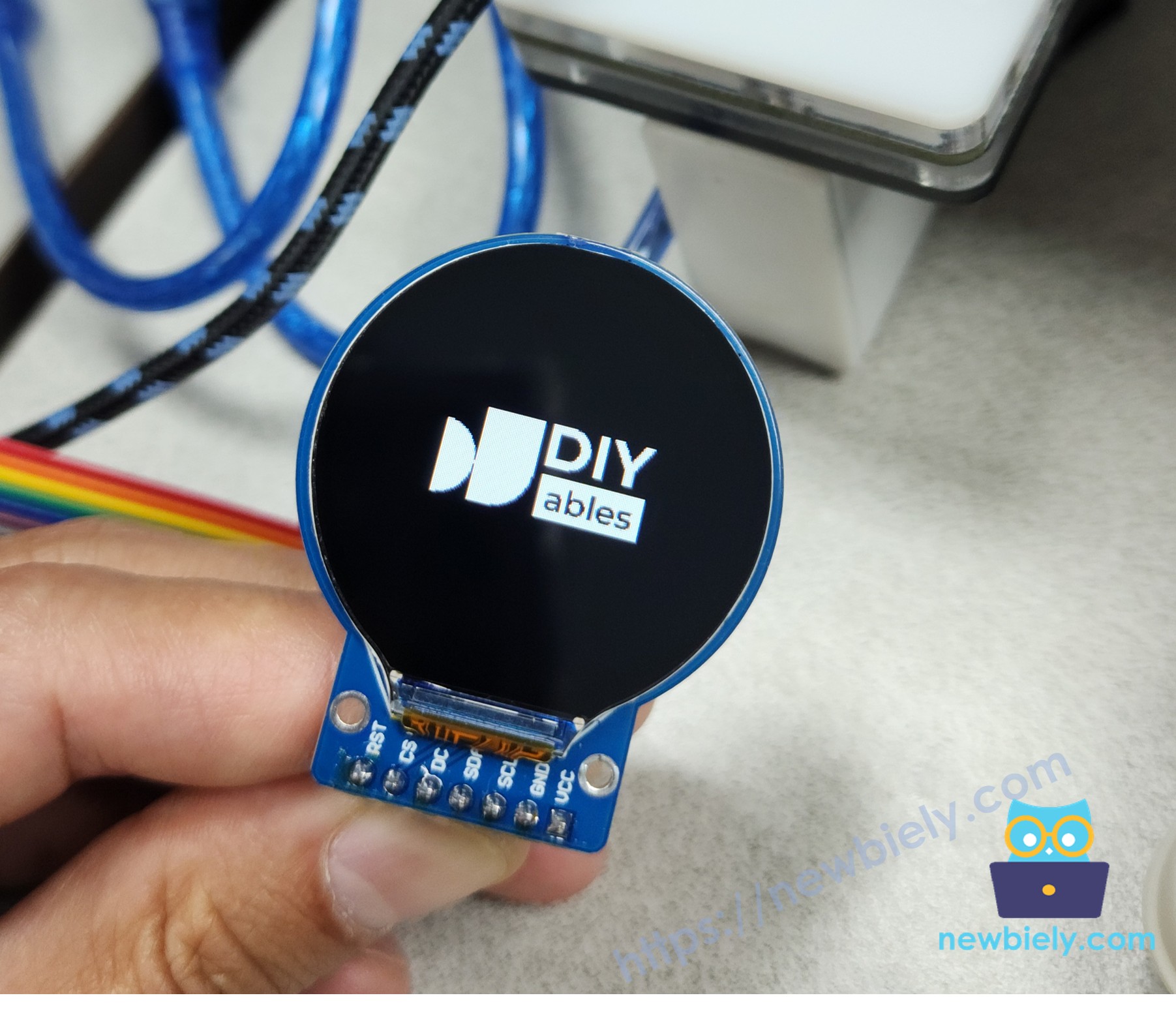
    Ao executar o código fornecido, uma imagem, como o logotipo da DIYables, será exibida na tela TFT LCD redonda de 1,28 polegada.

    Tela do Display TFT LCD Redondo Circular com Arduino UNO R4 exibindo uma imagem

    Quer mostrar a sua própria imagem?

    • Escolha uma imagem (JPEG ou PNG).
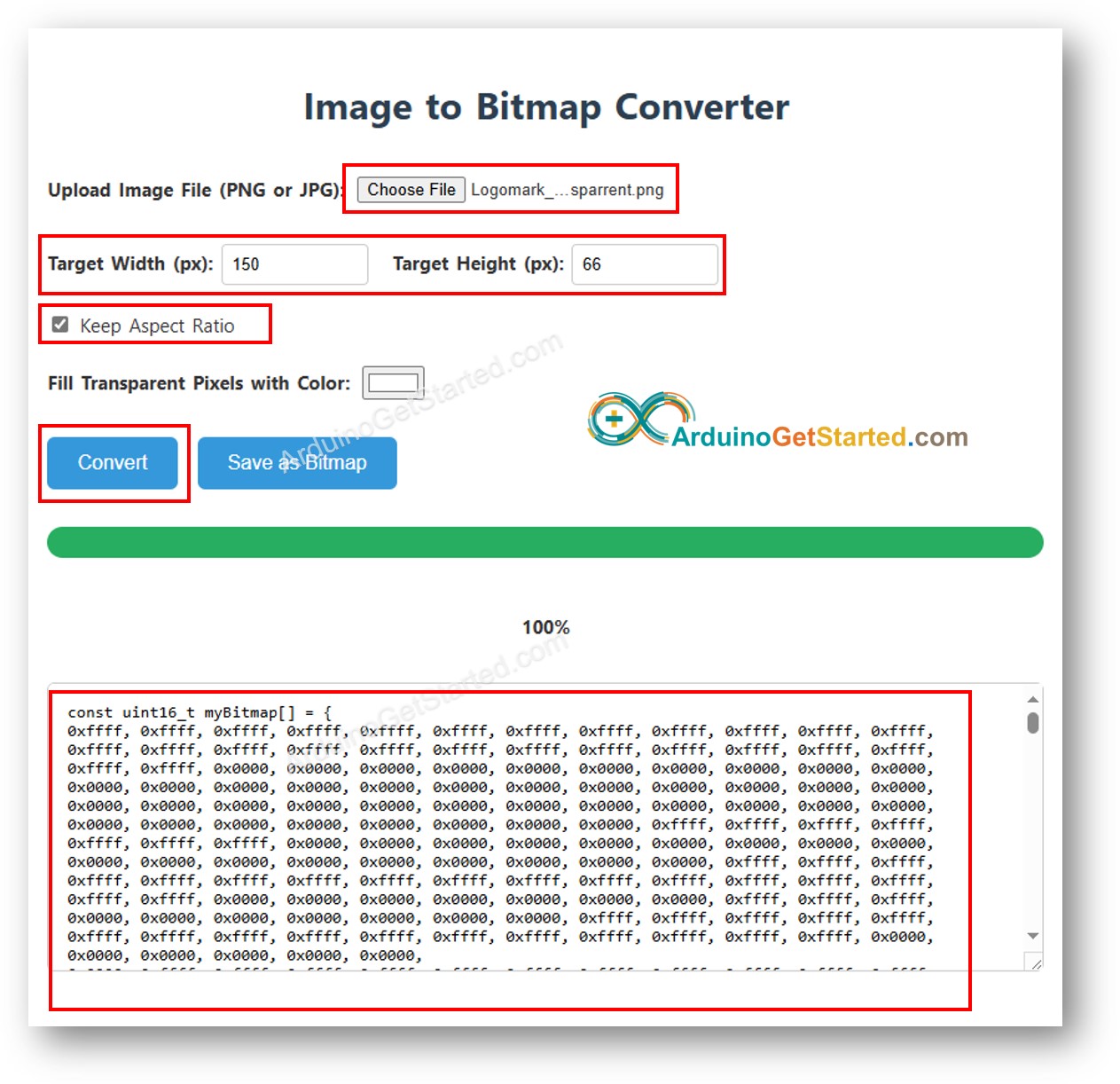
    • Transforme-a em um array de bitmap com a ferramenta Conversor de Imagem para Bitmap:
      • Envie a sua imagem e defina a largura (máximo de 240 pixels) para redimensioná-la.
      • Para PNGs com partes transparentes, escolha uma cor de fundo.
      • Clique no botão Convert e espere um instante.
      • Copie o array de bitmap e cole-o no arquivo bitmap.h.
      Imagem para array de bitmap
      • Atualize img_width e img_height no código DrawImage.ino para se ajustarem ao tamanho da sua imagem.
      • Clique em Upload na Arduino IDE para colocar o código em execução.

      Observação:

      • Garanta que o tamanho da imagem seja igual ou menor que 240x240 pixels.
      • Se você modificar o arquivo bitmap.h, faça uma pequena alteração no arquivo .ino (por exemplo, adicione um espaço) para garantir que a Arduino IDE reconheça a atualização durante a compilação.

      Exibir Imagens de um Cartão MicroSD no Display TFT LCD Redondo de 1,28 Polegada

      Neste caso, você precisa usar um Cartão Micro SD e um Módulo de Cartão Micro SD

      /* * Este código de Arduino UNO R4 foi desenvolvido por pt.newbiely.com * Este código de Arduino UNO R4 é disponibilizado ao público sem nenhuma restrição. * Para tutoriais completos e diagramas de ligação, visite: * https://pt.newbiely.com/tutorials/arduino-uno-r4/arduino-uno-r4-round-circular-tft-lcd-display */ #include <DIYables_TFT_Round.h> #include <SD.h> #define WHITE DIYables_TFT::colorRGB(255, 255, 255) #define PIN_RST 8 // The Arduino Uno R4 pin connected to the RST pin of the circular TFT display #define PIN_DC 9 // The Arduino Uno R4 pin connected to the DC pin of the circular TFT display #define PIN_CS 10 // The Arduino Uno R4 pin connected to the CS pin of the circular TFT display #define SD_CS 7 // The Arduino Uno R4 pin connected to the CS pin of SD Card module #define BUFFPIXEL 20 // Buffer size remains the same DIYables_TFT_GC9A01_Round TFT_display(PIN_RST, PIN_DC, PIN_CS); File bmpFile; uint16_t SCREEN_WIDTH; uint16_t SCREEN_HEIGHT; void setup() { Serial.begin(9600); if (!SD.begin(SD_CS)) { Serial.println("SD card initialization failed!"); return; } Serial.println("SD card initialized successfully."); Serial.println(F("Arduino TFT LCD Display")); TFT_display.begin(); // Set the rotation (0 to 3) TFT_display.setRotation(1); // Rotate screen 90 degrees // After rotation, update screen dimensions SCREEN_WIDTH = TFT_display.width(); SCREEN_HEIGHT = TFT_display.height(); TFT_display.fillScreen(WHITE); // Get image dimensions uint32_t imgWidth, imgHeight; if (getBMPDimensions("diyables.bmp", imgWidth, imgHeight)) { Serial.print("BMP Image Width: "); Serial.println(imgWidth); Serial.print("BMP Image Height: "); Serial.println(imgHeight); } else { Serial.println("Failed to get BMP dimensions"); } // Optionally, center the image based on its dimensions int x = (SCREEN_WIDTH - imgWidth) / 2; int y = (SCREEN_HEIGHT - imgHeight) / 2; drawBMP("diyables.bmp", x, y); // Draw image at calculated position } void loop(void) { } // Helper functions to read BMP file header uint16_t read16(File &f) { uint16_t result; result = f.read(); result |= (f.read() << 8); return result; } uint32_t read32(File &f) { uint32_t result; result = f.read(); result |= ((uint32_t)f.read() << 8); result |= ((uint32_t)f.read() << 16); result |= ((uint32_t)f.read() << 24); return result; } // Function to read a signed 32-bit integer int32_t readS32(File &f) { int32_t result; result = f.read(); result |= ((uint32_t)f.read() << 8); result |= ((uint32_t)f.read() << 16); result |= ((uint32_t)f.read() << 24); return result; } // Function to draw BMP from SD card void drawBMP(const char *filename, int x, int y) { bmpFile = SD.open(filename); if (!bmpFile) { Serial.println("File not found"); return; } if (read16(bmpFile) != 0x4D42) { // Check BMP signature Serial.println("Not a BMP file"); bmpFile.close(); return; } // Skip unnecessary BMP header details Serial.println("BMP signature OK"); uint32_t fileSize = read32(bmpFile); Serial.print("File Size: "); Serial.println(fileSize); read32(bmpFile); // Reserved bytes (skip) uint32_t imageOffset = read32(bmpFile); // Start of image data Serial.print("Image Data Offset: "); Serial.println(imageOffset); uint32_t dibHeaderSize = read32(bmpFile); // DIB header size Serial.print("DIB Header Size: "); Serial.println(dibHeaderSize); // Now read the width and height of the image uint32_t bmpWidth = read32(bmpFile); int32_t bmpHeight = readS32(bmpFile); // Read as signed 32-bit integer Serial.print("Image Width: "); Serial.println(bmpWidth); Serial.print("Image Height: "); Serial.println(bmpHeight); bool topDown = false; // Flag to check if the image is top-down if (bmpHeight < 0) { bmpHeight = -bmpHeight; // Make height positive for processing topDown = true; // Mark the BMP as top-down } if (read16(bmpFile) != 1) { // Planes must be 1 Serial.println("Invalid BMP file"); bmpFile.close(); return; } uint16_t depth = read16(bmpFile); // Color depth Serial.print("Bit Depth: "); Serial.println(depth); if (depth != 24) { // Only 24-bit BMP supported Serial.println("Only 24-bit BMP is supported"); bmpFile.close(); return; } if (read32(bmpFile) != 0) { // No compression Serial.println("Unsupported BMP compression"); bmpFile.close(); return; } // Move to the start of the image data bmpFile.seek(imageOffset); uint8_t sdbuffer[3 * BUFFPIXEL]; // Buffer for 20 pixels (3 bytes per pixel) uint16_t color; uint32_t rowSize = (bmpWidth * 3 + 3) & ~3; // BMP rows are padded to 4-byte boundaries // Adjust x and y if image is larger than screen if (x >= SCREEN_WIDTH || y >= SCREEN_HEIGHT) { Serial.println("Image position out of screen bounds"); return; } uint32_t maxRow = min(bmpHeight, SCREEN_HEIGHT - y); uint32_t maxCol = min(bmpWidth, SCREEN_WIDTH - x); // Draw the image for (uint32_t row = 0; row < maxRow; row++) { int32_t rowPos = topDown ? row : bmpHeight - 1 - row; // Adjust for top-down BMPs uint32_t filePosition = imageOffset + rowPos * rowSize; bmpFile.seek(filePosition); // Move to the correct row for (uint32_t col = 0; col < maxCol; col += BUFFPIXEL) { uint32_t pixelsToRead = min(BUFFPIXEL, maxCol - col); // Avoid reading beyond row width bmpFile.read(sdbuffer, 3 * pixelsToRead); // Read multiple pixels at once for (uint32_t i = 0; i < pixelsToRead; i++) { uint8_t b = sdbuffer[i * 3]; uint8_t g = sdbuffer[i * 3 + 1]; uint8_t r = sdbuffer[i * 3 + 2]; color = DIYables_TFT::colorRGB(r, g, b); // Draw pixel on screen if within bounds if ((x + col + i) < SCREEN_WIDTH && (y + row) < SCREEN_HEIGHT) { TFT_display.drawPixel(x + col + i, y + row, color); } } } } bmpFile.close(); // Close file when done Serial.println("Finished drawing BMP"); } // Function to get BMP image dimensions bool getBMPDimensions(const char *filename, uint32_t &width, uint32_t &height) { File bmpFile = SD.open(filename); if (!bmpFile) { Serial.println("File not found"); return false; } if (read16(bmpFile) != 0x4D42) { // Check BMP signature Serial.println("Not a BMP file"); bmpFile.close(); return false; } read32(bmpFile); // Skip file size read32(bmpFile); // Skip reserved bytes uint32_t imageOffset = read32(bmpFile); // Start of image data uint32_t dibHeaderSize = read32(bmpFile); // DIB header size // Read the width and height of the image width = read32(bmpFile); int32_t bmpHeight = readS32(bmpFile); // May be negative for top-down images height = (bmpHeight < 0) ? -bmpHeight : bmpHeight; bmpFile.close(); // Close the file return true; // Success }

      Passos Rápidos

      • Verifique se há um cartão microSD formatado com o arquivo de imagem correto.
      • Pegue o arquivo diyables.bmp e coloque-o em um cartão microSD formatado.
      • Coloque o cartão microSD no módulo de cartão SD.
      • Conecte o módulo de cartão SD ao seu Arduino UNO R4 assim:
        • CS no pino D7 do Arduino UNO R4
        • MOSI no pino D11 do Arduino UNO R4 (o mesmo do display)
        • MISO no pino D12 do Arduino UNO R4
        • SCK no pino D13 do Arduino UNO R4 (o mesmo do display).
      • Conecte o Arduino UNO R4 ao seu computador com um cabo USB.
      • Abra a Arduino IDE, escolha a placa correta (Arduino UNO R4 UNO) e a porta.
      • Copie o código e cole-o na Arduino IDE.
      • Clique no botão Upload na Arduino IDE para enviar o código.

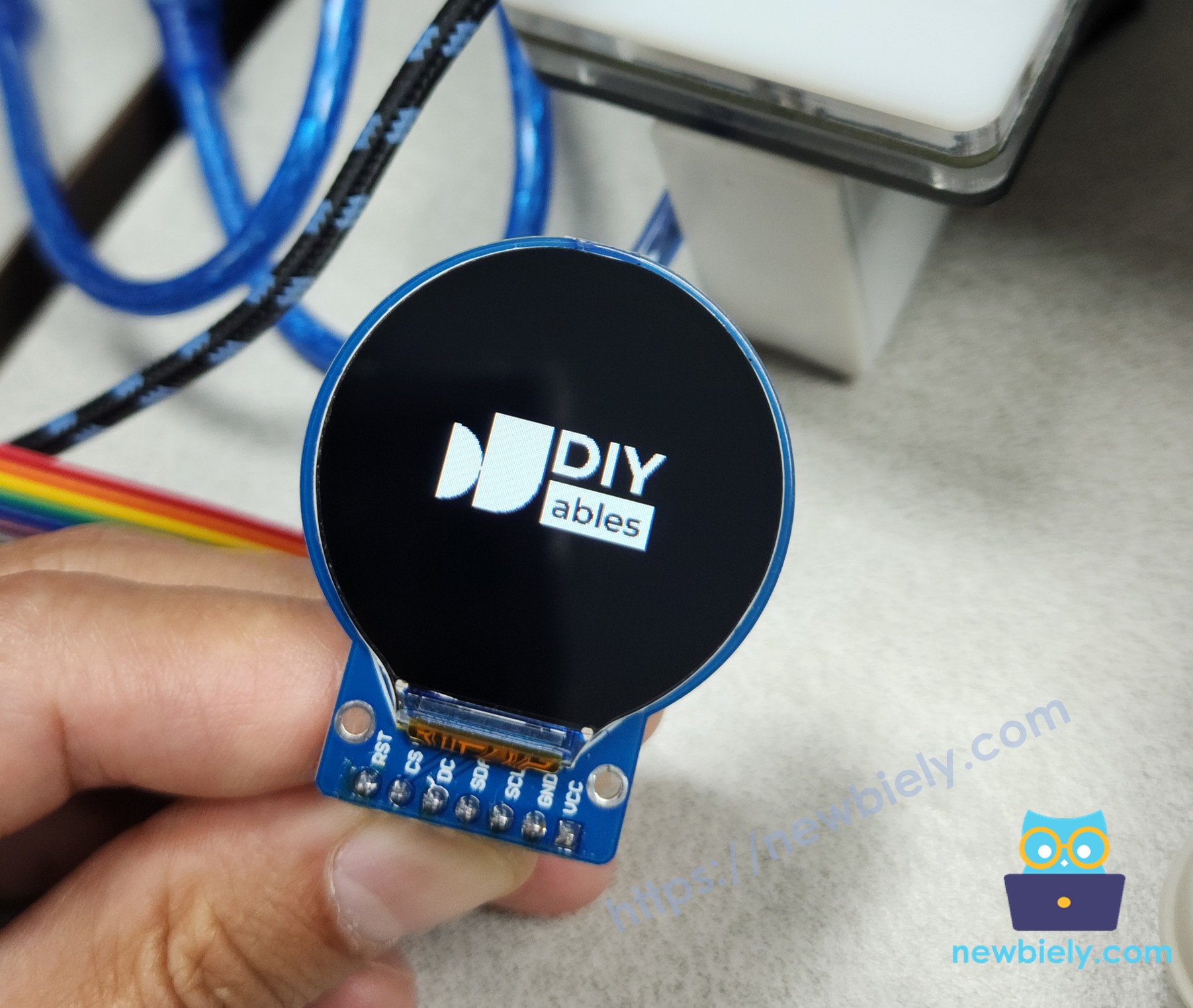
      Execute o código e você verá o logotipo da DIYables na tela TFT LCD redonda de 1,28 polegada.
      Tela do Display TFT LCD Redondo Circular com Arduino UNO R4 exibindo uma imagem do cartão SD

      Quer usar uma imagem nova?

      • Deixe a sua imagem pronta (JPG ou PNG).
      • Transforme-a em um arquivo bitmap com o Conversor de Imagem para Bitmap:
        • Clique no botão Convert e espere um pouco.
        • Clique no botão Save as Bitmap para baixá-la.
      • Mantenha o nome do arquivo bitmap curto, com menos de 9 caracteres (sem contar o .bmp).
      • Copie o arquivo bitmap para o seu cartão microSD.
      • Coloque o cartão microSD no módulo de cartão SD.
      • Mude o nome do arquivo no código (por exemplo, troque "diyables.bmp" pelo nome do seu arquivo).
      • Clique no botão Upload na Arduino IDE para enviar o código.

      Para mostrar mais imagens, adicione linhas extras de tft.drawBmp() com nomes de arquivo e posições diferentes.

Código Arduino UNO R4 – Relógio Analógico e Digital no Display TFT LCD Redondo de 1,28 Polegada

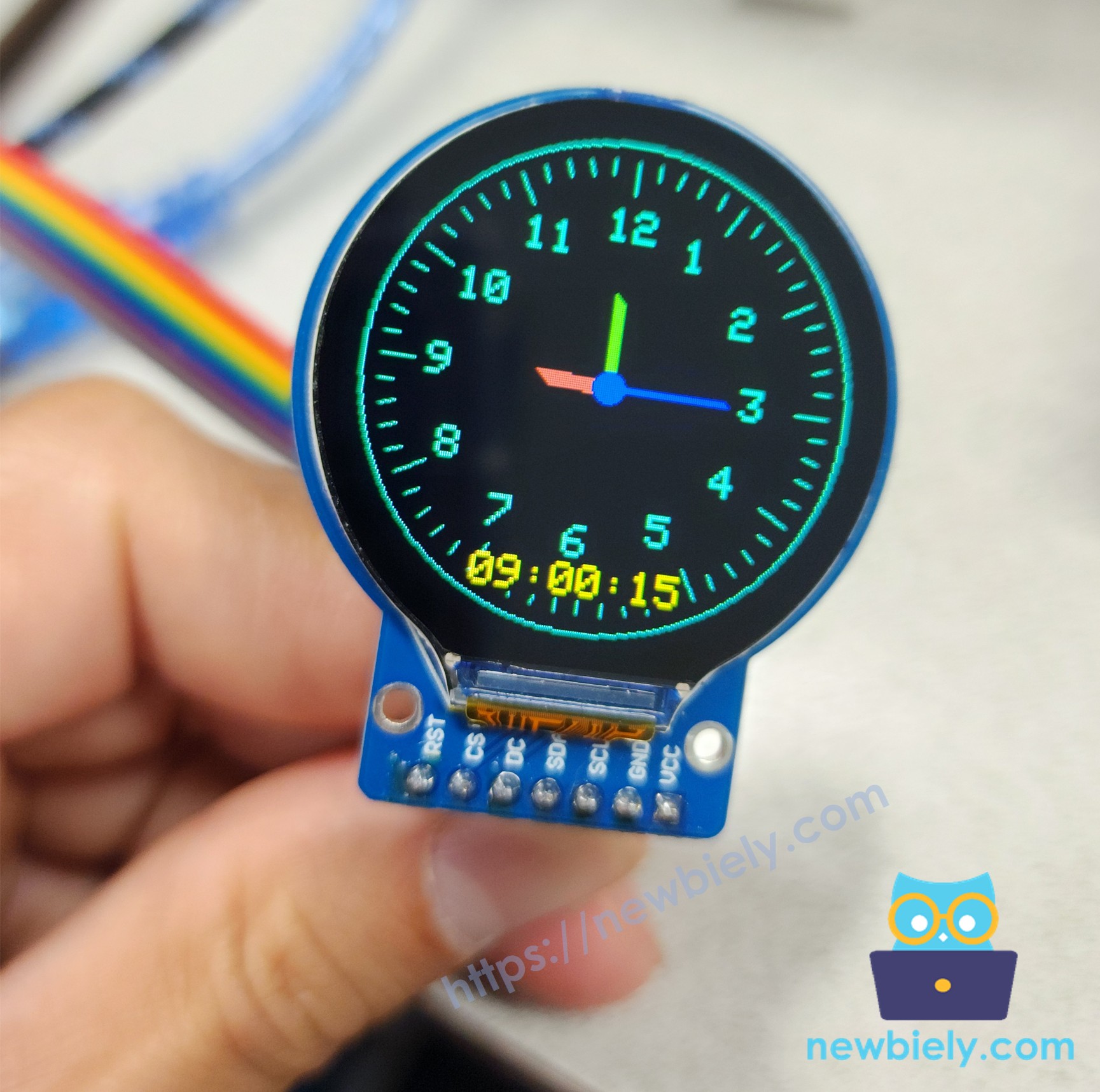
Este exemplo mostra como fazer um relógio em movimento, com estilos analógico e digital, no display TFT LCD redondo de 1,28 polegada. Ele usa a biblioteca DIYables_TFT_Round. O relógio analógico tem ponteiros de hora, minuto e segundo. Ao mesmo tempo, ele mostra a hora digital como HH:MM:SS.

O relógio começa às 09:00:05 usando a função millis() do Arduino UNO R4 para contar o tempo. A parte analógica também tem números de 1 a 12 e pequenas marcas para os minutos. O ponteiro dos segundos se move com suavidade, e a tela é atualizada rapidamente para evitar piscadas.

/* * Este código de Arduino UNO R4 foi desenvolvido por pt.newbiely.com * Este código de Arduino UNO R4 é disponibilizado ao público sem nenhuma restrição. * Para tutoriais completos e diagramas de ligação, visite: * https://pt.newbiely.com/tutorials/arduino-uno-r4/arduino-uno-r4-round-circular-tft-lcd-display */ #include <DIYables_TFT_Round.h> #include <math.h> #define PIN_RST 8 // The Arduino Uno R4 pin connected to the RST pin of the circular TFT display #define PIN_DC 9 // The Arduino Uno R4 pin connected to the DC pin of the circular TFT display #define PIN_CS 10 // The Arduino Uno R4 pin connected to the CS pin of the circular TFT display #define COLOR_BACKGROUND DIYables_TFT::colorRGB(0, 0, 0) // Black #define COLOR_HOUR DIYables_TFT::colorRGB(255, 80, 80) // Red-ish #define COLOR_MINUTE DIYables_TFT::colorRGB(80, 255, 80) // Green-ish #define COLOR_SECOND DIYables_TFT::colorRGB(0, 0, 255) // Blue #define COLOR_TICK DIYables_TFT::colorRGB(0, 255, 200) // Light gray DIYables_TFT_GC9A01_Round TFT_display(PIN_RST, PIN_DC, PIN_CS); const int CENTER_X = 120; const int CENTER_Y = 120; const int RADIUS = 110; const int HOUR_LEN = 30; const int MIN_LEN = 40; const int SEC_LEN = 55; // Preset offset for 09:00:05 in milliseconds const unsigned long PRESET_MS = 9UL * 3600000UL + // 9 hours 0UL * 60000UL + // 0 minutes 5UL * 1000UL; // 5 seconds float prevHourAngle = -1000, prevMinAngle = -1000, prevSecAngle = -1000; int prevDispHour = -1, prevDispMin = -1, prevDispSec = -1; void drawHand(int x, int y, float angle, int length, uint16_t color, int width) { int x2 = x + length * cos(angle - M_PI / 2); int y2 = y + length * sin(angle - M_PI / 2); for (int w = -width / 2; w <= width / 2; w++) { TFT_display.drawLine(x + w, y + w, x2 + w, y2 + w, color); } } void drawTicks() { for (int i = 0; i < 60; i++) { float angle = i * 6 * M_PI / 180.0; int x1 = CENTER_X + (RADIUS - 8) * cos(angle - M_PI / 2); int y1 = CENTER_Y + (RADIUS - 8) * sin(angle - M_PI / 2); int x2 = CENTER_X + (RADIUS - (i % 5 == 0 ? 22 : 14)) * cos(angle - M_PI / 2); int y2 = CENTER_Y + (RADIUS - (i % 5 == 0 ? 22 : 14)) * sin(angle - M_PI / 2); TFT_display.drawLine(x1, y1, x2, y2, COLOR_TICK); } TFT_display.setTextColor(COLOR_TICK, COLOR_BACKGROUND); TFT_display.setTextSize(2); for (int h = 1; h <= 12; h++) { float angle = (h * 30) * M_PI / 180.0; int tx = CENTER_X + (RADIUS - 38) * cos(angle - M_PI / 2) - 10; int ty = CENTER_Y + (RADIUS - 38) * sin(angle - M_PI / 2) - 8; TFT_display.setCursor(tx, ty); TFT_display.print(h); } } void printTime(int previous, int now, const char* offset, bool colon = true) { int16_t x = 70, y = 200; int16_t x1, y1; uint16_t w, h; TFT_display.getTextBounds(offset, x, y, &x1, &y1, &w, &h); // Update digital display TFT_display.setCursor(x + w, y); TFT_display.print(" "); TFT_display.setCursor(x + w, y); if (now < 10) TFT_display.print('0'); TFT_display.print(now); if (colon) TFT_display.print(":"); } void setup() { TFT_display.begin(); TFT_display.fillScreen(COLOR_BACKGROUND); TFT_display.drawCircle(CENTER_X, CENTER_Y, RADIUS, COLOR_TICK); drawTicks(); TFT_display.setTextColor(DIYables_TFT::colorRGB(255, 255, 0), COLOR_BACKGROUND); TFT_display.setTextSize(2); // Ensure first update in loop() repaints everything prevDispHour = -1; prevDispMin = -1; prevDispSec = -1; } void loop() { // Add preset offset to millis() unsigned long ms = millis() + PRESET_MS; float sec = fmod(ms / 1000.0, 60.0); float min = fmod(ms / 60000.0, 60.0); float hour = fmod(ms / 3600000.0, 12.0); int dispHour = (int)hour == 0 ? 12 : (int)hour; int dispMin = (int)min; int dispSec = (int)sec; float hourAngle = (hour + min / 60.0) * 30 * M_PI / 180.0; float minAngle = (min + sec / 60.0) * 6 * M_PI / 180.0; float secAngle = sec * 6 * M_PI / 180.0; // Hour hand (jumps), redraw when angle changed if (dispHour != prevDispHour || dispMin != prevDispMin) { if (prevHourAngle > -900) drawHand(CENTER_X, CENTER_Y, prevHourAngle, HOUR_LEN, COLOR_BACKGROUND, 7); // clear old position drawHand(CENTER_X, CENTER_Y, hourAngle, HOUR_LEN, COLOR_HOUR, 7); prevHourAngle = hourAngle; // Update digital display if (dispHour != prevDispHour) { printTime(prevDispHour, dispHour, ""); prevDispHour = dispHour; } } // Minute hand (jumps) if (dispMin != prevDispMin) { if (prevMinAngle > -900) drawHand(CENTER_X, CENTER_Y, prevMinAngle, MIN_LEN, COLOR_BACKGROUND, 5); // clear old position drawHand(CENTER_X, CENTER_Y, minAngle, MIN_LEN, COLOR_MINUTE, 5); printTime(prevDispMin, dispMin, "00:"); prevDispMin = dispMin; prevMinAngle = minAngle; } // Second hand (smooth) if (dispSec != prevDispSec) { if (prevSecAngle > -900) drawHand(CENTER_X, CENTER_Y, prevSecAngle, SEC_LEN, COLOR_BACKGROUND, 2); // clear old position drawHand(CENTER_X, CENTER_Y, secAngle, SEC_LEN, COLOR_SECOND, 2); TFT_display.fillCircle(CENTER_X, CENTER_Y, 7, COLOR_SECOND); // Redraw center dot // Update digital display printTime(prevDispSec, dispSec, "00:00:", false); prevDispSec = dispSec; prevSecAngle = secAngle; } }

Passos Rápidos

  • Copie o código acima e cole-o no editor da Arduino IDE.
  • Clique no botão Upload na Arduino IDE para carregar o código no Arduino UNO R4.

Confira a tela do TFT LCD redondo de 1,28"! Ela tem um relógio clássico com ponteiros de hora, minuto e segundo, além da hora digital na parte de baixo. O ponteiro dos segundos se move com suavidade, e os outros ponteiros são atualizados conforme o tempo passa.

Tela do Display TFT LCD Redondo Circular com Arduino UNO R4 mostrando um relógio

Observações

Este relógio usa a função millis() do Arduino UNO R4, começando às 09:00:05, para mostrar a hora. Se você quiser a hora real, é melhor adicionar um módulo de Relógio de Tempo Real (RTC), como o DS3231.

Há alguns pequenos bugs no display:

  • Às vezes os ponteiros podem piscar ou deixar marcas. Isso acontece porque o ponteiro antigo é apagado desenhando-se por cima dele, o que nem sempre funciona bem quando os ponteiros se sobrepõem. Uma solução é redesenhar todo o mostrador do relógio.
  • A hora digital pode não parecer centralizada porque números diferentes ocupam espaços diferentes. Você pode corrigir isso usando uma fonte com letras de largura igual ou mudando a posição do texto conforme o tamanho dele.

Para melhorar o relógio, você pode:

  • Usar a sua própria fonte (veja o exemplo UseExternalFont.ino).
  • Deixar os ponteiros mais suaves usando anti-aliasing.
  • Mostrar a data ou testar um estilo de relógio diferente, como o formato de 24 horas.

Radar Panorâmico com Arduino UNO R4, TFT LCD Redondo e Sensor Ultrassônico

Abaixo está o código completo para construir um radar panorâmico no display TFT LCD Redondo Circular de 1,28 Polegada usando um servo motor e um sensor ultrassônico HC-SR04:

/* * Este código de Arduino UNO R4 foi desenvolvido por pt.newbiely.com * Este código de Arduino UNO R4 é disponibilizado ao público sem nenhuma restrição. * Para tutoriais completos e diagramas de ligação, visite: * https://pt.newbiely.com/tutorials/arduino-uno-r4/arduino-uno-r4-round-circular-tft-lcd-display */ /* * Project: Panoramic Radar 180° - Fully Optimized with Noise Filter * Hardware: Arduino Uno R4 + GC9A01 + HC-SR04 + SG90 Servo */ #include <DIYables_TFT_Round.h> #include <Servo.h> #include <math.h> // ─── Pin Configuration ─────────────────────────────────────────── #define PIN_RST 8 #define PIN_DC 9 #define PIN_CS 10 #define PIN_TRIG 2 #define PIN_ECHO 3 #define PIN_SERVO 5 // ─── RGB565 Color Definitions ──────────────────────────────────── #define BLACK DIYables_TFT::colorRGB(0, 0, 0 ) #define GREEN DIYables_TFT::colorRGB(0, 255, 0 ) #define DARK_GREEN DIYables_TFT::colorRGB(0, 80, 0 ) #define RED DIYables_TFT::colorRGB(255, 0, 0 ) #define WHITE DIYables_TFT::colorRGB(255, 255, 255) // ─── Radar Parameters ──────────────────────────────────────────── const int CX = 120; // Center X const int CY = 130; // Center Y const int R = 100; // Radar radius const float MAX_DIST_CM = 50.0; // Maximum display distance const float DETECT_CM = 45.0; // Obstacle detection threshold const int STEP = 4; // Angle step (degrees) const int DOT_RADIUS = 3; // Red obstacle dot radius DIYables_TFT_GC9A01_Round tft(PIN_RST, PIN_DC, PIN_CS); Servo radarServo; int angle = 0; int scanDirection = 1; float lastDist[181]; // Anti-flicker variables for text updates int lastDisplayAngle = -1; int lastDisplayDist = -1; // ─── Coordinate Utilities ──────────────────────────────────────── inline void polarToXY(int deg, float dist, int &x, int &y) { float rad = deg * M_PI / 180.0; x = CX + (int)(cos(rad) * dist); y = CY - (int)(sin(rad) * dist); } // ─── Draw Static Radar Grid (Called Once) ──────────────────────── void drawStaticRadar() { tft.drawCircleHelper(CX, CY, R, 3, DARK_GREEN); tft.drawCircleHelper(CX, CY, R * 3 / 4, 3, DARK_GREEN); tft.drawCircleHelper(CX, CY, R / 2, 3, DARK_GREEN); tft.drawCircleHelper(CX, CY, R / 4, 3, DARK_GREEN); tft.drawLine(CX - R, CY, CX + R, CY, DARK_GREEN); tft.drawLine(CX, CY, CX, CY - R, DARK_GREEN); } // ─── Restore Grid Pixels Erased by Sweep Line ──────────────────── void restoreGridAtAngle(int deg) { float rad = deg * M_PI / 180.0; float c = cos(rad), s = sin(rad); int radii[] = { R, R * 3 / 4, R / 2, R / 4 }; for (int i = 0; i < 4; i++) { int gx = CX + (int)(c * radii[i]); int gy = CY - (int)(s * radii[i]); tft.drawPixel(gx, gy, DARK_GREEN); } if (deg == 90) { tft.drawLine(CX, CY - R, CX, CY, DARK_GREEN); } } // ─── Raw Distance Measurement (Single Sample) ──────────────────── float singleUltrasonicMeasure() { digitalWrite(PIN_TRIG, LOW); delayMicroseconds(2); digitalWrite(PIN_TRIG, HIGH); delayMicroseconds(10); digitalWrite(PIN_TRIG, LOW); long dur = pulseIn(PIN_ECHO, HIGH, 30000); if (dur == 0) return MAX_DIST_CM; float d = (dur * 0.0343f) / 2.0f; return (d > MAX_DIST_CM) ? MAX_DIST_CM : d; } // ─── Filtered Distance Measurement (5-Sample Trimmed Mean) ─────── float measureDistanceWithFilter() { float filterArray[5]; // 1. Collect 5 consecutive distance samples for (int sample = 0; sample < 5; sample++) { filterArray[sample] = singleUltrasonicMeasure(); delay(20); // 20ms gap to optimize mechanical scan speed } // 2. Sort array ascending (Bubble Sort) for (int i = 0; i < 4; i++) { for (int j = i + 1; j < 5; j++) { if (filterArray[i] > filterArray[j]) { float swap = filterArray[i]; filterArray[i] = filterArray[j]; filterArray[j] = swap; } } } // 3. Trim outliers: discard lowest (index 0) and highest (index 4) // Average the 3 reliable middle samples (index 1, 2, 3) double sum = 0; for (int sample = 1; sample < 4; sample++) { sum += filterArray[sample]; } return (float)(sum / 3.0); } // ─── Erase Sweep Line at a Specific Angle ──────────────────────── void eraseSweepLine(int deg) { if (deg < 0 || deg > 180) return; int tx, ty; polarToXY(deg, R, tx, ty); tft.drawLine(CX, CY, tx, ty, BLACK); restoreGridAtAngle(deg); } // ─── Erase Obstacle Dot at a Specific Angle ────────────────────── void eraseObjectDot(int deg) { if (lastDist[deg] <= 0 || lastDist[deg] >= DETECT_CM) return; float scale = (lastDist[deg] / MAX_DIST_CM) * R; int ox, oy; polarToXY(deg, scale, ox, oy); tft.fillCircle(ox, oy, DOT_RADIUS, BLACK); restoreGridAtAngle(deg); } // ─── Update Status Text (Anti-Flicker) ─────────────────────────── void updateStatusText(int deg, float dist) { int distInt = (dist >= MAX_DIST_CM) ? -1 : (int)dist; if (deg == lastDisplayAngle && distInt == lastDisplayDist) return; // Erase old text by redrawing in black tft.setTextColor(BLACK); tft.setTextSize(2); tft.setCursor(40, 180); tft.print("Ang:"); tft.print(lastDisplayAngle < 0 ? 0 : lastDisplayAngle); tft.print(" D:"); if (lastDisplayDist == -1) tft.print("--"); else tft.print(lastDisplayDist); tft.print("cm"); // Draw new text in white tft.setTextColor(WHITE); tft.setCursor(40, 180); tft.print("Ang:"); tft.print(deg); tft.print(" D:"); if (distInt == -1) tft.print("--"); else tft.print(distInt); tft.print("cm"); lastDisplayAngle = deg; lastDisplayDist = distInt; } // ─── Setup ─────────────────────────────────────────────────────── void setup() { Serial.begin(9600); pinMode(PIN_TRIG, OUTPUT); pinMode(PIN_ECHO, INPUT); for (int i = 0; i <= 180; i++) lastDist[i] = 0.0f; radarServo.attach(PIN_SERVO); radarServo.write(0); delay(500); tft.begin(); tft.setRotation(2); tft.fillScreen(BLACK); drawStaticRadar(); // Draw initial status text tft.setTextColor(WHITE); tft.setTextSize(2); tft.setCursor(40, 180); tft.print("Ang:0 D:--cm"); } // ─── Main Loop ─────────────────────────────────────────────────── void loop() { // 1. Move servo to target angle radarServo.write(angle); delay(15); // Wait for servo arm to settle before first sample // 2. Measure distance using trimmed mean filter float dist = measureDistanceWithFilter(); // 3. Erase previous sweep line int prevAngle = constrain(angle - scanDirection * STEP, 0, 180); eraseSweepLine(prevAngle); // 4. Erase old obstacle dot at current angle (from previous sweep) eraseObjectDot(angle); // 5. Draw new sweep line int tx, ty; polarToXY(angle, R, tx, ty); tft.drawLine(CX, CY, tx, ty, GREEN); // 6. Draw new obstacle dot if a stable obstacle is detected if (dist < DETECT_CM) { float scale = (dist / MAX_DIST_CM) * R; int ox, oy; polarToXY(angle, scale, ox, oy); tft.fillCircle(ox, oy, DOT_RADIUS, RED); lastDist[angle] = dist; // Remember for next sweep } else { lastDist[angle] = 0.0f; // No obstacle — clear memory } // 7. Update status text updateStatusText(angle, dist); // 8. Advance angle and reverse direction at boundaries angle += scanDirection * STEP; if (angle >= 180) { angle = 180; scanDirection = -1; } else if (angle <= 0) { angle = 0; scanDirection = 1; } }

Abaixo está um tutorial em vídeo passo a passo que mostra como construir um display de radar panorâmico com o Arduino UNO R4 e o TFT LCD Redondo Circular de 1,28 Polegada:

Mini Painel de Carro com Arduino UNO R4 no TFT LCD Redondo

O vídeo abaixo mostra como construir um mini painel de carro com velocímetro, barra de RPM, indicador de combustível, relógio e setas de direção no TFT LCD Redondo Circular de 1,28 Polegada:

O código abaixo mostra a velocidade do carro a partir de um potenciômetro no A0 como um velocímetro, e pisca as setas de direção esquerda/direita na tela e em dois LEDs quando você pressiona os dois botões:

/* * Este código de Arduino UNO R4 foi desenvolvido por pt.newbiely.com * Este código de Arduino UNO R4 é disponibilizado ao público sem nenhuma restrição. * Para tutoriais completos e diagramas de ligação, visite: * https://pt.newbiely.com/tutorials/arduino-uno-r4/arduino-uno-r4-round-circular-tft-lcd-display */ #include <DIYables_TFT_Round.h> #include <math.h> // Mini Car Dashboard // Arduino UNO R4 WiFi + GC9A01 round TFT (240x240) // A0: speed potentiometer | D2/D3: turn buttons | D4/D5: turn LEDs // ---------------- Pins ---------------- #define TFT_RST 8 #define TFT_DC 9 #define TFT_CS 10 #define SPEED_POT_PIN A0 #define LEFT_BTN 2 #define RIGHT_BTN 3 #define LEFT_LED 4 #define RIGHT_LED 5 // Try 0..3 if the image is rotated or offset #define SCREEN_ROTATION 2 DIYables_TFT_GC9A01_Round tft(TFT_RST, TFT_DC, TFT_CS); // ---------------- Colors ---------------- #define BLACK DIYables_TFT::colorRGB(0, 0, 0) #define WHITE DIYables_TFT::colorRGB(245, 250, 255) #define CYAN DIYables_TFT::colorRGB(0, 200, 255) #define BLUE DIYables_TFT::colorRGB(0, 90, 255) #define GREEN DIYables_TFT::colorRGB(40, 255, 75) #define RED DIYables_TFT::colorRGB(255, 45, 35) #define ORANGE DIYables_TFT::colorRGB(255, 155, 20) #define GREY DIYables_TFT::colorRGB(60, 75, 95) #define DARK DIYables_TFT::colorRGB(18, 32, 52) #define TRACK DIYables_TFT::colorRGB(22, 36, 56) #define MUTED DIYables_TFT::colorRGB(130, 155, 180) // ---------------- Dashboard constants ---------------- const int MAX_SPEED = 160; const int FUEL_PERCENT = 72; const int START_MINUTES = 10 * 60 + 24; // simulated clock starts at 10:24 // ---------------- Potentiometer filtering ---------------- const int ADC_BITS = 12; const int ADC_MAX = 4095; int potMin = 0; // calibrate if the ends do not reach 0 / 160 int potMax = ADC_MAX; const int END_MARGIN = 40; // dead zone at both ends of the pot const int ADC_SAMPLES = 16; // samples averaged per reading const float SPEED_ALPHA = 0.15; // smoothing: lower = smoother but slower const float SPEED_HYST = 0.7; // min change (km/h) before the shown value updates const unsigned long SPEED_SAMPLE_MS = 10; // ---------------- Timing ---------------- const unsigned long DEBOUNCE_MS = 35; const unsigned long BLINK_MS = 400; const unsigned long REFRESH_MS = 40; // ---------------- Speedometer geometry ---------------- const int SPD_CX = 120; const int SPD_CY = 116; const int SPD_R = 78; const int SPD_T = 8; // arc thickness // ---------------- Steering arc geometry ---------------- const int ST_CX = 120; const int ST_CY = 158; const int ST_R = 36; // ---------------- State ---------------- float filteredSpeed = 0; int speedKmh = 0; int shownSpeed = -1; int shownRpmTenths = -1; int shownRpmLit = -1; int lastClockMinutes = -1; bool leftSignal = false; bool rightSignal = false; bool leftShown = false; bool rightShown = false; bool blinkOn = false; bool lastLeftReading = HIGH; bool lastRightReading = HIGH; bool leftStableState = HIGH; bool rightStableState = HIGH; unsigned long lastLeftDebounce = 0; unsigned long lastRightDebounce = 0; unsigned long lastBlink = 0; unsigned long lastRefresh = 0; unsigned long lastSpeedSample = 0; // ===================================================== // Drawing helpers // ===================================================== // Draws a thick arc as quads made of two triangles void drawArc(int cx, int cy, int radius, int startAngle, int endAngle, uint16_t color, int thickness) { const int STEP = 3; float ri = radius - thickness / 2.0; float ro = radius + thickness / 2.0; for (int a = startAngle; a < endAngle; a += STEP) { int b = min(a + STEP + 1, endAngle); // 1 degree overlap avoids gaps float ra = a * PI / 180.0; float rb = b * PI / 180.0; int x1 = cx + lroundf(cosf(ra) * ri); int y1 = cy + lroundf(sinf(ra) * ri); int x2 = cx + lroundf(cosf(ra) * ro); int y2 = cy + lroundf(sinf(ra) * ro); int x3 = cx + lroundf(cosf(rb) * ri); int y3 = cy + lroundf(sinf(rb) * ri); int x4 = cx + lroundf(cosf(rb) * ro); int y4 = cy + lroundf(sinf(rb) * ro); tft.fillTriangle(x1, y1, x2, y2, x3, y3, color); tft.fillTriangle(x2, y2, x3, y3, x4, y4, color); } } // ===================================================== // Clock // ===================================================== void drawClock(bool force) { int total = (START_MINUTES + (int)(millis() / 60000UL)) % 1440; if (!force && total == lastClockMinutes) return; lastClockMinutes = total; char buf[6]; snprintf(buf, sizeof(buf), "%02d:%02d", total / 60, total % 60); tft.fillRect(86, 7, 68, 20, BLACK); tft.setTextColor(WHITE); tft.setTextSize(2); tft.setCursor(90, 9); tft.print(buf); } void drawTopStatus() { tft.drawLine(62, 17, 82, 17, BLUE); tft.drawLine(158, 17, 178, 17, BLUE); drawClock(true); } // ===================================================== // Speedometer // The arc is split into 160 fixed segments (1 km/h each). // Lighting and erasing use the exact same shape, so no pixels are left behind. // ===================================================== uint16_t speedColor(int k) { if (k < 80) return CYAN; if (k < 120) return BLUE; if (k < 130) return ORANGE; return RED; } void drawSpeedSegment(int k, uint16_t color) { float a0 = (150.0 + 1.5 * k) * PI / 180.0; float a1 = (150.0 + 1.5 * (k + 1)) * PI / 180.0; float ri = SPD_R - SPD_T / 2.0; float ro = SPD_R + SPD_T / 2.0; int x1 = SPD_CX + lroundf(cosf(a0) * ri); int y1 = SPD_CY + lroundf(sinf(a0) * ri); int x2 = SPD_CX + lroundf(cosf(a0) * ro); int y2 = SPD_CY + lroundf(sinf(a0) * ro); int x3 = SPD_CX + lroundf(cosf(a1) * ri); int y3 = SPD_CY + lroundf(sinf(a1) * ri); int x4 = SPD_CX + lroundf(cosf(a1) * ro); int y4 = SPD_CY + lroundf(sinf(a1) * ro); tft.fillTriangle(x1, y1, x2, y2, x3, y3, color); tft.fillTriangle(x2, y2, x3, y3, x4, y4, color); } void drawSpeedNumber() { char buf[5]; snprintf(buf, sizeof(buf), "%d", speedKmh); int w = strlen(buf) * 24; // text size 4: 24 px per character // Clear area stays clear of the "40" and "120" scale labels tft.fillRect(84, 90, 72, 36, BLACK); tft.setTextColor(WHITE); tft.setTextSize(4); tft.setCursor(120 - w / 2, 92); tft.print(buf); } void updateSpeedDisplay() { if (speedKmh == shownSpeed) return; int from = (shownSpeed < 0) ? 0 : shownSpeed; if (speedKmh > from) { for (int k = from; k < speedKmh; k++) { drawSpeedSegment(k, speedColor(k)); } } else { for (int k = speedKmh; k < from; k++) { drawSpeedSegment(k, TRACK); } // Redraw the last lit segment so the edge stays intact if (speedKmh > 0) { drawSpeedSegment(speedKmh - 1, speedColor(speedKmh - 1)); } } drawSpeedNumber(); shownSpeed = speedKmh; } void drawSpeedometerStatic() { tft.drawCircle(120, 120, 119, GREY); tft.drawCircle(120, 120, 118, DARK); for (int k = 0; k < MAX_SPEED; k++) { drawSpeedSegment(k, TRACK); } // Ticks and labels: 0, 20, ... 160 for (int i = 0; i <= 8; i++) { float rad = (150 + i * 30) * PI / 180.0; int x1 = SPD_CX + lroundf(cosf(rad) * 63); int y1 = SPD_CY + lroundf(sinf(rad) * 63); int x2 = SPD_CX + lroundf(cosf(rad) * 71); int y2 = SPD_CY + lroundf(sinf(rad) * 71); tft.drawLine(x1, y1, x2, y2, WHITE); int value = i * 20; int len = (value >= 100) ? 3 : (value >= 10 ? 2 : 1); int lx = SPD_CX + lroundf(cosf(rad) * 52); int ly = SPD_CY + lroundf(sinf(rad) * 52); tft.setTextSize(1); tft.setTextColor(WHITE); tft.setCursor(lx - (len * 6) / 2, ly - 4); tft.print(value); } tft.setTextColor(CYAN); tft.setTextSize(2); tft.setCursor(96, 127); tft.print("km/h"); tft.drawRoundRect(102, 146, 36, 20, 4, BLUE); tft.setTextColor(WHITE); tft.setTextSize(2); tft.setCursor(114, 148); tft.print("D"); } // ===================================================== // Turn signal arrows // ===================================================== void drawLeftArrow(bool active) { tft.fillRect(42, 25, 30, 20, BLACK); if (!active) return; tft.fillRect(58, 32, 12, 6, GREEN); tft.fillTriangle(44, 35, 58, 27, 58, 43, GREEN); } void drawRightArrow(bool active) { tft.fillRect(168, 25, 30, 20, BLACK); if (!active) return; tft.fillRect(170, 32, 12, 6, GREEN); tft.fillTriangle(196, 35, 182, 27, 182, 43, GREEN); } // ===================================================== // RPM and fuel // ===================================================== void updateRpm() { // RPM follows speed: 0.8 -> 5.6 (x1000) int tenths = 8 + (speedKmh * 3) / 10; if (tenths != shownRpmTenths) { tft.fillRect(30, 174, 40, 16, BLACK); tft.setTextColor(WHITE); tft.setTextSize(2); tft.setCursor(30, 174); tft.print(tenths / 10); tft.print("."); tft.print(tenths % 10); shownRpmTenths = tenths; } int lit = constrain(tenths / 9, 0, 6); if (lit != shownRpmLit) { for (int i = 0; i < 6; i++) { uint16_t c = DARK; if (i < lit) c = (i == 5) ? RED : CYAN; tft.fillRect(34 + i * 9, 194, 8, 3, c); } shownRpmLit = lit; } } void drawRpmAndFuelStatic() { // RPM, left-aligned with its bar tft.setTextSize(1); tft.setTextColor(CYAN); tft.setCursor(30, 164); tft.print("RPM"); tft.setTextColor(MUTED); tft.setCursor(54, 164); tft.print("x1000"); tft.drawRoundRect(32, 192, 62, 7, 3, DARK); // Fuel, right-aligned with the right end of its bar tft.setTextSize(1); tft.setTextColor(CYAN); tft.setCursor(184, 164); tft.print("FUEL"); tft.setTextColor(WHITE); tft.setTextSize(2); tft.setCursor(172, 174); tft.print(FUEL_PERCENT); tft.print("%"); tft.drawRoundRect(146, 192, 62, 7, 3, BLUE); tft.fillRoundRect(148, 194, (58 * FUEL_PERCENT) / 100, 3, 1, CYAN); } // ===================================================== // Decorative steering icon and arc (fixed at 0 degrees) // ===================================================== void steeringPoint(float angleDeg, int r, int &x, int &y) { float rad = angleDeg * PI / 180.0; x = ST_CX + lroundf(cosf(rad) * r); y = ST_CY + lroundf(sinf(rad) * r); } void drawSteeringStatic() { tft.drawCircle(120, 178, 8, WHITE); tft.drawCircle(120, 178, 7, WHITE); tft.fillCircle(120, 178, 2, WHITE); tft.drawLine(113, 176, 127, 176, WHITE); tft.drawLine(120, 178, 120, 185, WHITE); // Angle 90 is the bottom of the arc: left half blue, right half orange drawArc(ST_CX, ST_CY, ST_R, 90, 140, BLUE, 4); drawArc(ST_CX, ST_CY, ST_R, 40, 90, ORANGE, 4); int x1, y1, x2, y2; steeringPoint(90, ST_R - 6, x1, y1); steeringPoint(90, ST_R + 5, x2, y2); tft.drawLine(x1, y1, x2, y2, WHITE); steeringPoint(140, ST_R - 5, x1, y1); steeringPoint(140, ST_R + 5, x2, y2); tft.drawLine(x1, y1, x2, y2, WHITE); steeringPoint(40, ST_R - 5, x1, y1); steeringPoint(40, ST_R + 5, x2, y2); tft.drawLine(x1, y1, x2, y2, WHITE); steeringPoint(90, ST_R, x1, y1); tft.fillCircle(x1, y1, 3, CYAN); } // ===================================================== // Inputs // ===================================================== void handleButtons() { unsigned long now = millis(); bool leftReading = digitalRead(LEFT_BTN); bool rightReading = digitalRead(RIGHT_BTN); if (leftReading != lastLeftReading) lastLeftDebounce = now; if (now - lastLeftDebounce > DEBOUNCE_MS && leftReading != leftStableState) { leftStableState = leftReading; if (leftStableState == LOW) { leftSignal = !leftSignal; if (leftSignal) rightSignal = false; } } lastLeftReading = leftReading; if (rightReading != lastRightReading) lastRightDebounce = now; if (now - lastRightDebounce > DEBOUNCE_MS && rightReading != rightStableState) { rightStableState = rightReading; if (rightStableState == LOW) { rightSignal = !rightSignal; if (rightSignal) leftSignal = false; } } lastRightReading = rightReading; } // Averages several ADC samples and maps the result to 0..MAX_SPEED float readSpeedTarget() { long sum = 0; for (int i = 0; i < ADC_SAMPLES; i++) { sum += analogRead(SPEED_POT_PIN); } float raw = (float)sum / ADC_SAMPLES; float lo = potMin + END_MARGIN; float hi = potMax - END_MARGIN; raw = constrain(raw, lo, hi); return (raw - lo) * MAX_SPEED / (hi - lo); } void readSpeed() { float target = readSpeedTarget(); filteredSpeed += SPEED_ALPHA * (target - filteredSpeed); // Hysteresis: ignore small changes to stop the value flickering if (fabsf(filteredSpeed - speedKmh) > SPEED_HYST) { speedKmh = constrain((int)lroundf(filteredSpeed), 0, MAX_SPEED); } } void updateTurnLEDs() { digitalWrite(LEFT_LED, (leftSignal && blinkOn) ? HIGH : LOW); digitalWrite(RIGHT_LED, (rightSignal && blinkOn) ? HIGH : LOW); } // ===================================================== // Setup and loop // ===================================================== void setup() { Serial.begin(115200); analogReadResolution(ADC_BITS); pinMode(LEFT_BTN, INPUT_PULLUP); pinMode(RIGHT_BTN, INPUT_PULLUP); pinMode(LEFT_LED, OUTPUT); pinMode(RIGHT_LED, OUTPUT); pinMode(SPEED_POT_PIN, INPUT); digitalWrite(LEFT_LED, LOW); digitalWrite(RIGHT_LED, LOW); tft.begin(); tft.setRotation(SCREEN_ROTATION); tft.fillScreen(BLACK); drawSpeedometerStatic(); drawTopStatus(); drawRpmAndFuelStatic(); drawSteeringStatic(); filteredSpeed = readSpeedTarget(); speedKmh = constrain((int)lroundf(filteredSpeed), 0, MAX_SPEED); updateSpeedDisplay(); updateRpm(); drawLeftArrow(false); drawRightArrow(false); Serial.println("Mini Car Dashboard started"); } void loop() { unsigned long now = millis(); handleButtons(); if (now - lastSpeedSample >= SPEED_SAMPLE_MS) { lastSpeedSample = now; readSpeed(); } if (now - lastBlink >= BLINK_MS) { lastBlink = now; blinkOn = !blinkOn; } // Redraw arrows only when their visible state changes bool wantLeft = leftSignal && blinkOn; bool wantRight = rightSignal && blinkOn; if (wantLeft != leftShown) { drawLeftArrow(wantLeft); leftShown = wantLeft; } if (wantRight != rightShown) { drawRightArrow(wantRight); rightShown = wantRight; } updateTurnLEDs(); if (now - lastRefresh >= REFRESH_MS) { lastRefresh = now; updateSpeedDisplay(); updateRpm(); drawClock(false); } }

※ NOSSAS MENSAGENS

  • Fique à vontade para compartilhar o link deste tutorial. Porém, por favor, não use nosso conteúdo em outros sites. Investimos muito esforço e tempo para criar este conteúdo, por favor respeite nosso trabalho!